







Question: Update the script provided on the first day of class (go to Lab 6 in CANVAS to download the .m file) by adjusting the code
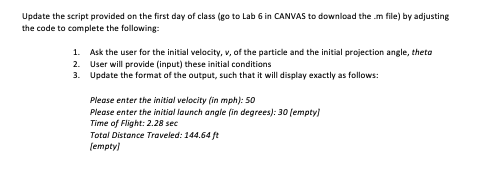
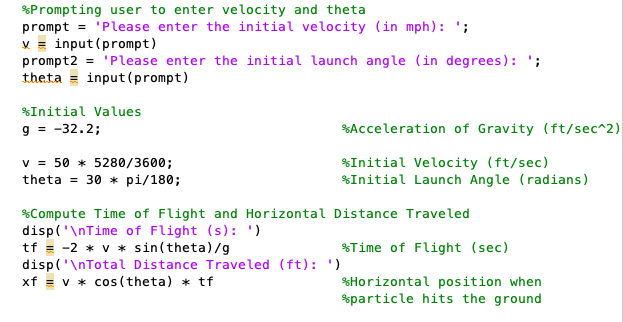
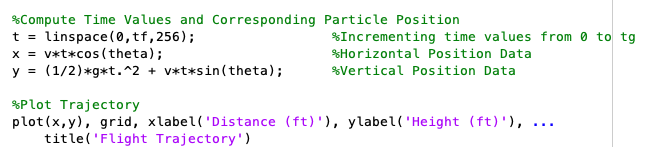
Update the script provided on the first day of class (go to Lab 6 in CANVAS to download the .m file) by adjusting the code to complete the following: 1. Ask the user for the initial velocity, v, of the particle and the initial projection angle, theta 2. User will provide (input) these initial conditions 3. Update the format of the output, such that it will display exactly as follows: Please enter the initial velocity (in mph): 50 Please enter the initial launch angle in degrees): 30 (empty) Time of Flight: 2.28 sec Total Distance Traveled: 144.64 ft (empty) *Prompting user to enter velocity and theta prompt = 'Please enter the initial velocity (in mph): '; v=input(prompt) prompt2 = 'Please enter the initial launch angle (in degrees): '; theta = input (prompt) %Initial Values 9 = -32.2; %Acceleration of Gravity (ft/sec^2) V = 50 * 5280/3600; theta = 30 + pi/180; %Initial Velocity (ft/sec) $Initial Launch Angle (radians) *Compute Time of Flight and Horizontal Distance Traveled disp(' Time of Flight (s): ') tf = -2 * V * sin(theta)/g %Time of Flight (sec) disp(' Total Distance Traveled (ft): ') xf = v * cos(theta) * tf %Horizontal position when %particle hits the ground %Compute Time Values and corresponding Particle Position t = linspace(0, tf,256); %Incrementing time values from 0 to tg x = v*t*cos(theta); Horizontal Position Data y = (1/2)*g*t.^2 + v*t*sin(theta); Vertical Position Data %Plot Trajectory plot(x,y), grid, xlabel('Distance (ft)'), ylabel('Height (ft)'), .. title('Flight Trajectory')
Step by Step Solution
There are 3 Steps involved in it

Get step-by-step solutions from verified subject matter experts
 Study Help