







Question: Upload a single .sql file that contains solutions (in sql) for Chapter 3 exercises below. Prefix each solution with a comment with problem number as
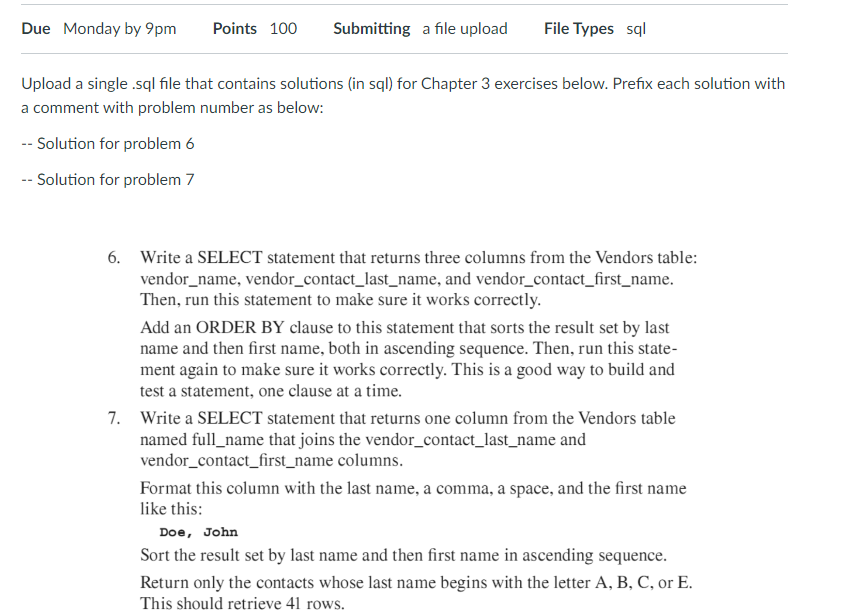
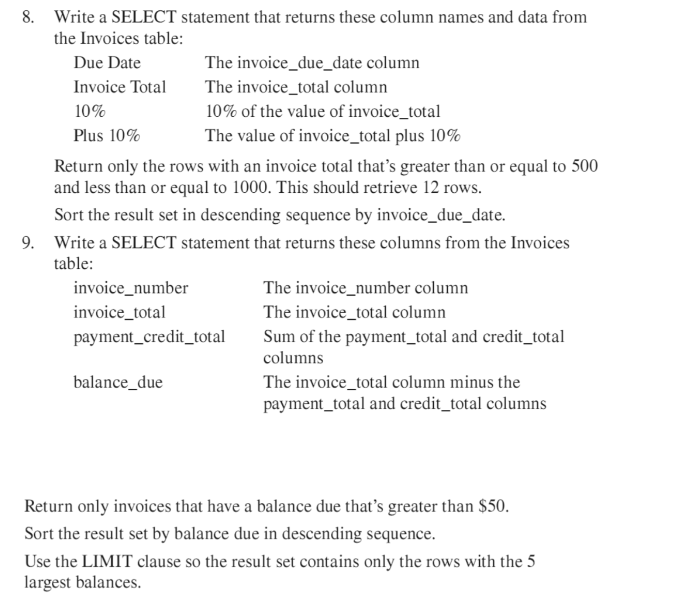
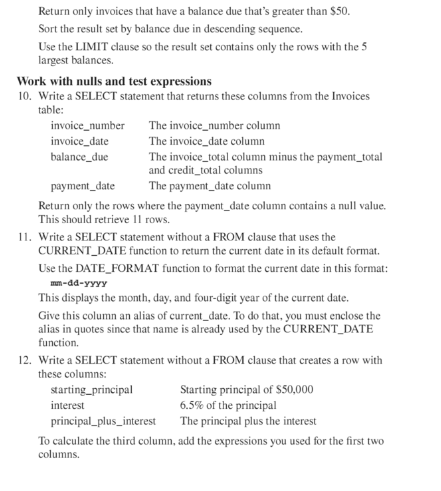
Upload a single .sql file that contains solutions (in sql) for Chapter 3 exercises below. Prefix each solution with a comment with problem number as below: -- Solution for problem 6 - Solution for problem 7 6. Write a SELECT statement that returns three columns from the Vendors table: vendor_name, vendor_contact_last_name, and vendor_contact_first_name. Then, run this statement to make sure it works correctly. Add an ORDER BY clause to this statement that sorts the result set by last name and then first name, both in ascending sequence. Then, run this statement again to make sure it works correctly. This is a good way to build and test a statement, one clause at a time. 7. Write a SELECT statement that returns one column from the Vendors table named full_name that joins the vendor_contact_last_name and vendor_contact_first_name columns. Format this column with the last name, a comma, a space, and the first name like this: Doe, John Sort the result set by last name and then first name in ascending sequence. Return only the contacts whose last name begins with the letter A, B, C, or E. This should retrieve 41 rows. 8. Write a SELECT statement that returns these column names and data from the Invoices table: Return only the rows with an invoice total that's greater than or equal to 500 and less than or equal to 1000 . This should retrieve 12 rows. Sort the result set in descending sequence by invoice_due_date. 9. Write a SELECT statement that returns these columns from the Invoices tahla. Return only invoices that have a balance due that's greater than $50. Sort the result set by balance due in descending sequence. Use the LIMIT clause so the result set contains only the rows with the 5 largest balances. Return only invoices that have a balance due that's greater than $50. Sort the result set by balance due in descending sequence. Use the LIMIT clause so the result set contains only the rows with the 5 largest balances. Work with nulls and test expressions 10. Write a SELECT statement that returns these columns from the Invoices table: Return only the rows where the payment_date column contains a null value. This should retrieve 11 rows. 11. Write a SELECT statement without a FROM clause that uses the CURRENT_DATE function to return the current date in its default format. Use the DATE_FORMAT function to format the current date in this format: mmdAyYyy This displays the month, day, and four-digit year of the current date. Give this column an alias of current_date. To do that, you must enclose the alias in quotes since that name is already used by the CURRENT_DATE function. 12. Write a SELECT statement without a FROM clause that creates a row with these columns: To calculate the third column, add the expressions you used for the first two columns
Step by Step Solution
There are 3 Steps involved in it

Get step-by-step solutions from verified subject matter experts
 Study Help