







Question: Use Ansys APDL to write the code according to the steps below. Please attach the code. 6. A detailed exercise of APDLCreate a text file
Use Ansys APDL to write the code according to the steps below.
Please attach the code.
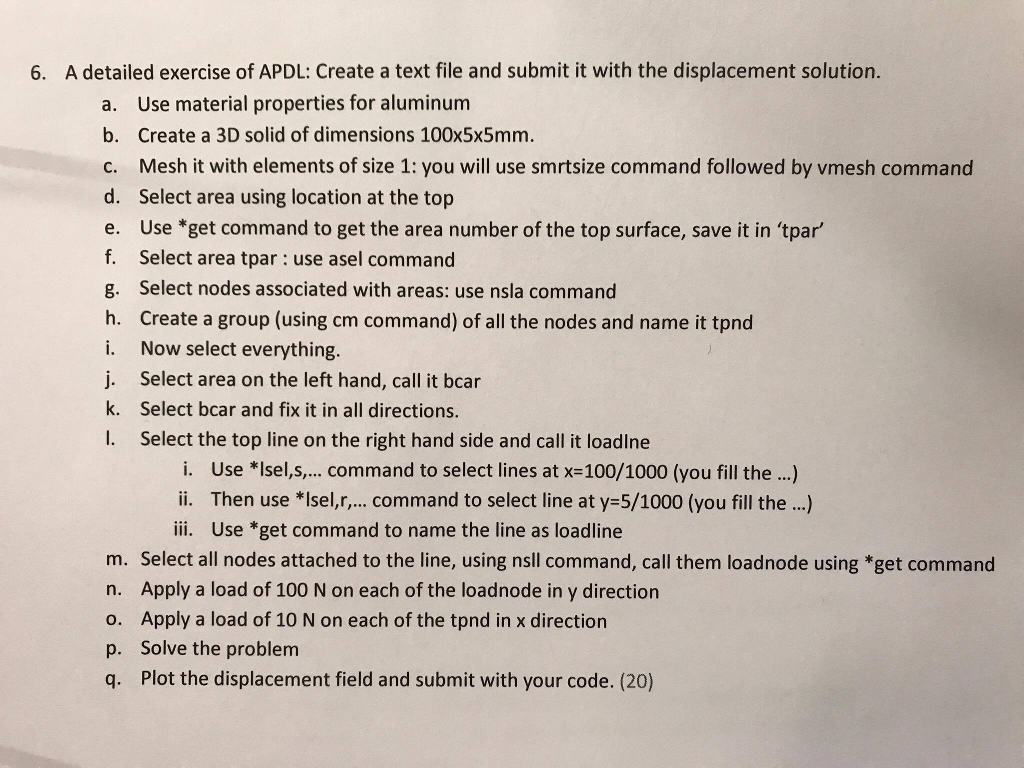
6. A detailed exercise of APDLCreate a text file and submit it with the displacement solution. a. Use material properties for aluminum b. Create a 3D solid of dimensions 100x5x5mm. C. Mesh it with elements of size 1: you will use smrtsize command followed by vmesh command d. Select area using location at the top e. Use *get command to get the area number of the top surface, save it in tpar f. Select area tpar: use asel command g. Select nodes associated with areas: use nsla command h, Create a group (using cm command ) of all the nodes and name it tnd i. Now select everything. j. Select area on the left hand, call it bcar k. Select bcar and fix it in all directions. I. Select the top line on the right hand side and call it loadine i. Use * Isels, command to select lines at x=100/1000 (you fill the ...) i. Then use * Iselr, ., command to select line at y=5/1000 (you fill the..) iii. Use "get command to name the line as loadline m. Select all nodes attached to the lineusing nsll command, call them loadnode using *get command n. Apply a load of 100 N on each of the loadnode in y direction o. Apply a load of 10 N on each of the tnd in x direction p. Solve the problem q. Plot the displacement field and submit with your code. (20) 6. A detailed exercise of APDLCreate a text file and submit it with the displacement solution. a. Use material properties for aluminum b. Create a 3D solid of dimensions 100x5x5mm. C. Mesh it with elements of size 1: you will use smrtsize command followed by vmesh command d. Select area using location at the top e. Use *get command to get the area number of the top surface, save it in tpar f. Select area tpar: use asel command g. Select nodes associated with areas: use nsla command h, Create a group (using cm command ) of all the nodes and name it tnd i. Now select everything. j. Select area on the left hand, call it bcar k. Select bcar and fix it in all directions. I. Select the top line on the right hand side and call it loadine i. Use * Isels, command to select lines at x=100/1000 (you fill the ...) i. Then use * Iselr, ., command to select line at y=5/1000 (you fill the..) iii. Use "get command to name the line as loadline m. Select all nodes attached to the lineusing nsll command, call them loadnode using *get command n. Apply a load of 100 N on each of the loadnode in y direction o. Apply a load of 10 N on each of the tnd in x direction p. Solve the problem q. Plot the displacement field and submit with your code. (20)
Step by Step Solution
There are 3 Steps involved in it

Get step-by-step solutions from verified subject matter experts
 Study Help