







Question: Use Array to write a C++ program. The program asks the user to enter a series of integers. Press Enter in the middle of each
Use Array to write a C++ program. The program asks the user to enter a series of integers. Press Enter in the middle of each integer. For each integer, a corresponding square matrix of numbers is generated (see figure). Each integer represents the number of rows and the number of columns. For example, the user enters "5" and the square of numbers has five rows and five columns. The operation rule of square matrix is shown in the figure. Each integer corresponding to the generated square of numbers should be separated by a line of white space! Use Array to write a C++ program. The program asks the user to enter a series of integers. Press Enter in the middle of each integer. For each integer, a corresponding square matrix of numbers is generated (see figure). Each integer represents the number of rows and the number of columns. For example, the user enters "5" and the square of numbers has five rows and five columns. The outermost digit of the square matrix is one, the second layer of numbers from the outside in is two, the third layer is third, and so on. The operation rule of square matrix is shown in the figure. Each integer corresponding to the generated square of numbers should be separated by a line of white space! Most of this should be done in a do-while loop (see figure). As shown in the figure, when the user enters 5, a square matrix of five rows and five columns should be generated, with the first circle being 1, the second circle being 2, and the middle circle being 3. The techniques available are loop, array, vector, and enum. Multiple returns are not acceptable (only one return is allowed)!
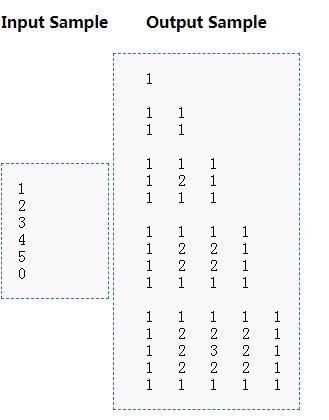

Input Sample Output Sample 1 Ous WNH ENNE ENNE ENNNH 1 1 N do { //process } while (d != 0)://d is the input which is not canal to 0
Step by Step Solution
There are 3 Steps involved in it
1 Expert Approved Answer
Step: 1 Unlock

Question Has Been Solved by an Expert!
Get step-by-step solutions from verified subject matter experts
Step: 2 Unlock
Step: 3 Unlock
 Study Help