







Question: Use C++ Consider the below class interface: class MyContainer { private: int* mHead; // head of the member array int mSize; // size of the
Use C++
Consider the below class interface:
class MyContainer
{
private:
int* mHead; // head of the member array
int mSize; // size of the member array
public: // Grading:
MyContainer(); // 0
MyContainer(int*, int); // 0.2
~MyContainer(); // 0
void Add(int); // 0.1
void Conc(int*, int); // 0.3
void Delete(int); // 0.1
void Erase(int); // 0.1
int GetSize(); // 0
void DisplayAll(); // 0
// 0.2 for the rest of the program
};
Provide the implementation of the class such as:
MyContainer class represents a dynamic array of integers. The array and its data will be dynamically allocated/populated. In addition, this class provides functionality for populating or/and performing actions on the data. Such as:
MyContainer() sets size to zero and head to null
MyContainer(int*, int) takes an array of integers and the count of them, and then populates the members dynamically
~MyContainer() releases any and all allocated memories back to the OS
Add() takes an integer value and adds it to the existing array
Conc() takes an array of integers and the count of them, then adds the content of the new array to the existing array.
Delete() takes an integer value and deletes it from the array. If duplicates exist in the array, then it will delete all the occurrences. If the value does not exist, then it will display value does not exist
Erase() take an index as an integer value and deletes the value at that index.
GetSize() returns the size of the array
DisplayAll() displays all current values of the array
Sample driver program:
int main()
{
const int cSize = 5;
int lArray[cSize] = { 2, 3, 7, 6, 8 };
MyContainer lContainer(lArray, cSize);
lContainer.DisplayAll();
lContainer.Delete(7);
lContainer.DisplayAll();
cout
lContainer.Add(-1);
lContainer.Add(-10);
lContainer.Add(15);
lContainer.DisplayAll();
cout
system( "PAUSE" );
return 0;
}
The above code should display:
Consider the below class interface:
class MyContainer
{
private:
int* mHead; // head of the member array
int mSize; // size of the member array
public: // Grading:
MyContainer(); // 0
MyContainer(int*, int); // 0.2
~MyContainer(); // 0
void Add(int); // 0.1
void Conc(int*, int); // 0.3
void Delete(int); // 0.1
void Erase(int); // 0.1
int GetSize(); // 0
void DisplayAll(); // 0
// 0.2 for the rest of the program
};
Provide the implementation of the class such as:
MyContainer class represents a dynamic array of integers. The array and its data will be dynamically allocated/populated. In addition, this class provides functionality for populating or/and performing actions on the data. Such as:
MyContainer() sets size to zero and head to null
MyContainer(int*, int) takes an array of integers and the count of them, and then populates the members dynamically
~MyContainer() releases any and all allocated memories back to the OS
Add() takes an integer value and adds it to the existing array
Conc() takes an array of integers and the count of them, then adds the content of the new array to the existing array.
Delete() takes an integer value and deletes it from the array. If duplicates exist in the array, then it will delete all the occurrences. If the value does not exist, then it will display value does not exist
Erase() take an index as an integer value and deletes the value at that index.
GetSize() returns the size of the array
DisplayAll() displays all current values of the array
Sample driver program:
int main()
{
const int cSize = 5;
int lArray[cSize] = { 2, 3, 7, 6, 8 };
MyContainer lContainer(lArray, cSize);
lContainer.DisplayAll();
lContainer.Delete(7);
lContainer.DisplayAll();
cout
lContainer.Add(-1);
lContainer.Add(-10);
lContainer.Add(15);
lContainer.DisplayAll();
cout
system( "PAUSE" );
return 0;
}
The above code should display:
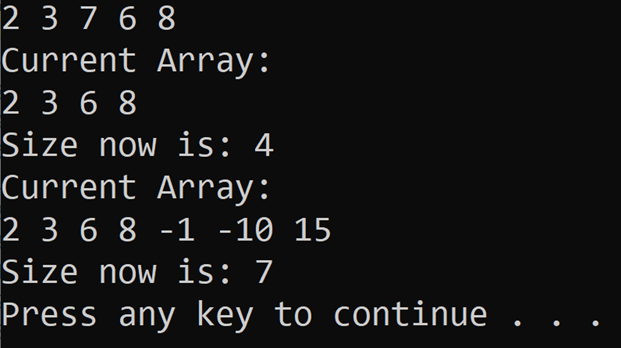
23768 Current Array: 2368 Size now is: 4 Current Array: 2368 -1 1015 Size now is: 7 Press any key to continue
Step by Step Solution
There are 3 Steps involved in it

Get step-by-step solutions from verified subject matter experts
 Study Help