



Question: use c++ output should look exactly like shown in pic please provide a snapshot of the output that looks exactly like in the picture. thank
use c++ output should look exactly like shown in pic
please provide a snapshot of the output that looks exactly like in the picture.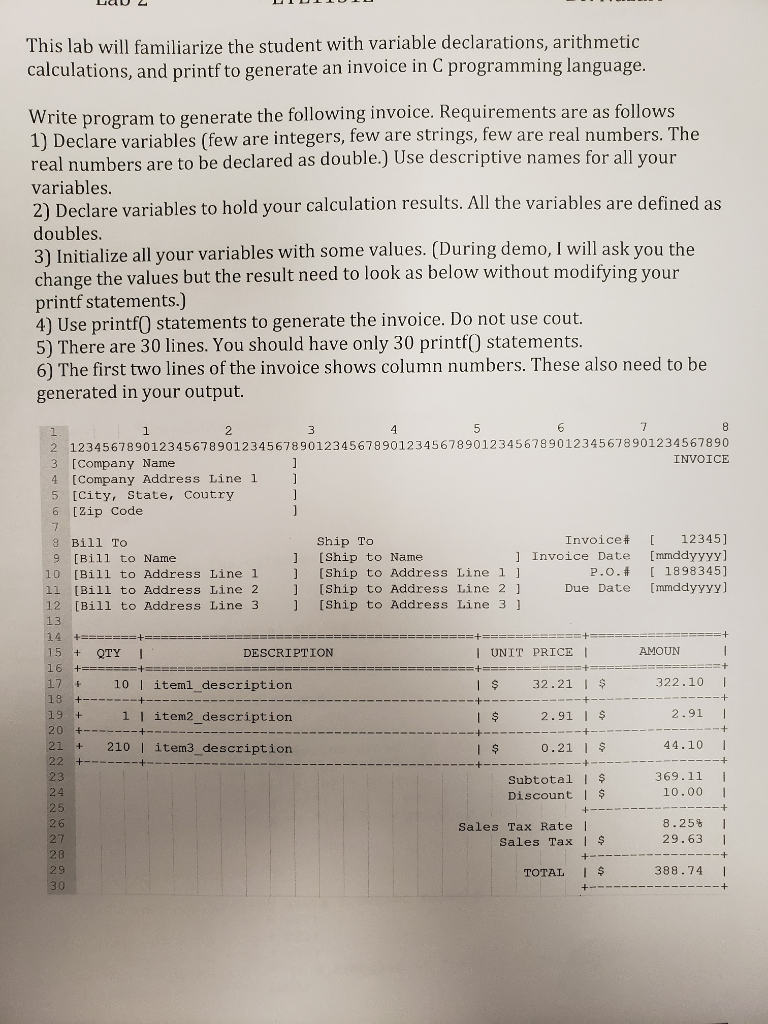 thank you!
This lab will familiarize the student with variable declarations, arithmetic calculations, and printf to generate an invoice in C programming language Write program to generate the following invoice. Requirements are as follows 1) Declare variables (few are integers, few are strings, few are real numbers. The real numbers are to be declared as double.) Use descriptive names for all your variables 2) Declare variables to hold your calculation results. All the variables are defined as doubles 3) Initialize all your variables with some values. (During demo, I will ask you the change the values but the result need to look as below without modifying your printf statements.) 4) Use printf0 statements to generate the invoice. Do not use cout. 5) There are 30 lines. You should have only 30 printf0 statements. 6) The first two lines of the invoice shows column numbers. These also need to be generated in your output 6 2 12345678901234567890123456789012345678901234567890123456789012345678901234567890 3 [Company Name INVOICE [Company Address Line 1 5 [City, State, Coutry [zip Code Invoice# [ 12345] ] Invoice Date [mmddyyyy] P.o.t 1898345] Due Date [mmddyyyy] Ship To 8 Bill To 9 [Bill to Name 1 [Ship to Name 10 [Bill to Address Line1 11 [Bill to Address Line 2 12 [Bill to Address Line 3 [Ship to Address Line 1 ] [Ship to Address Line 2 1 [Ship to Address Line 3 QTY I DESCRIPTION I UNIT PRICE AMOUN 17 t 10 I iteml description I $ 32.21 I 322.10 I 2.91 I $ 2.91 I + l I item2_ description 21 210 I item3_description 23 0.21 1 $ 44.10 Subtotal I DiscountIs 369.11 10.00 26 27 28 Sales Tax Rate l sales TaxI 8.25% 29.63 1 TOTAL I 388.74
Step by Step Solution
There are 3 Steps involved in it

Get step-by-step solutions from verified subject matter experts