







Question: USE C++ PLEASE Output a simple message. Hint: An example to use Ctrl+d to stop input: // Read a number from the keyboard and displays
USE C++ PLEASE
Output
- a simple message.
Hint:
- An example to use Ctrl+d to stop input:
// Read a number from the keyboard and displays it to the // screen until user's input is ctrl+d
while (cin >> number)
{
cout
}
USING C++
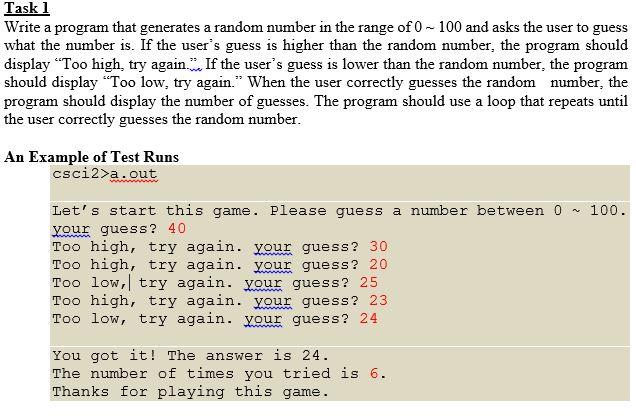
Task 1 Write a program that generates a random number in the range of 0 - 100 and asks the user to guess what the number is. If the user's guess is higher than the random number, the program should display "Too high, try again... If the user's guess is lower than the random number, the program should display "Too low, try again." When the user correctly guesses the random number, the program should display the number of guesses. The program should use a loop that repeats until the user correctly guesses the random number. An Example of Test Runs csci2>a.out 100. Let's start this game. Please guess a number between O your guess? 40 Too high, try again. your guess? 30 Too high, try again. your guess? 20 Too low, try again. your guess? 25 Too high, try again. your guess? 23 Too low, try again. your guess? 24 You got it! The answer is 24. The number of times you tried is 6. Thanks for playing this game
Step by Step Solution
There are 3 Steps involved in it

Get step-by-step solutions from verified subject matter experts
 Study Help