







Question: Use C++ programing language. Use structs instead of classes The information required for the CSV(excel file) file is on page 2. CANNOT USE CLASSES Program
Use C++ programing language.
Use structs instead of classes
The information required for the CSV(excel file) file is on page 2.
CANNOT USE CLASSES
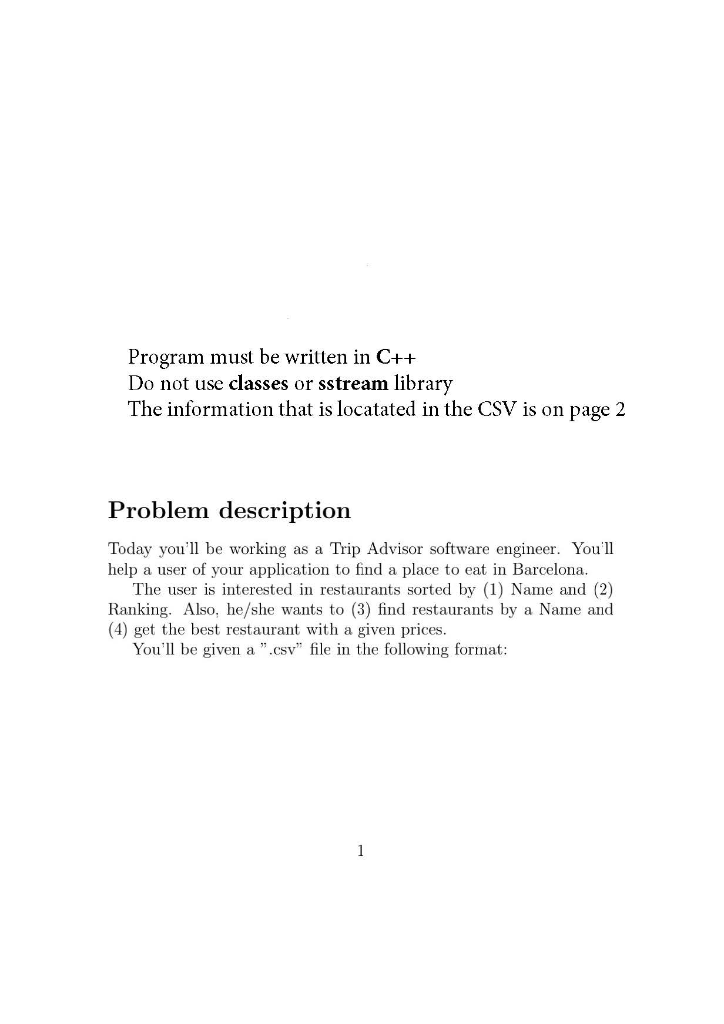
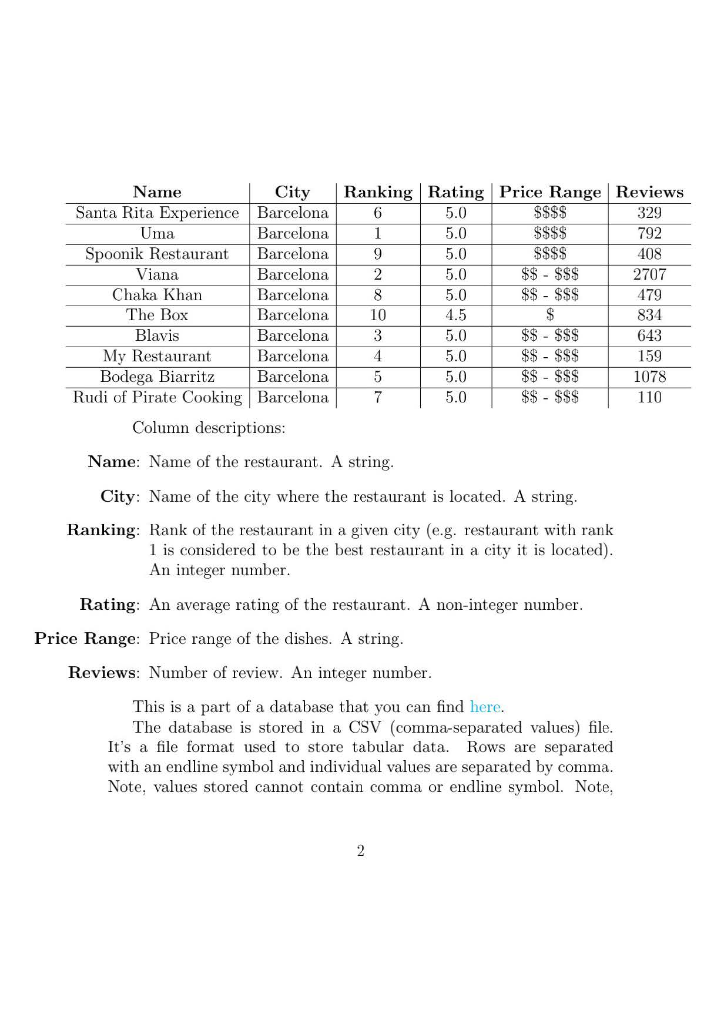
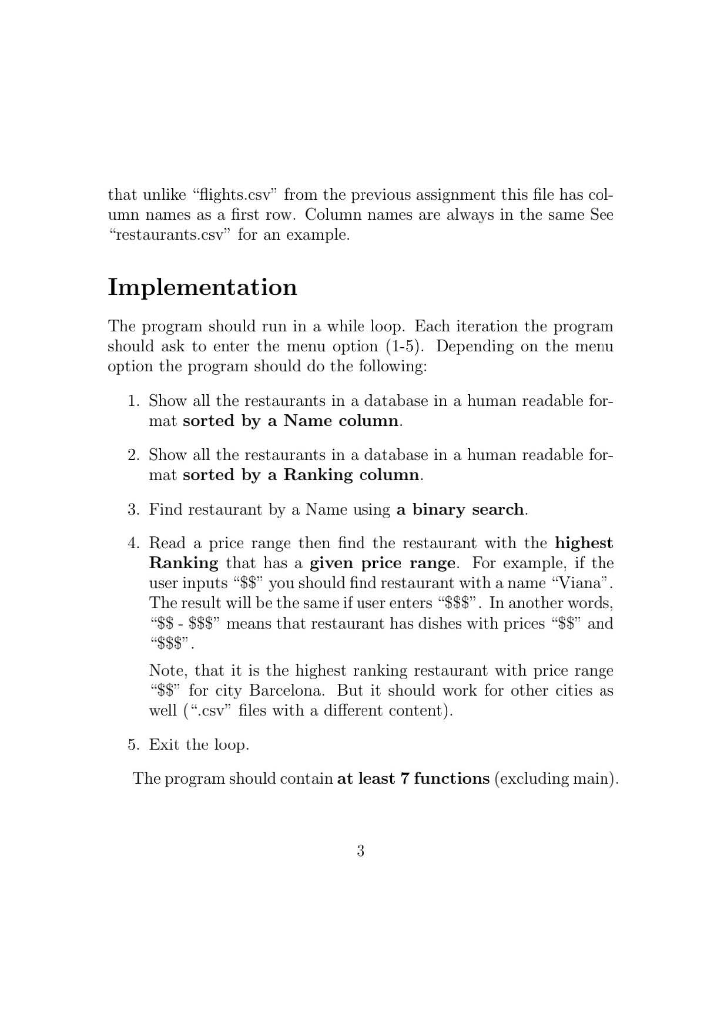
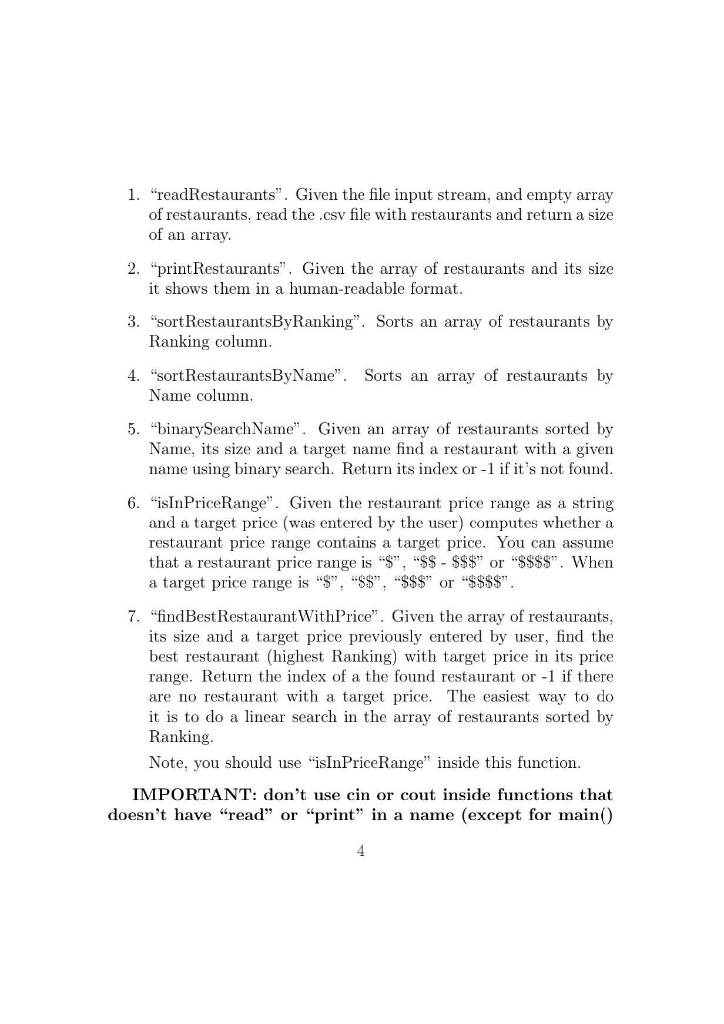
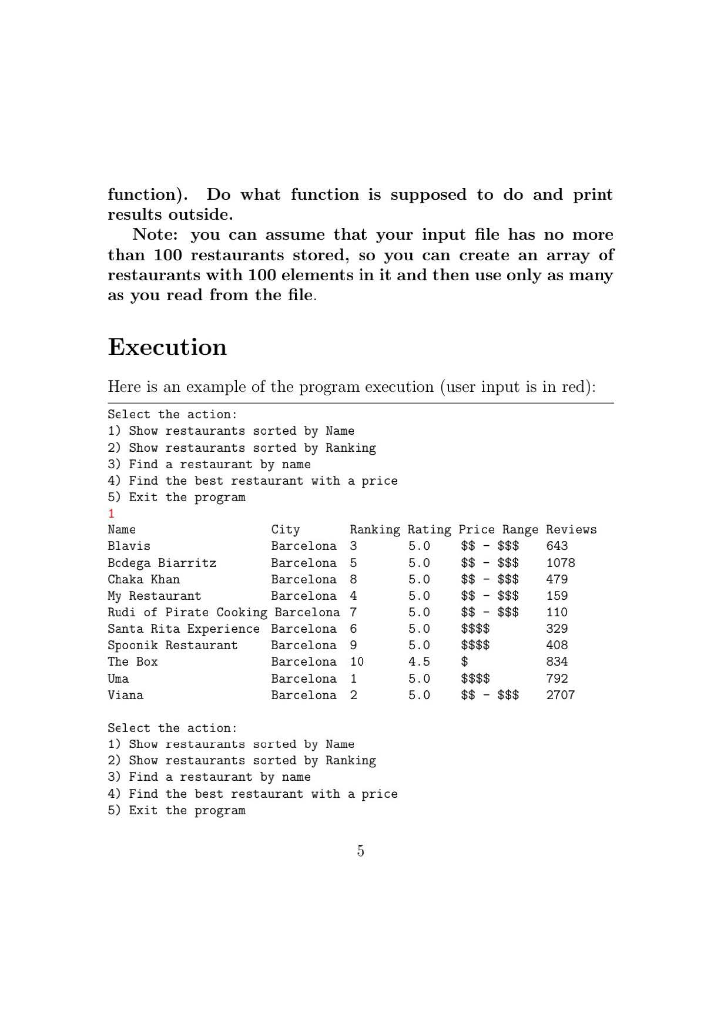
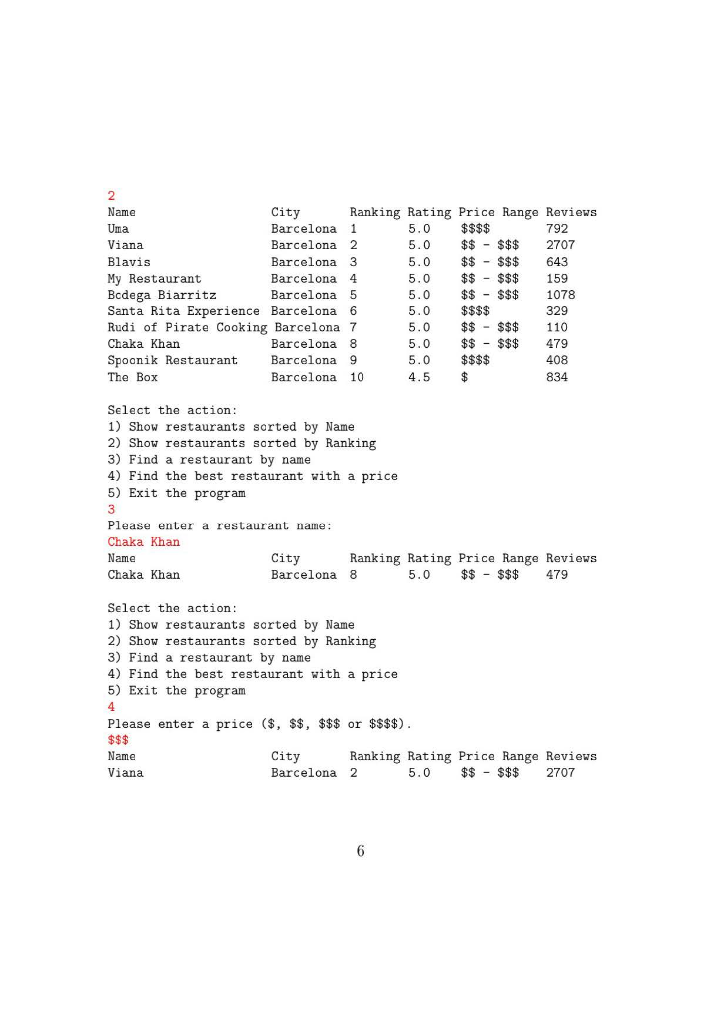
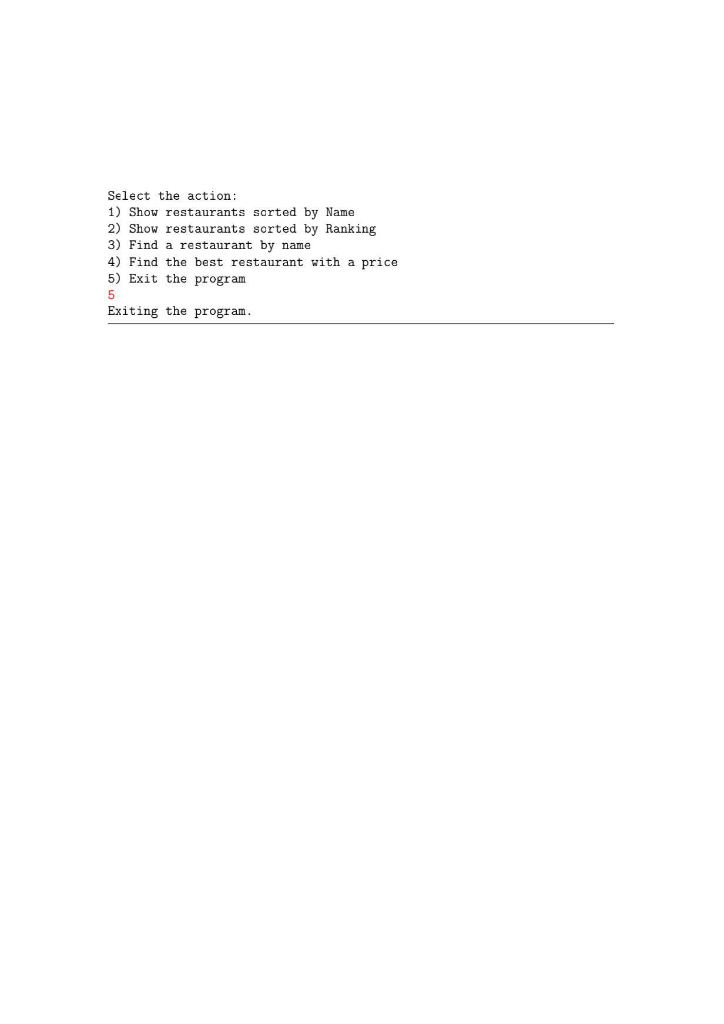
Program must be written in C++ Do not use classes or sstream library The information that is locatated in the CSV is on page 2 Problem description Today you'll be working as a Trip Advisor software engineer. You'll help a user of your application to find a place to eat in Barcelona. The user is interested in restaurants sorted by (1) Name and (2) Ranking. Also, he/she wants to (3) find restaurants by a Name and (4) get the best restaurant with a given prices. You'll be given a ".csv" file in the following format: 5.0 Name City Ranking Rating Price Range Reviews Santa Rita Experience Barcelona 5.0 $$$$ 329 Uma Barcelona 5.0 $$$$ 792 Spoonik Restaurant Barcelona 5.0 $$$$ 408 Viana Barcelona $$ - $$$ 2707 Chaka Khan Barcelona 5.0 $$ - $$$ 479 The Box Barcelona 4.5 834 Blavis Barcelona 5.0 $$ - $$$ 643 My Restaurant Barcelona 5.0 $$ - $$$ 159 Bodega Biarritz Barcelona 5.0 $$ - $$$ 1078 Rudi of Pirate Cooking Barcelona 5.0 $5 - 35 110 Column descriptions: Name: Name of the restaurant. A string. 7 0.0 City: Name of the city where the restaurant is located. A string, Ranking: Rank of the restaurant in a given city (e.g. restaurant with rank 1 is considered to be the best restaurant in a city it is located). An integer number. Rating: An average rating of the restaurant. A non-integer number, Price Range: Price range of the dishes. A string. Reviews: Number of review. An integer number. This is a part of a database that you can find here. The database is stored in a CSV (comma-separated values) file. It's a file format used to store tabular data. Rows are separated with an endline symbol and individual values are separated by comma. Note, values stored cannot contain comma or endline symbol. Note, that unlike "flights.csv" from the previous assignment this file has col- umn names as a first row. Column names are always in the same See "restaurants.csv" for an example. Implementation The program should run in a while loop. Each iteration the program should ask to enter the menu option (1-5). Depending on the menu option the program should do the following: 1. Show all the restaurants in a database in a human readable for- mat sorted by a Name column. 2. Show all the restaurants in a database in a human readable for- mat sorted by a Ranking column. 3. Find restaurant by a Name using a binary search. 4. Read a price range then find the restaurant with the highest Ranking that has a given price range. For example, if the user inputs "$$" you should find restaurant with a name "Viana". The result will be the same if user enters "$$$". In another words, "$$ - $$$" means that restaurant has dishes with prices "$$" and $$$". Note, that it is the highest ranking restaurant with price range "$$" for city Barcelona. But it should work for other cities as well (".csv" files with a different content). 5. Exit the loop. The program should contain at least 7 functions (excluding main). 1. "readRestaurants". Given the file input stream, and empty array of restaurants, read the .csv file with restaurants and return a size of an array. 2. "print Restaurants". Given the array of restaurants and its size it shows them in a human-readable format. 3. "sort RestaurantsByRanking". Sorts an array of restaurants by Ranking column. 4. "sort RestaurantsByName". Sorts an array of restaurants by Name column 5. "binarySearchName". Given an array of restaurants sorted by Name, its size and a target name find a restaurant with a given name using binary search. Return its index or -1 if it's not found. 6. "isInPriceRange". Given the restaurant price range as a string and a target price (was entered by the user) computes whether a restaurant price range contains a target price. You can assume that a restaurant price range is "$", "$$ - $$$" or "$$$$". When a target price range is "$", "$$", "$$$" or "$$$$". 7. "findBest Restaurant WithPrice". Given the array of restaurants, its size and a target price previously entered by user, find the best restaurant (highest Ranking) with target price in its price range. Return the index of a the found restaurant or -1 if there are no restaurant with a target price. The easiest way to do it is to do a linear search in the array of restaurants sorted by Ranking. Note, you should use "isInPriceRange" inside this function. IMPORTANT: don't use cin or cout inside functions that doesn't have "read" or "print" in a name (except for main() function). Do what function is supposed to do and print results outside. Note: you can assume that your input file has no more than 100 restaurants stored, so you can create an array of restaurants with 100 elements in it and then use only as many as you read from the file. Execution Here is an example of the program execution (user input is in red): Select the action: 1) Show restaurants sorted by Name 2) Show restaurants sorted by Ranking 3) Find a restaurant by name 4) Find the best restaurant with a price 5) Exit the program Name City Ranking Rating Price Range Reviews Blavis Barcelona 3 5.0 $$ - $$$ 643 Bodega Biarritz Barcelona 5 5.0 $$ - $$$ 1078 Chaka Khan Barcelona 8 5.0 $$ - $$$ 479 My Restaurant Barcelona 4 5.0 $$ - $$$ 159 Rudi of Pirate Cooking Barcelona 7 5.0 $$ - $$$ 110 Santa Rita Experience Barcelona 6 5.0 $$$$ 329 Spoonik Restaurant Barcelona 9 5.0 $$$$ 408 The Box Barcelona 10 4.5 834 Uma Barcelona 1 5.0 $$$$ 792 Viana Barcelona 2 5.0 $$ - $$$ 2707 Select the action: 1) Show restaurants sorted by Name 2) Show restaurants sorted by Ranking 3) Find a restaurant by name 4) Find the best restaurant with a price 5) Exit the program Name City Ranking Rating Price Range Reviews Uma Barcelona 1 5.0 $$$$ 792 Viana Barcelona 2 5.0 $$ - $$$ 2707 Blavis Barcelona 3 5.0 $$ - $$$ 643 My Restaurant Barcelona 4 5.0 $$ - $$$ 159 Bodega Biarritz Barcelona 5 5.0 $$ - $$$ 1078 Santa Rita Experience Barcelona 6 5.0 $$$$ 329 Rudi of Pirate Cooking Barcelona 7 5.0 $$ - $$$ 110 Chaka Khan Barcelona 8 5.0 $$ - $$$ 479 Spoonik Restaurant Barcelona 9 5.0 $$$$ The Box Barcelona 10 4.5 834 408 Select the action: 1) Show restaurants sorted by Name 2) Show restaurants sorted by Ranking 3) Find a restaurant by name 4) Find the best restaurant with a price 5) Exit the program Please enter a restaurant name: Chaka Khan Name City Ranking Rating Price Range Reviews Chaka Khan Barcelona 8 5.0 $$ - $$$ 479 Select the action: 1) Show restaurants sorted by Name 2) Show restaurants sorted by Ranking 3) Find a restaurant by name 4) Find the best restaurant with a price 5) Exit the program Please enter a price ($,$$, $$$ or $$$$). $$$ Name City Ranking Rating Price Range Reviews Viana Barcelona 2 5.0 $$ - $$$ 2707 Select the action: 1) Show restaurants sorted by Name 2) Show restaurants sorted by Ranking 3) Find a restaurant by name 4) Find the best restaurant with a price 5) Exit the program Exiting the program. Program must be written in C++ Do not use classes or sstream library The information that is locatated in the CSV is on page 2 Problem description Today you'll be working as a Trip Advisor software engineer. You'll help a user of your application to find a place to eat in Barcelona. The user is interested in restaurants sorted by (1) Name and (2) Ranking. Also, he/she wants to (3) find restaurants by a Name and (4) get the best restaurant with a given prices. You'll be given a ".csv" file in the following format: 5.0 Name City Ranking Rating Price Range Reviews Santa Rita Experience Barcelona 5.0 $$$$ 329 Uma Barcelona 5.0 $$$$ 792 Spoonik Restaurant Barcelona 5.0 $$$$ 408 Viana Barcelona $$ - $$$ 2707 Chaka Khan Barcelona 5.0 $$ - $$$ 479 The Box Barcelona 4.5 834 Blavis Barcelona 5.0 $$ - $$$ 643 My Restaurant Barcelona 5.0 $$ - $$$ 159 Bodega Biarritz Barcelona 5.0 $$ - $$$ 1078 Rudi of Pirate Cooking Barcelona 5.0 $5 - 35 110 Column descriptions: Name: Name of the restaurant. A string. 7 0.0 City: Name of the city where the restaurant is located. A string, Ranking: Rank of the restaurant in a given city (e.g. restaurant with rank 1 is considered to be the best restaurant in a city it is located). An integer number. Rating: An average rating of the restaurant. A non-integer number, Price Range: Price range of the dishes. A string. Reviews: Number of review. An integer number. This is a part of a database that you can find here. The database is stored in a CSV (comma-separated values) file. It's a file format used to store tabular data. Rows are separated with an endline symbol and individual values are separated by comma. Note, values stored cannot contain comma or endline symbol. Note, that unlike "flights.csv" from the previous assignment this file has col- umn names as a first row. Column names are always in the same See "restaurants.csv" for an example. Implementation The program should run in a while loop. Each iteration the program should ask to enter the menu option (1-5). Depending on the menu option the program should do the following: 1. Show all the restaurants in a database in a human readable for- mat sorted by a Name column. 2. Show all the restaurants in a database in a human readable for- mat sorted by a Ranking column. 3. Find restaurant by a Name using a binary search. 4. Read a price range then find the restaurant with the highest Ranking that has a given price range. For example, if the user inputs "$$" you should find restaurant with a name "Viana". The result will be the same if user enters "$$$". In another words, "$$ - $$$" means that restaurant has dishes with prices "$$" and $$$". Note, that it is the highest ranking restaurant with price range "$$" for city Barcelona. But it should work for other cities as well (".csv" files with a different content). 5. Exit the loop. The program should contain at least 7 functions (excluding main). 1. "readRestaurants". Given the file input stream, and empty array of restaurants, read the .csv file with restaurants and return a size of an array. 2. "print Restaurants". Given the array of restaurants and its size it shows them in a human-readable format. 3. "sort RestaurantsByRanking". Sorts an array of restaurants by Ranking column. 4. "sort RestaurantsByName". Sorts an array of restaurants by Name column 5. "binarySearchName". Given an array of restaurants sorted by Name, its size and a target name find a restaurant with a given name using binary search. Return its index or -1 if it's not found. 6. "isInPriceRange". Given the restaurant price range as a string and a target price (was entered by the user) computes whether a restaurant price range contains a target price. You can assume that a restaurant price range is "$", "$$ - $$$" or "$$$$". When a target price range is "$", "$$", "$$$" or "$$$$". 7. "findBest Restaurant WithPrice". Given the array of restaurants, its size and a target price previously entered by user, find the best restaurant (highest Ranking) with target price in its price range. Return the index of a the found restaurant or -1 if there are no restaurant with a target price. The easiest way to do it is to do a linear search in the array of restaurants sorted by Ranking. Note, you should use "isInPriceRange" inside this function. IMPORTANT: don't use cin or cout inside functions that doesn't have "read" or "print" in a name (except for main() function). Do what function is supposed to do and print results outside. Note: you can assume that your input file has no more than 100 restaurants stored, so you can create an array of restaurants with 100 elements in it and then use only as many as you read from the file. Execution Here is an example of the program execution (user input is in red): Select the action: 1) Show restaurants sorted by Name 2) Show restaurants sorted by Ranking 3) Find a restaurant by name 4) Find the best restaurant with a price 5) Exit the program Name City Ranking Rating Price Range Reviews Blavis Barcelona 3 5.0 $$ - $$$ 643 Bodega Biarritz Barcelona 5 5.0 $$ - $$$ 1078 Chaka Khan Barcelona 8 5.0 $$ - $$$ 479 My Restaurant Barcelona 4 5.0 $$ - $$$ 159 Rudi of Pirate Cooking Barcelona 7 5.0 $$ - $$$ 110 Santa Rita Experience Barcelona 6 5.0 $$$$ 329 Spoonik Restaurant Barcelona 9 5.0 $$$$ 408 The Box Barcelona 10 4.5 834 Uma Barcelona 1 5.0 $$$$ 792 Viana Barcelona 2 5.0 $$ - $$$ 2707 Select the action: 1) Show restaurants sorted by Name 2) Show restaurants sorted by Ranking 3) Find a restaurant by name 4) Find the best restaurant with a price 5) Exit the program Name City Ranking Rating Price Range Reviews Uma Barcelona 1 5.0 $$$$ 792 Viana Barcelona 2 5.0 $$ - $$$ 2707 Blavis Barcelona 3 5.0 $$ - $$$ 643 My Restaurant Barcelona 4 5.0 $$ - $$$ 159 Bodega Biarritz Barcelona 5 5.0 $$ - $$$ 1078 Santa Rita Experience Barcelona 6 5.0 $$$$ 329 Rudi of Pirate Cooking Barcelona 7 5.0 $$ - $$$ 110 Chaka Khan Barcelona 8 5.0 $$ - $$$ 479 Spoonik Restaurant Barcelona 9 5.0 $$$$ The Box Barcelona 10 4.5 834 408 Select the action: 1) Show restaurants sorted by Name 2) Show restaurants sorted by Ranking 3) Find a restaurant by name 4) Find the best restaurant with a price 5) Exit the program Please enter a restaurant name: Chaka Khan Name City Ranking Rating Price Range Reviews Chaka Khan Barcelona 8 5.0 $$ - $$$ 479 Select the action: 1) Show restaurants sorted by Name 2) Show restaurants sorted by Ranking 3) Find a restaurant by name 4) Find the best restaurant with a price 5) Exit the program Please enter a price ($,$$, $$$ or $$$$). $$$ Name City Ranking Rating Price Range Reviews Viana Barcelona 2 5.0 $$ - $$$ 2707 Select the action: 1) Show restaurants sorted by Name 2) Show restaurants sorted by Ranking 3) Find a restaurant by name 4) Find the best restaurant with a price 5) Exit the program Exiting the program
Step by Step Solution
There are 3 Steps involved in it

Get step-by-step solutions from verified subject matter experts
 Study Help