







Question: use c programming The OS Simulator is written for you and uses the following loop to run each of the processes on the system. The
use c programming
The OS Simulator is written for you and uses the following loop to run each of the processes on the system. The Clock is a simple counter that starts at Starting Time of 1 and runs until the OS is halted with an exit command. Each cycle through the loop takes 1 time unit, and all of the processes use time remaining in terms of the same time units. So, if a process has a time_remaining value of 3, it will need to run on the CPU three times for it to complete.

2.2 Process States Every process can be in exactly one of five possible states in the Scheduler at any given time.
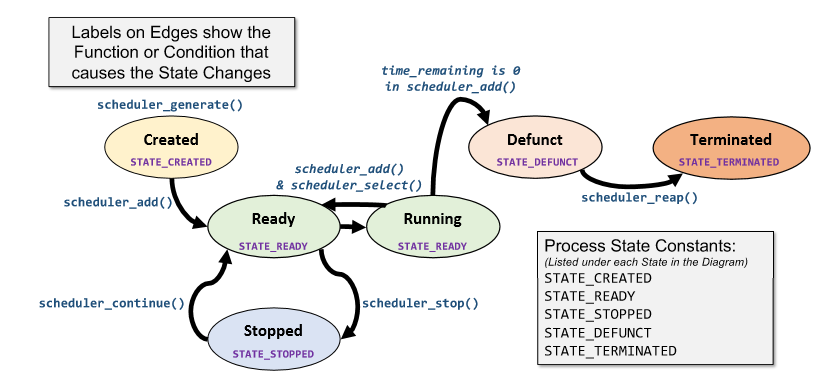
This diagram shows the states that each Process can be in and which function that changes the states from one to another. As an example, if a Process is in the Ready List and is in the Ready State (STATE_READY), and your scheduler_stop() function is called, then that Process will change to the Stopped State (STATE_STOPPED).
2.3 Process Flags The Process structs maintain their current state using the flags member. This 32-bit int contains pieces of information that have been combined together using bitwise operations.

Bits 0-4 represent the current state of the Process. C = STATE_CREATED R = STATE_READY T = STATE_STOPPED Z = STATE_DEFUNCT X = STATE_TERMINATED Bit 5 is a flag representing if the process was run with super user privileges (Called using sudo) S = PF_SUPERPRIV Bits 6-31 are the lower 26 bits of the Exit Code when the process finished running on the CPU. eg. A process run with sudo that is Defunct with an exit_code of 3 has flags equal to 0xE8
4 Implementation Details You will complete all of the functions in scheduler.c. You may create any additional functions that you like
4.1 Function API References
Schedule *scheduler_init(); Your init function needs to create a Schedule struct that is fully allocated. All allocations within this struct will be dynamic, using malloc. Take note that Schedule contains pointers to List structs, which themselves also need to be allocated. Each List struct contains a pointer to the head of a singly linked list and a count of the number of items in that list, which must be initialized to 0. All head pointers must be initialized to NULL. On any errors, return NULL, otherwise return your new Schedule. int scheduler_count(List *ll); Return the count of the number of processes in the given list, or 0 on any error. Process *scheduler_generate(char *command, int pid, int time_remaining, int is_sudo); This needs to create a new Process with the given information. Dynamically allocate memory for the command and copy it in to the new process. Set the fields for pid and time_remaining. For time_last_run, call the following clock function to get the current time: clock_get_time(); and use that value. All newly created processes will have their creation time as their initial time last run. Set the initial state to STATE_CREATED. If is_sudo is 1, set the PF_SUPERPRIV flag in the flags. Initialize the exit_code portion of the flags to 0. Return the pointer to the new Process on success, or NULL on any error.
STATE_DEFUNCT You can just insert it into the Defunct List. If the process arrives in any other state, you can return as an error. Return 0 on success or -1 on any error.
Process *scheduler_select(Schedule *schedule); In this function, you will choose the best process from the Ready List to return to the CPU. When you select a process, you will be removing that process struct from the linked list and returning a pointer to it. This means, you will need to set its next pointer to NULL before returning it, since its no longer in any list. The algorithm you will use is as follows: Select the process with the lowest time_remaining value from the Ready List. o If there is a tie for lowest time_remaining, select the one with lowest PID However, If any process in the list is in starvation, which is defined below, select it instead of the one with lowest time_remaining. o If two or more processes are in starvation, select the one with lowest PID A process is defined as being in starvation if the difference between the current time from clock_get_time() and time_last_run is >= TIME_STARVATION As an example, if the current time is 5 and a process has time_last_run = 2, and TIME_STARVATION is 3, then that process is in starvation. Starvation is a measure of a process that never gets selected because its time_remaining is too high. This technique ensures all processes get a chance to run. Return the selected Process on success or NULL on any error. int scheduler_reap(Schedule *schedule, int pid); This needs to find the process with matching pid from the Defunct List. Once found, remove the process from the Defunct List. Set the process state to STATE_TERMINATED and then extract its exit_code from the flags. Free the process. Return the exit_code on success or -1 on any error. int scheduler_stop(Schedule *schedule, int pid); This needs to find the process with matching pid from the Ready List. Once found, remove the process from the Ready List. Set the process state to STATE_STOPPED and then insert it into the Stopped List in Ascending PID order. If this process is not in the ready list, you can return error. Return 0 on success or -1 on any error. int scheduler_add(Schedule *schedule, Process *process); This needs to add the given process to your schedule by its State (in the flags). If the current state of the process is: STATE_CREATED Set the state to STATE_READY and insert it into the Ready List in Ascending PID order. STATE_READY You need to check its time_remaining. If the time_remaining > 0, then you can just insert it into the Ready List in Ascending PID order. If the time_remaining is 0, then set it to STATE_DEFUNCT and insert it into the Defunct List in Ascending PID order.
int scheduler_continue(Schedule *schedule, int pid); This needs to find the process with matching pid from the Stopped List. Once found, remove the process from the Stopped List. Set the process state to STATE_READY and then insert it into the Ready List in Ascending PID order. If this process is not in the stopped list, you can return error. Return 0 on success or -1 on any error. void scheduler_free(Schedule *schedule); Frees all memory allocated with a Schedule and then the schedule itself. It is possible to run this program with no memory leaks!
code:
#include
/* Called when the program terminates. * You may use this to clean up memory or for any other purpose. */ void scheduler_exit(Schedule *schedule) { return; }
/* Initialize the Schedule Struct * Follow the specification for this function. * Returns a pointer to the new Schedule or NULL on any error. */ Schedule *scheduler_init() { return NULL; }
/* Add the process into the appropriate linked list. * Follow the specification for this function. * Returns a 0 on success or a -1 on any error. */ int scheduler_add(Schedule *schedule, Process *process) { return -1; }
/* Move the process with matching pid from Ready to Stopped. * Change its State to Stopped. * Follow the specification for this function. * Returns a 0 on success or a -1 on any error. */ int scheduler_stop(Schedule *schedule, int pid) { return -1; }
/* Move the process with matching pid from Stopped to Ready. * Change its State to Ready. * Follow the specification for this function. * Returns a 0 on success or a -1 on any error. */ int scheduler_continue(Schedule *schedule, int pid) { return -1; }
/* Remove the process with matching pid from Defunct. * Follow the specification for this function. * Returns its exit code (from flags) on success or a -1 on any error. */ int scheduler_reap(Schedule *schedule, int pid) { return -1; }
/* Create a new Process with the given information. * - Malloc and copy the command string, don't just assign it! * Set the STATE_CREATED flag. * If is_sudo, also set the PF_SUPERPRIV flag. * Follow the specification for this function. * Returns the Process on success or a NULL on any error. */ Process *scheduler_generate(char *command, int pid, int time_remaining, int is_sudo) { return NULL; }
/* Select the next process to run from Ready List. * Follow the specification for this function. * Returns the process selected or NULL if none available or on any errors. */ Process *scheduler_select(Schedule *schedule) { return NULL; }
/* Returns the number of items in a given List * Follow the specification for this function. * Returns the count of the List, or -1 on any errors. */ int scheduler_count(List *ll) { return -1; }
/* Completely frees all allocated memory in the scheduler * Follow the specification for this function. */ void scheduler_free(Schedule *scheduler) { return; }
Initialize Scheduler Scheduler *scheduler_init() Set Clock to 1 Remove Process from CPU int scheduler_add(Schedule *s, Process *p) Process *scheduler_generate(name, pid, time_remaining, is_sudo) int scheduler_add(Schedule *s, Process *p) int scheduler_stop(Schedule *s, int pid) int scheduler_continue (Schedule *s, int pid) int scheduler_reap(Schedule *s, int pid) Perform 1 Action Select the next Process to Run Process *scheduler_select(Schedule *s) Advance Clock Run Process Called Throughout: int scheduler_count(List *1) Exit void scheduler_free(Schedule *s) Labels on Edges show the Function or Condition that causes the State Changes time_remaining is a in scheduler_add() scheduler_generate() Created STATE_CREATED Defunct STATE_DEFUNCT Terminated STATE_TERMINATED scheduler_add() & scheduler_select() scheduler_add scheduler_reap() Ready Running STATE_READY STATE_READY scheduler_continue() scheduler_stop() Process State Constants: (Listed under each State in the Diagram) STATE_CREATED STATE READY STATE_STOPPED STATE_DEFUNCT STATE TERMINATED Stopped STATE_STOPPED 3 3 1 1 2 9 2 8 2 7 2 6 2 5 2 4 2 3 2 2 exit_code 2 1 1 1 9 8 7 2 1 1 6 1 5 1 4 1 3 1 2 1 1 @ 9 @ 8 @ 7 SX ZTRC @ @ @ @ @ 5 4 3 2 1 6 Initialize Scheduler Scheduler *scheduler_init() Set Clock to 1 Remove Process from CPU int scheduler_add(Schedule *s, Process *p) Process *scheduler_generate(name, pid, time_remaining, is_sudo) int scheduler_add(Schedule *s, Process *p) int scheduler_stop(Schedule *s, int pid) int scheduler_continue (Schedule *s, int pid) int scheduler_reap(Schedule *s, int pid) Perform 1 Action Select the next Process to Run Process *scheduler_select(Schedule *s) Advance Clock Run Process Called Throughout: int scheduler_count(List *1) Exit void scheduler_free(Schedule *s) Labels on Edges show the Function or Condition that causes the State Changes time_remaining is a in scheduler_add() scheduler_generate() Created STATE_CREATED Defunct STATE_DEFUNCT Terminated STATE_TERMINATED scheduler_add() & scheduler_select() scheduler_add scheduler_reap() Ready Running STATE_READY STATE_READY scheduler_continue() scheduler_stop() Process State Constants: (Listed under each State in the Diagram) STATE_CREATED STATE READY STATE_STOPPED STATE_DEFUNCT STATE TERMINATED Stopped STATE_STOPPED 3 3 1 1 2 9 2 8 2 7 2 6 2 5 2 4 2 3 2 2 exit_code 2 1 1 1 9 8 7 2 1 1 6 1 5 1 4 1 3 1 2 1 1 @ 9 @ 8 @ 7 SX ZTRC @ @ @ @ @ 5 4 3 2 1 6
Step by Step Solution
There are 3 Steps involved in it

Get step-by-step solutions from verified subject matter experts
 Study Help