







Question: Use Django and Python to create a multi-page website which catalogues items on a topic of your choice. Pick a topic that you like, for
Use Django and Python to create a multi-page website which catalogues items on a topic of your choice. Pick a topic that you like, for example it could be books, movies, music, computer games, holiday destinations, etc.
There should be at least 4 items in your catalogue and no more than 10 items at most. Exceeding the minimum of 4 simply allows you to get a better feel for how the website will look when it is fully populated with data. The user should be able to click on each item displayed in your catalogue, which will navigate them to a new page to view the details specific to that item.
Create a Python class, in its own file, which defines the data structure for your items. For example, you might create a Books class that contains fields like title, author, genre, etc. Import your new Class into your Django project and use it to help define the data being sent to the Context.
The items from your websites catalogue will need to be defined within your Python code, and displayed by using Templates by passing the data to the Context for display. Do not hard code your catalogue items directly into your HTML.
Task 1 Requirements
For this task, you are required to complete the following using Python & Django:
Create a website with at least these three pages.
Incorrect template sample
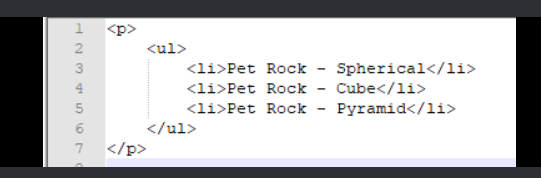
Correct template sample
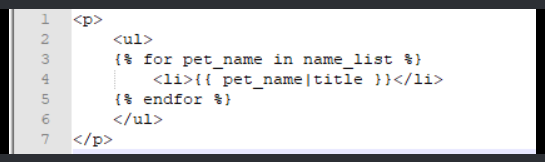
1
2 3 4 5 Kul>
7 1
2 3 4 5 Kul>
7
Step by Step Solution
There are 3 Steps involved in it

Get step-by-step solutions from verified subject matter experts
 Study Help