







Question: Use dynamic arrays Homework #8 e, Toil and Bubble Sort a Dynamically Allocated Array of Strings Assigned: November 1, 2017 Due: Nov. 8 by 11:59:59
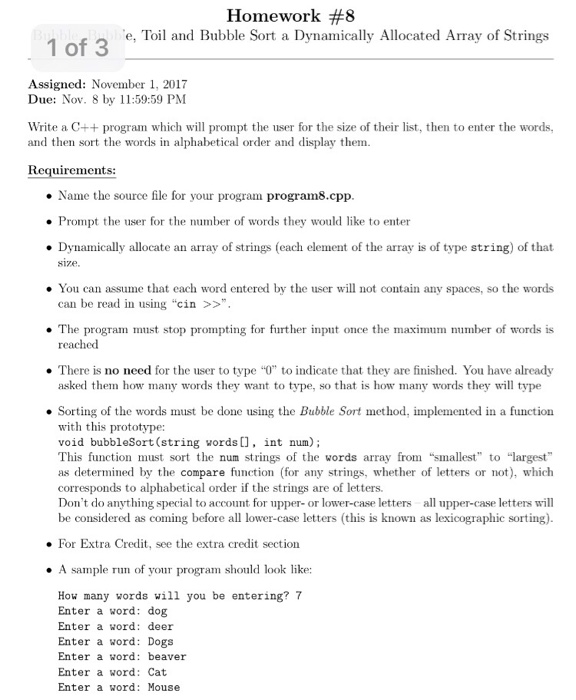
Homework #8 e, Toil and Bubble Sort a Dynamically Allocated Array of Strings Assigned: November 1, 2017 Due: Nov. 8 by 11:59:59 PM Write a C++ program which will prompt the user for the size of their list, then to enter the words, and then sort the words in alphabetical order and display them. uirements: . Name the source file for your program program8.cpp . Prompt the user for the number of words they would like to enter Dynamically allocate an array of strings (each element of the array is of type string) of that . You can assume that each word entered by the user will not contain any spaces, so the words . The program must stop promptig for further input once the maximum number of words is . There is no need for the user to type 0 to indicate that they are finished. You have already .Sorting of the words must be done using the Bubble Sort method, implemented in a function can be read in using "cin > reached asked them how many words they want to type, so that is how many words they will type with this prototype: void bubbleSort (string words[], int num); This function must sort the num strings of the words array from "smallest to "largest as determined by the compare function (for any strings, whether of letters or not), which corresponds to alphabetical order if the strings are of letters. Don't do anything special to account for upper- or lower-case letters all upper-case letters will be considered as coming before all lower-case letters (this is known as lexicographic sorting). For Extra Credit, see the extra credit section . A sampl le run of your program should look like: How many words will you be entering? 7 Enter a word: dog Enter a word: deer Enter a word: Dogs Enter a word: beaver Enter a word: Cat Enter a word: Mouse
Step by Step Solution
There are 3 Steps involved in it

Get step-by-step solutions from verified subject matter experts
 Study Help