







Question: use excel PR 10-3A Wage and tax statement data on employer FICA tax 2. (e) $29,847.15 Ehrlich Co, began business on January 2 . Salaries
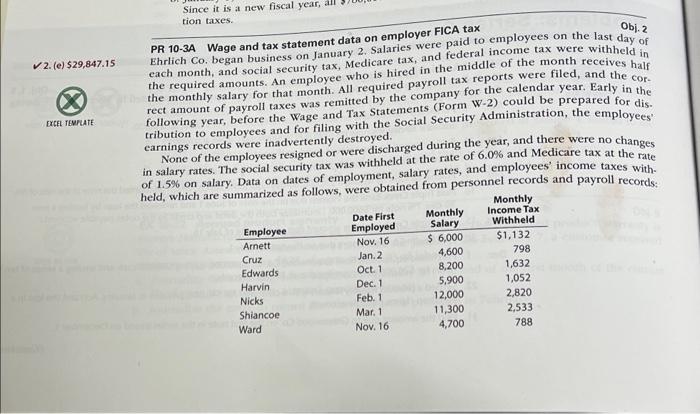
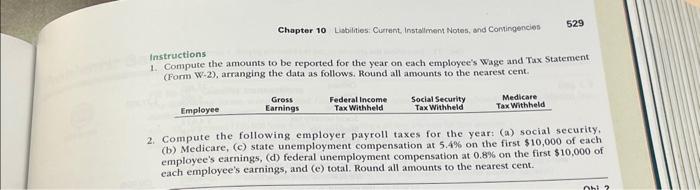
PR 10-3A Wage and tax statement data on employer FICA tax 2. (e) $29,847.15 Ehrlich Co, began business on January 2 . Salaries were paid to employees on the last day of each month, and social security tax, Medicare tax, and federal income tax were withheld in the required amounts. An employee who is hired in the middle of the month receives half the monthly salary for that month. All required payroll tax reports were filed, and the correct amount of payroll taxes was remitted by the company for the calendar year. Early in the following year, before the Wage and Tax Statements (Form W-2) could be prepared for dis. tribution to employees and for filing with the Social Security Administration, the employees None of the employees resigned or were discharged during the year, and there were no changes earnings records were inadvertently destroyed. in salary rates. The social security tax was withheld at the rate of 6.0% and Medicare tax at the rate of 1.5% on salary. Data on dates of employment, salary rates, and employees' income taxes with. held, which are s'mmarized as follows. were obtained from personnel records and payroll records: instructions 1. Compute the amounts to be reported for the year on each employee's Wage and Tax Statempent (Form W-2), arranging the data as follows. Fiound all amounts to the nearest cent. 2. Compute the following employer payroll taxes for the year: (a) social security. (b) Medicare, (c) state unemployment compensation at 5.4% on the first $10,000 of each employee's earnings, (d) federal unemployment compensation at 0.8% on the first $10,000 of each employee's earnings, and (c) total. Round all amounts to the nearest cent
Step by Step Solution
There are 3 Steps involved in it

Get step-by-step solutions from verified subject matter experts
 Study Help