





Question: use file pointer carefully!!! 1. Declare a file pointer called input. Open a file called location.txt for reading using this pointer. 2. If the file
 use file pointer carefully!!! 1. Declare a file pointer called input.

use file pointer carefully!!!

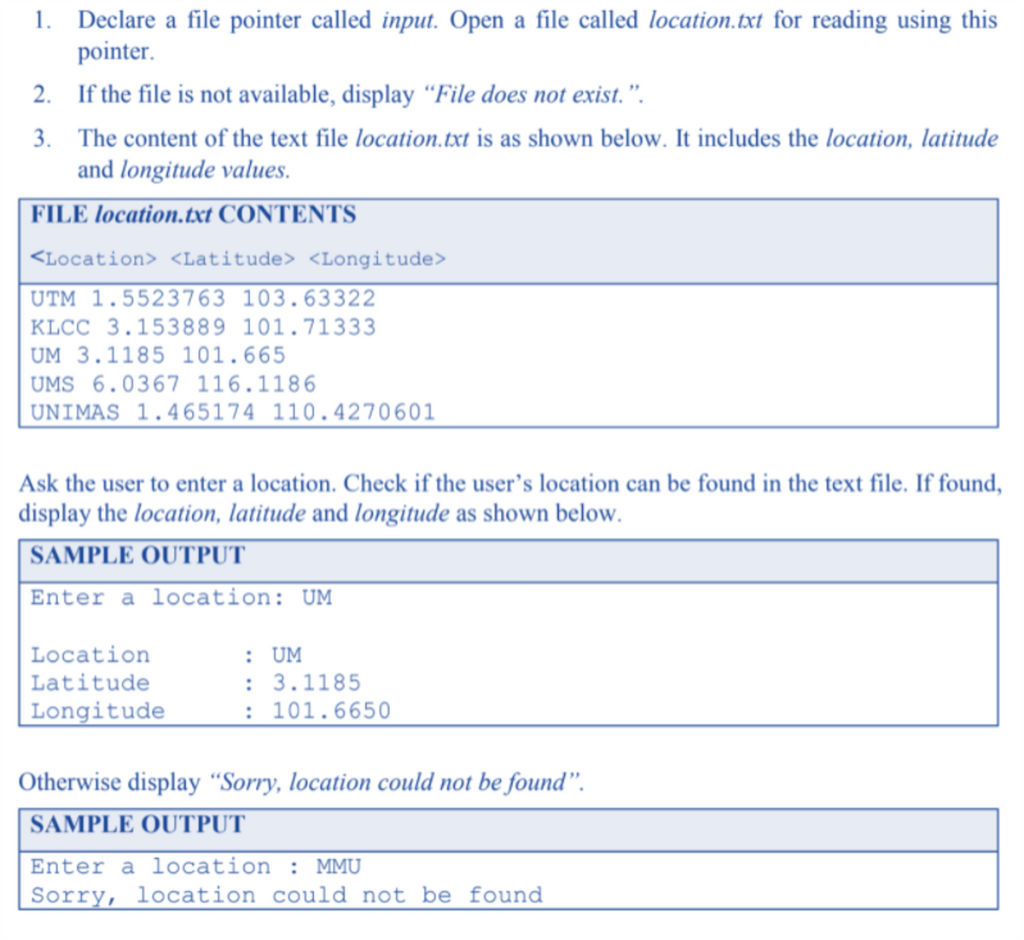
1. Declare a file pointer called input. Open a file called location.txt for reading using this pointer. 2. If the file is not available, display File does not exist.. 3. The content of the text file location.txt is as shown below. It includes the location, latitude and longitude values. FILE location.txt CONTENTS UTM 1.5523763 103.63322 KLCC 3.153889 101.71333 UM 3.1185 101.665 UMS 6.0367 116.1186 UNIMAS 1.465174 110.4270601 Ask the user to enter a location. Check if the user's location can be found in the text file. If found, display the location, latitude and longitude as shown below. SAMPLE OUTPUT Enter a location: UM Location Latitude Longitude : UM : 3.1185 : 101.6650 Otherwise display "Sorry, location could not be found. SAMPLE OUTPUT Enter a location : MMU Sorry, location could not be found

Step by Step Solution

There are 3 Steps involved in it

1 Expert Approved Answer
Step: 1 Unlock blur-text-image
Question Has Been Solved by an Expert!

Get step-by-step solutions from verified subject matter experts

Step: 2 Unlock
Step: 3 Unlock

Students Have Also Explored These Related Databases Questions!