







Question: Use information completed in 1 to do 2 with a formula the correct IF formula in every cell 2. Use the information from Requirement 1
Use information completed in 1 to do 2 with a formula the correct IF formula in every cell
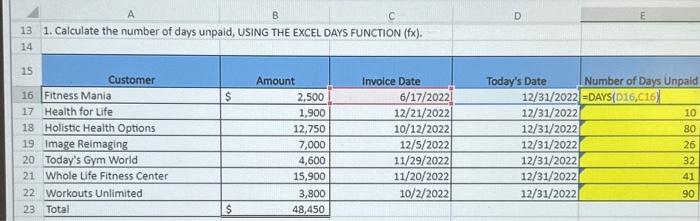

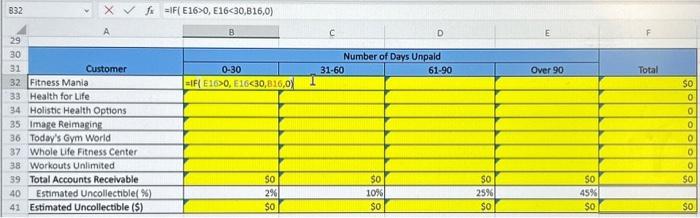
2. Use the information from Requirement 1 to complete the Aging of Accounts Receivable Schedule. Create a formula for each age category, using the Excel IF function to determine where each customer amount belongs. Calculate each "Total" cell by using the Excel SUM function and include all possible cells. Leave no cells blank. HINT: Use the =AND function to check for date ranges. For example, =IF(AND(E8>30,E8
Step by Step Solution
There are 3 Steps involved in it
1 Expert Approved Answer
Step: 1 Unlock

Question Has Been Solved by an Expert!
Get step-by-step solutions from verified subject matter experts
Step: 2 Unlock
Step: 3 Unlock
 Study Help