







Question: Use Java language. I need to come up with an Android app using Android studio that thatencrypts messages using a simple substitution cipher. Entry Text:
Use Java language. I need to come up with an Android app using Android studio that thatencrypts messages using a simple substitution cipher.
Entry Text: message to be encoded.
This input should be a nonempty string and must contain at least one letter or number.
This input should be provided to the app through an EditText widget, initially blank.
Case : first encryption parameter.
This input should be an integer coprime to between and :
This input should be provided to the app through an EditText widget, initially set to
Statement: second encryption parameter.
This input should be an integer and
This input should be provided to the app through an EditText widget, initially set to
Example:
Text Encrypted, the text resulting from applying the following cipher:
Each character in the alphabet is assigned a numeric value between and based on its position in the alphabet ieABZabz Note that the alphabet contains letters and numbers.
For each character in the alphabet, where the numeric value is x the encoded value of the letter is defined as Exax b where a and b are the values of Arg Input and Arg Input respectively, as in an Affine Cipher.
The encoded character for the input character is calculated by taking the encoded number, which is a value between and and translating it back into a character again where ABZabz
All nonalphanumeric characters must remain unchanged.
The output should be shown using a noneditable TextView that is initially blank and recomputed when the "Encrypt Entry Text" button is pressed. If any input is invalid when the button is pressed, the output should then be set to ie the empty string and all applicable error messages should be generated see below
The sample is included below
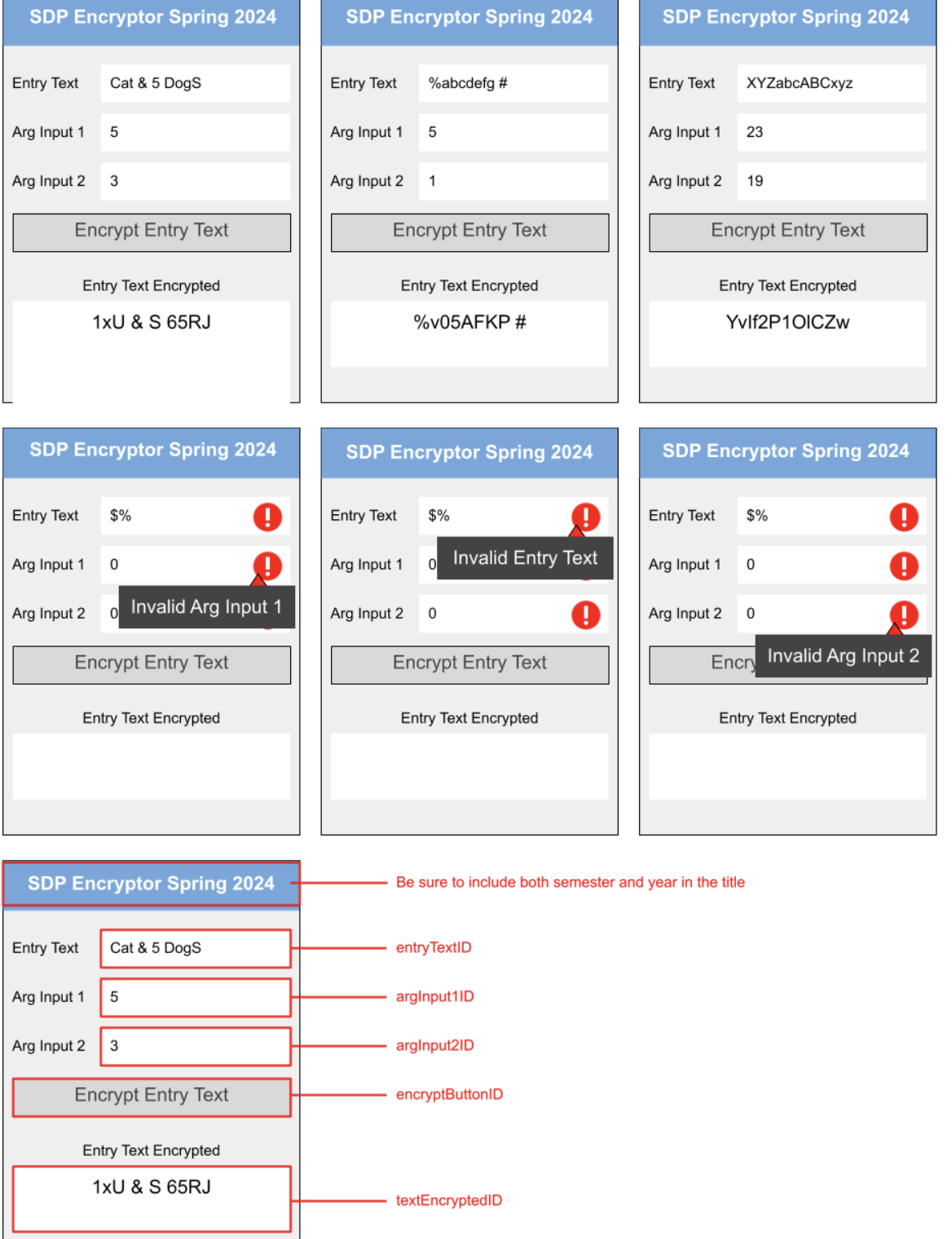
Step by Step Solution
There are 3 Steps involved in it
1 Expert Approved Answer
Step: 1 Unlock

Question Has Been Solved by an Expert!
Get step-by-step solutions from verified subject matter experts
Step: 2 Unlock
Step: 3 Unlock
 Study Help