







Question: Use java to do the code and run through this online gdb, https://www.onlinegdb.com/ 1. Using a loop of your choice, read information from the console
Use java to do the code and run through this online gdb, https://www.onlinegdb.com/
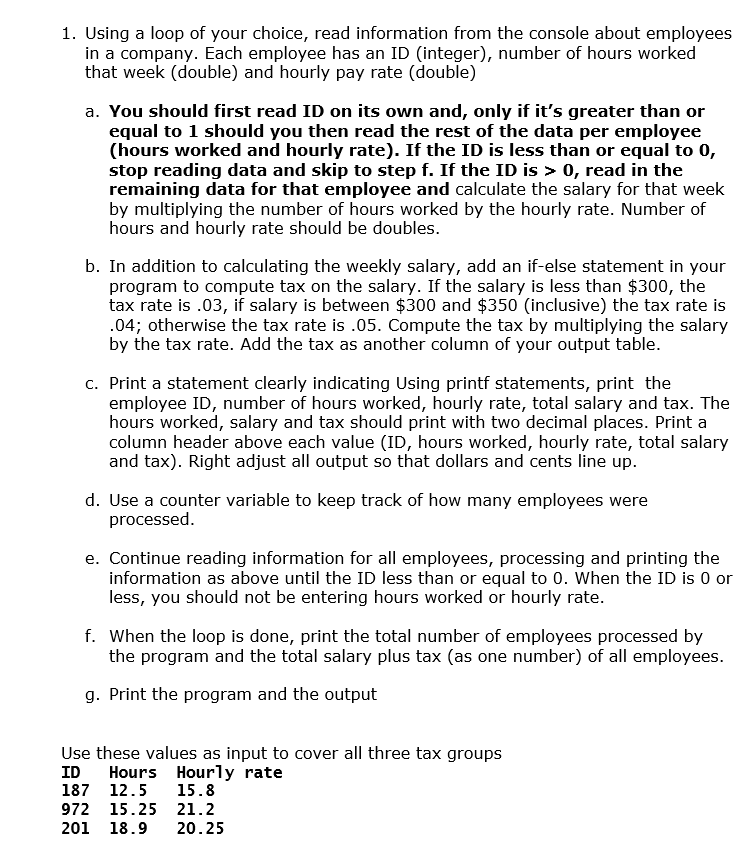
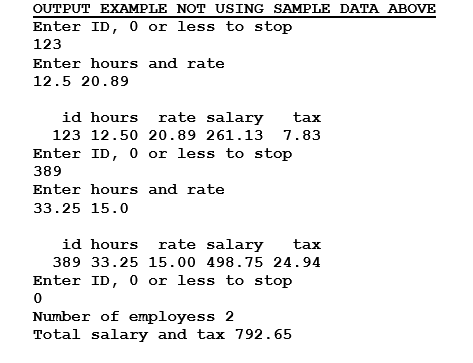
1. Using a loop of your choice, read information from the console about employees in a company. Each employee has an ID (integer), number of hours worked that week (double) and hourly pay rate (double) a. You should first read ID on its own and, only if it's greater than or equal to 1 should you then read the rest of the data per employee (hours worked and hourly rate). If the ID is less than or equal to 0, stop reading data and skip to step f. If the ID is > 0, read in the remaining data for that employee and calculate the salary for that week by multiplying the number of hours worked by the hourly rate. Number of hours and hourly rate should be doubles. b. In addition to calculating the weekly salary, add an if-else statement in your program to compute tax on the salary. If the salary is less than $300, the tax rate is .03, if salary is between $300 and $350 (inclusive) the tax rate is .04; otherwise the tax rate is .05. Compute the tax by multiplying the salary by the tax rate. Add the tax as another column of your output table. c. Print a statement clearly indicating Using printf statements, print the employee ID, number of hours worked, hourly rate, total salary and tax. The hours worked, salary and tax should print with two decimal places. Print a column header above each value (ID, hours worked, hourly rate, total salary and tax). Right adjust all output so that dollars and cents line up. d. Use a counter variable to keep track of how many employees were processed. e. Continue reading information for all employees, processing and printing the information as above until the ID less than or equal to 0. When the ID is 0 or less, you should not be entering hours worked or hourly rate. f. When the loop is done, print the total number of employees processed by the program and the total salary plus tax (as one number) of all employees. g. Print the program and the output Use these values as input to cover all three tax groups ID Hours Hourly rate 187 12.5 15.8 972 15.25 21.2 201 18.9 20.25 OUTPUT EXAMPLE NOT USING SAMPLE DATA ABOVE Enter ID, 0 or less to stop 123 Enter hours and rate 12.5 20.89 id hours rate salary tax 123 12.50 20.89 261.13 7.83 Enter ID, 0 or less to stop 389 Enter hours and rate 33.25 15.0 id hours rate salary tax 389 33.25 15.00 498.75 24.94 Enter ID, 0 or less to stop 0 Number of employess 2 Total salary and tax 792.65
Step by Step Solution
There are 3 Steps involved in it

Get step-by-step solutions from verified subject matter experts
 Study Help