







Question: Use JavaScript to implement the Client-Side Encryption Tool Interface as shown in Figure 1. (2) Use a Crypto Library to implement AES-256 encryption on a
Use JavaScript to implement the Client-Side Encryption Tool Interface as shown in Figure 1. (2) Use a Crypto Library to implement AES-256 encryption on a secret message with a list of your accounts, usernames, and passwords, where the encryption key is your email address. (3) Output the encrypted message (in the hexadecimal form). (4) Use a Crypto Library to implement AES-256 decryption on the encrypted message (in the hexadecimal form), where the decryption key is your email address. (5) Output the decrypted message and check if it is the same as the original secret message.
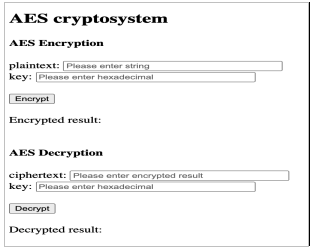
AES cryptosystem AES Encryption plaintext: Please enter string key: Please enter hexadecimal Encrypt Encrypted result: AES Decryption ciphertext: Please enter encrypted result key: Please enter hexadecimal Decrypt Decrypted result:
Step by Step Solution
There are 3 Steps involved in it
To implement the ClientSide Encryption Tool Interface using JavaScript and a crypto library for AES256 encryption and decryption you can follow the st... View full answer

Get step-by-step solutions from verified subject matter experts
 Study Help