







Question: Use Lc3-assembly and show .asm code Starter Code: .ORIG x3000 ; DO NOT TOUCH ; Store 1209 in ARRAY LEA R1, ARRAY AND R2, R2,
Use Lc3-assembly and show .asm code
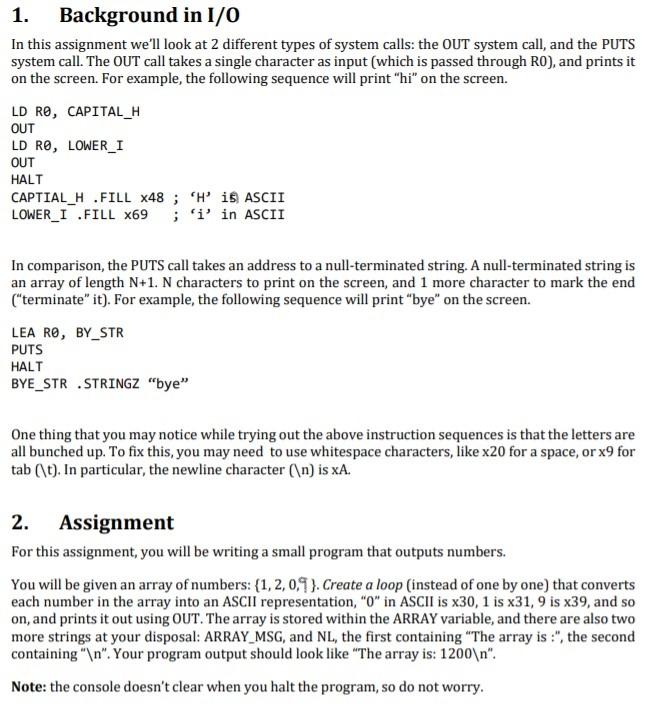
Starter Code:
.ORIG x3000
; DO NOT TOUCH
; Store 1209 in ARRAY
LEA R1, ARRAY
AND R2, R2, x0
ADD R2, R2, x1
STR R2, R1, #0
ADD R2, R2, x1
STR R2, R1, #1
AND R2, R2, x0
STR R2, R1, #2
ADD R2, R2, x9
STR R2, R1, #3
; END OF INITIALIZING ARRAY
; TODO: Document what the registers are
; TODO: Convert contents of ARRAY to something you can use to print on screen
HALT
ARRAY .BLKW 4
ARRAY_LEN .FILL 4
ARRAY_MSG .STRINGZ "The array is: "
NL .STRINGZ " "
.END
1. Background in 1/0 In this assignment we'll look at 2 different types of system calls: the OUT system call, and the PUTS system call. The OUT call takes a single character as input (which is passed through RO), and prints it on the screen. For example, the following sequence will print "hi" on the screen. LD RO, CAPITAL_H OUT LD RO, LOWER_1 OUT HALT CAPTIAL_H .FILL X48 ; His ASCII LOWER_I .FILL x69 ; 'i' in ASCII In comparison, the PUTS call takes an address to a null-terminated string. A null-terminated string is an array of length N+1. N characters to print on the screen, and 1 more character to mark the end ("terminate" it). For example, the following sequence will print "bye" on the screen. LEA RO, BY_STR PUTS HALT BYE_STR STRINGZ "bye" One thing that you may notice while trying out the above instruction sequences is that the letters are all bunched up. To fix this, you may need to use whitespace characters, like x20 for a space, or x9 for tab (\t). In particular, the newline character ( ) is xA. 2. Assignment For this assignment, you will be writing a small program that outputs numbers. You will be given an array of numbers: {1, 2,0.9). Create a loop (instead of one by one) that converts each number in the array into an ASCII representation, "o" in ASCII is x30, 1 is x31, 9 is x39, and so on, and prints it out using OUT. The array is stored within the ARRAY variable, and there are also two more strings at your disposal: ARRAY_MSG, and NL, the first containing "The array is :", the second containing " ". Your program output should look like "The array is: 1200 ". Note: the console doesn't clear when you halt the program, so do not worry. 1. Background in 1/0 In this assignment we'll look at 2 different types of system calls: the OUT system call, and the PUTS system call. The OUT call takes a single character as input (which is passed through RO), and prints it on the screen. For example, the following sequence will print "hi" on the screen. LD RO, CAPITAL_H OUT LD RO, LOWER_1 OUT HALT CAPTIAL_H .FILL X48 ; His ASCII LOWER_I .FILL x69 ; 'i' in ASCII In comparison, the PUTS call takes an address to a null-terminated string. A null-terminated string is an array of length N+1. N characters to print on the screen, and 1 more character to mark the end ("terminate" it). For example, the following sequence will print "bye" on the screen. LEA RO, BY_STR PUTS HALT BYE_STR STRINGZ "bye" One thing that you may notice while trying out the above instruction sequences is that the letters are all bunched up. To fix this, you may need to use whitespace characters, like x20 for a space, or x9 for tab (\t). In particular, the newline character ( ) is xA. 2. Assignment For this assignment, you will be writing a small program that outputs numbers. You will be given an array of numbers: {1, 2,0.9). Create a loop (instead of one by one) that converts each number in the array into an ASCII representation, "o" in ASCII is x30, 1 is x31, 9 is x39, and so on, and prints it out using OUT. The array is stored within the ARRAY variable, and there are also two more strings at your disposal: ARRAY_MSG, and NL, the first containing "The array is :", the second containing " ". Your program output should look like "The array is: 1200 ". Note: the console doesn't clear when you halt the program, so do not worry
Step by Step Solution
There are 3 Steps involved in it

Get step-by-step solutions from verified subject matter experts
 Study Help