







Question: Use linux commands and shell tmp ->te -> home -> Desktop -> diri ->.txt -> b.ah -> dir2 - C.txt -> Downloads -> dl.pat ->
Use linux commands and shell 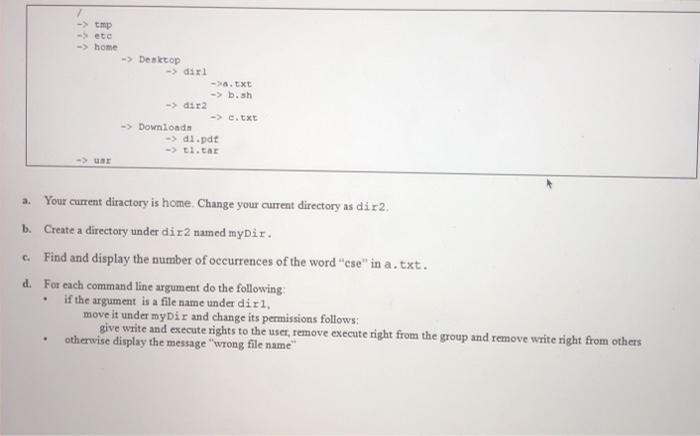
tmp ->te -> home -> Desktop -> diri ->.txt -> b.ah -> dir2 - C.txt -> Downloads -> dl.pat -> tl.tar -> ur a. c Your current diractory is home Change your current directory as dir2. b. Create a directory under dir2 named myDir. Find and display the number of occurrences of the word "cse" in a.txt. d. For each command line argument do the following: if the argument is a file name under diri, move it under myDir and change its permissions follows: give write and execute rights to the user, remove execute right from the group and remove write right from others otherwise display the message "wrong file name
Step by Step Solution
There are 3 Steps involved in it
1 Expert Approved Answer
Step: 1 Unlock

Question Has Been Solved by an Expert!
Get step-by-step solutions from verified subject matter experts
Step: 2 Unlock
Step: 3 Unlock
 Study Help