







Question: Use MapReduce to Remove Duplicated Records For this program, we will have two input files. file1.txt 2012-3-1 a 2012-3-2 b 2012-3-3 c 2012-3-4 d 2012-3-5
Use MapReduce to Remove Duplicated Records
For this program, we will have two input files.
file1.txt
2012-3-1 a 2012-3-2 b 2012-3-3 c 2012-3-4 d 2012-3-5 a 2012-3-6 b 2012-3-7 c 2012-3-3 c
file2.txt
2012-3-1 b 2012-3-2 a 2012-3-3 b 2012-3-4 d 2012-3-5 a 2012-3-6 c 2012-3-7 d 2012-3-3 c
Notice that in these two files, there are some duplicated records (appears more than once). Our goal is to find these duplicates and only write them once in the output, save the output in file3.txt.
For example, the output would look like:
2012-3-1 a 2012-3-1 b 2012-3-2 a 2012-3-2 b 2012-3-3 b 2012-3-3 c 2012-3-4 d 2012-3-5 a 2012-3-6 b 2012-3-6 c 2012-3-7 c 2012-3-7 d
The basic idea is read all records using mapper, then just feed same input to the reducer. No matter how many times these records appear in the input file, just output once.
First step, you need to create the project use Maven. You need to enter input to file1.txt and file2.txt as described above.
In the mapper, output the entire record as key. In your reducer, you would output the key, so it would be unique.
After you implement the mapper and reducer, compile the program.
Use scp to upload your file1.txt and file2.txt to the master node and put them in a directory created in HDFS.
Use following as an example, remember to replace my file path and machine address to your own file path and machine address. (If you use EC2, then the user id is ubuntu, if you use EMR, the user id is hadoop)
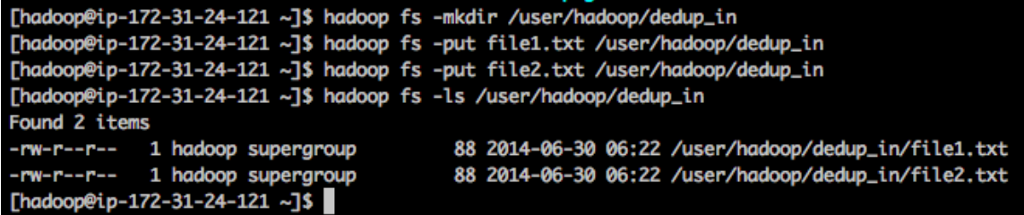
when you complete your program, upload your jar file and run it using the command similar to following (name your own input and output directory)
$ hadoop jar DeDup-1.0.jar edu.missouri.hadoop.DeDup /user/hadoop/dedup_in /user/hadoop/dedup_out
Submit your implementation and paste the screen shot of your output in your report.
Thadoopeip-172-31-24-121 ]S hadoop fs -mkdir /user/hadoop/dedup_in [hadoopeip-172-31-24-121 -]s hadoop fs -put filel.txt /user/hadoop/dedup in [hadoopeip-172-31-24-121 ]S hadoop fs -put file2.txt /user/hadoop/dedup_in Chadoopeip-172-31-24-121 -]s hadoop fs -ls /user/hadoop/dedup.in Found 2 items -rw-r--r-1 hadoop supergroup -rw-r--r-1 hadoop supergroup [hadoopeip-172-31-24-121 -]s | 88 2014-06-30 06:22 /user/hadoop/dedup_in/filel.txt 88 2014-06-30 06:22 /user/hadoop/dedup_in/file2.txt Thadoopeip-172-31-24-121 ]S hadoop fs -mkdir /user/hadoop/dedup_in [hadoopeip-172-31-24-121 -]s hadoop fs -put filel.txt /user/hadoop/dedup in [hadoopeip-172-31-24-121 ]S hadoop fs -put file2.txt /user/hadoop/dedup_in Chadoopeip-172-31-24-121 -]s hadoop fs -ls /user/hadoop/dedup.in Found 2 items -rw-r--r-1 hadoop supergroup -rw-r--r-1 hadoop supergroup [hadoopeip-172-31-24-121 -]s | 88 2014-06-30 06:22 /user/hadoop/dedup_in/filel.txt 88 2014-06-30 06:22 /user/hadoop/dedup_in/file2.txt
Step by Step Solution
There are 3 Steps involved in it

Get step-by-step solutions from verified subject matter experts
 Study Help