







Question: USE MATLAB (1) Prompt the user 'Enter a row vector of any numbers' in the command window, and enter an arbitrary row vector and store
USE MATLAB 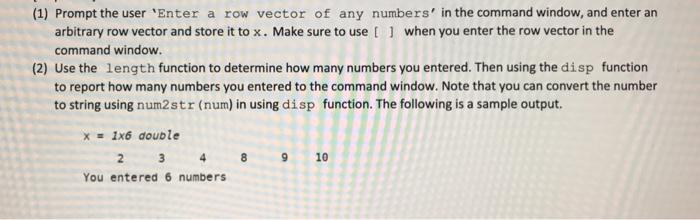
(1) Prompt the user 'Enter a row vector of any numbers' in the command window, and enter an arbitrary row vector and store it to x. Make sure to use [ ] when you enter the row vector in the command window. (2) Use the length function to determine how many numbers you entered. Then using the disp function to report how many numbers you entered to the command window. Note that you can convert the number to string using num 2 str (num) in using disp function. The following is a sample output
Step by Step Solution
There are 3 Steps involved in it
1 Expert Approved Answer
Step: 1 Unlock

Question Has Been Solved by an Expert!
Get step-by-step solutions from verified subject matter experts
Step: 2 Unlock
Step: 3 Unlock
 Study Help