







Question: USE MATLAB AND USE FOLLOWING FORMAT %Vandermonde matrix format long e %generate matrix A n = 10; A = zeros(n,n); %initialize %assign exact soln x,
 USE MATLAB AND USE FOLLOWING FORMAT
%Vandermonde matrix
format long e
%generate matrix A
n = 10;
A = zeros(n,n); %initialize
%assign exact soln x, and compute right hand side b
%compute soln xc (computed solution) with backslash to compare with exact solution x below
%compute relbackerr
%cond number, condno
%compute upper bound on relfor err, upperbd
%compute actual relative forward error, relforerr
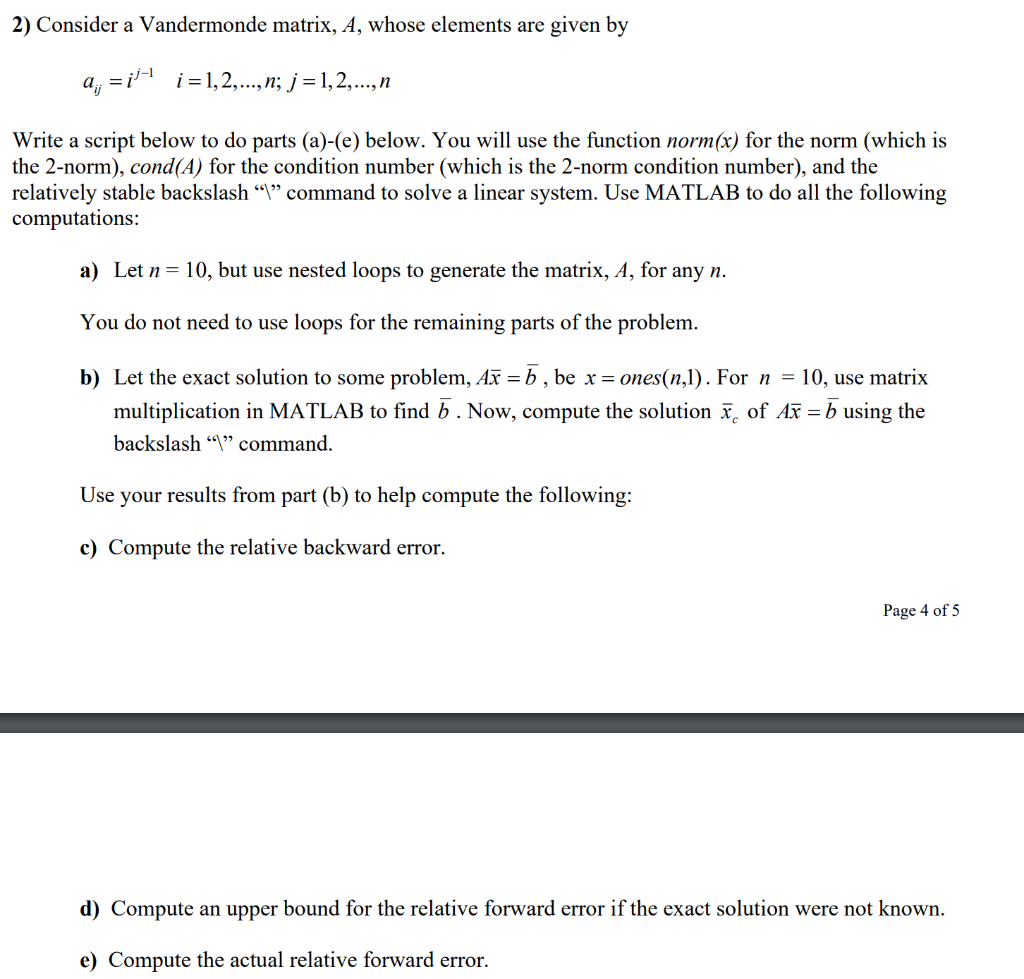
2) Consider a Vandermonde matrix, A, whose elements are given by 4, =ji+ i =1,2,..., n; j =1,2,..., n Write a script below to do parts (a)-(e) below. You will use the function norm(x) for the norm (which is the 2-norm), cond(A) for the condition number (which is the 2-norm condition number), and the relatively stable backslash Y command to solve a linear system. Use MATLAB to do all the following computations: a) Let n= 10, but use nested loops to generate the matrix, A, for any n. You do not need to use loops for the remaining parts of the problem. b) Let the exact solution to some problem, Ax = b , be x = ones(n,1). For n = 10, use matrix multiplication in MATLAB to find b. Now, compute the solution x, of Ax = b using the backslash 9 command. Use your results from part (b) to help compute the following: c) Compute the relative backward error. Page 4 of 5 d) Compute an upper bound for the relative forward error if the exact solution were not known. e) Compute the actual relative forward error
Step by Step Solution
There are 3 Steps involved in it

Get step-by-step solutions from verified subject matter experts
 Study Help