







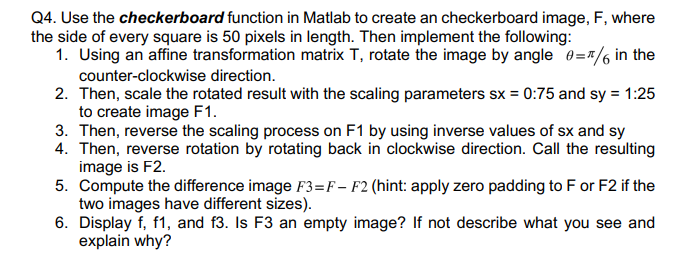
Question: use matlab image processing tool and include actual code Q4. Use the checkerboard function in Matlab to create an checkerboard image, F, where the side
use matlab image processing tool and include actual code
Q4. Use the checkerboard function in Matlab to create an checkerboard image, F, where the side of every square is 50 pixels in length. Then implement the following: 1. Using an affine transformation matrix T, rotate the image by angle =/6 in the counter-clockwise direction. 2. Then, scale the rotated result with the scaling parameters sx=0:75 and sy=1:25 to create image F1. 3. Then, reverse the scaling process on F1 by using inverse values of sx and sy 4. Then, reverse rotation by rotating back in clockwise direction. Call the resulting image is F2. 5. Compute the difference image F3=FF2 (hint: apply zero padding to F or F2 if the two images have different sizes). 6. Display f,f1, and f3. Is F3 an empty image? If not describe what you see and explain why
Step by Step Solution
There are 3 Steps involved in it

Get step-by-step solutions from verified subject matter experts
 Study Help