







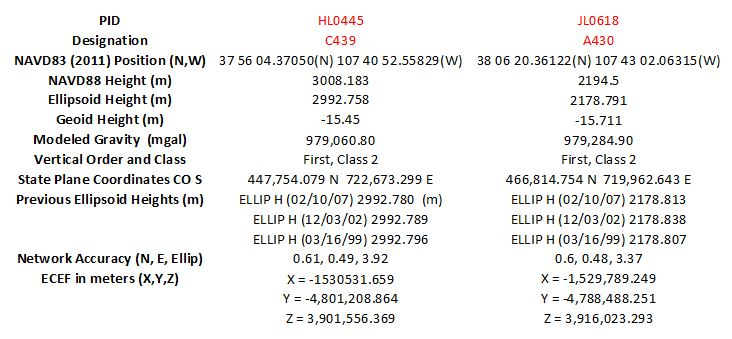
Question: Use MATLAB, NGS Tools, and the data I have provided to answer the following questions. The NGS tools can be found here: https://www.ngs.noaa.gov/TOOLS/ The data
Use MATLAB, NGS Tools, and the data I have provided to answer the following questions. The NGS tools can be found here: https://www.ngs.noaa.gov/TOOLS/
The data sheets can be found here: https://www.ngs.noaa.gov/NGSDataExplorer/
Please provide the MATLAB scripts for each problem.
1. Compute plane coordinate inverse using SPC CO S values between the points in the sense C 439 to A 430. Report grid distance and grid azimuth.
2. What is the ground distance between the points? Use the grid distance and mean Combined Factor (CF) from the data sheets.
3. What is the difference between published NAVD 88 heights (H) in the sense C 439 to A 430?
4. What is the difference between the published NAD 83 ellipsoid heights (h)?
5. What is the difference between the published Geoid 12 height (N)?
6. What is the NAVD 88 height (H) for each point derived from the published values for the ellipsoid height and geoid height using the equation: h - N = H. What is the difference between these values and the published values for the two monuments?
7. Compute a two-dimensional geodetic inverse (using NGS toolkit item: INVERSE) between the two points in the sense C 439 to A 430. Report the ellipsoid distance.
8. Compute the three-dimensional geodetic inverse (using NGS toolkit item: INVERS3D) between the two points in the sense C 439 to A 430. Report the following: ellipsoid distance, delta height, mark-to-mark distance, and DN, DE, DU use the program output.
9. Report the magnetic declination at each point using the date: 6 March 2019. Use declination calculator at: http://www.ngdc.noaa.gov/geomag/magfield.shtml
10.Compute the deflection of the vertical (using DEFLEC09) for each point. Report the Xi, Eta and Hor Laplace values.
Step by Step Solution
There are 3 Steps involved in it

Get step-by-step solutions from verified subject matter experts
 Study Help