



Question: (Use MATLAB Optimization Commands (linprog, quadprog, or fmincon).) To be able to solve an optimization problem using one of the Matlab built-in functions you need
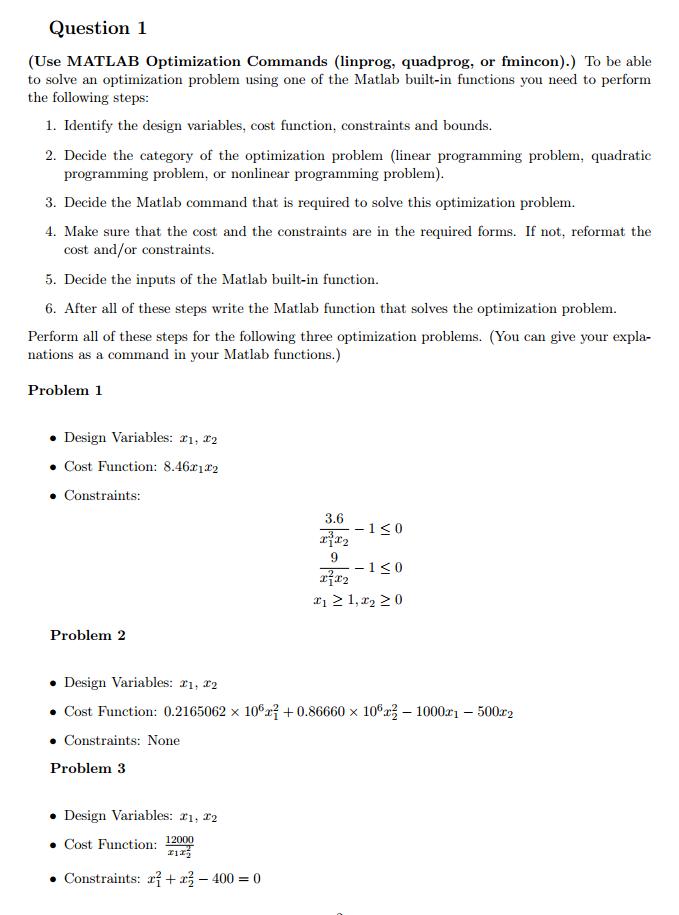
(Use MATLAB Optimization Commands (linprog, quadprog, or fmincon).) To be able to solve an optimization problem using one of the Matlab built-in functions you need to perform the following steps:
1. Identify the design variables, cost function, constraints and bounds.
2. Decide the category of the optimization problem (linear programming problem, quadratic programming problem, or nonlinear programming problem).
3. Decide the Matlab command that is required to solve this optimization problem.
4. Make sure that the cost and the constraints are in the required forms. If not, reformat the cost and/or constraints.
5. Decide the inputs of the Matlab built-in function.
6. After all of these steps write the Matlab function that solves the optimization problem. Perform all of these steps for the following three optimization problems. (You can give your explanations as a command in your Matlab functions.)
Question 1 (Use MATLAB Optimization Commands (linprog, quadprog, or fmincon).) To be able to solve an optimization problem using one of the Matlab built-in functions you need to perform the following steps: 1. Identify the design variables, cost function, constraints and bounds. 2. Decide the category of the optimization problem (linear programming problem, quadratic programming problem, or nonlinear programming problem). 3. Decide the Matlab command that is required to solve this optimization problem. 4. Make sure that the cost and the constraints are in the required forms. If not, reformat the cost and/or constraints. 5. Decide the inputs of the Matlab built-in function. 6. After all of these steps write the Matlab function that solves the optimization problem. Perform all of these steps for the following three optimization problems. (You can give your expla- nations as a command in your Matlab functions.) Problem 1 Design Variables: 1, 2 Cost Function: 8.46x122 Constraints: Problem 2 Problem 3 Design Variables: 21, 22 . Cost Function: 0.2165062 x 10⁷ +0.86660 x 10²-10001 - 500m2 Constraints: None Design Variables: 1, 2 Cost Function: 12000 212 3.6 xx 9 -1 0 xx * 1,2 20 Constraints: 2 + x - 400 = 0 -10
Step by Step Solution
3.51 Rating (168 Votes )
There are 3 Steps involved in it
For example a linear programming problem 12x1 7x2 max Subject to 2x1 x2 10 ... View full answer

Get step-by-step solutions from verified subject matter experts