







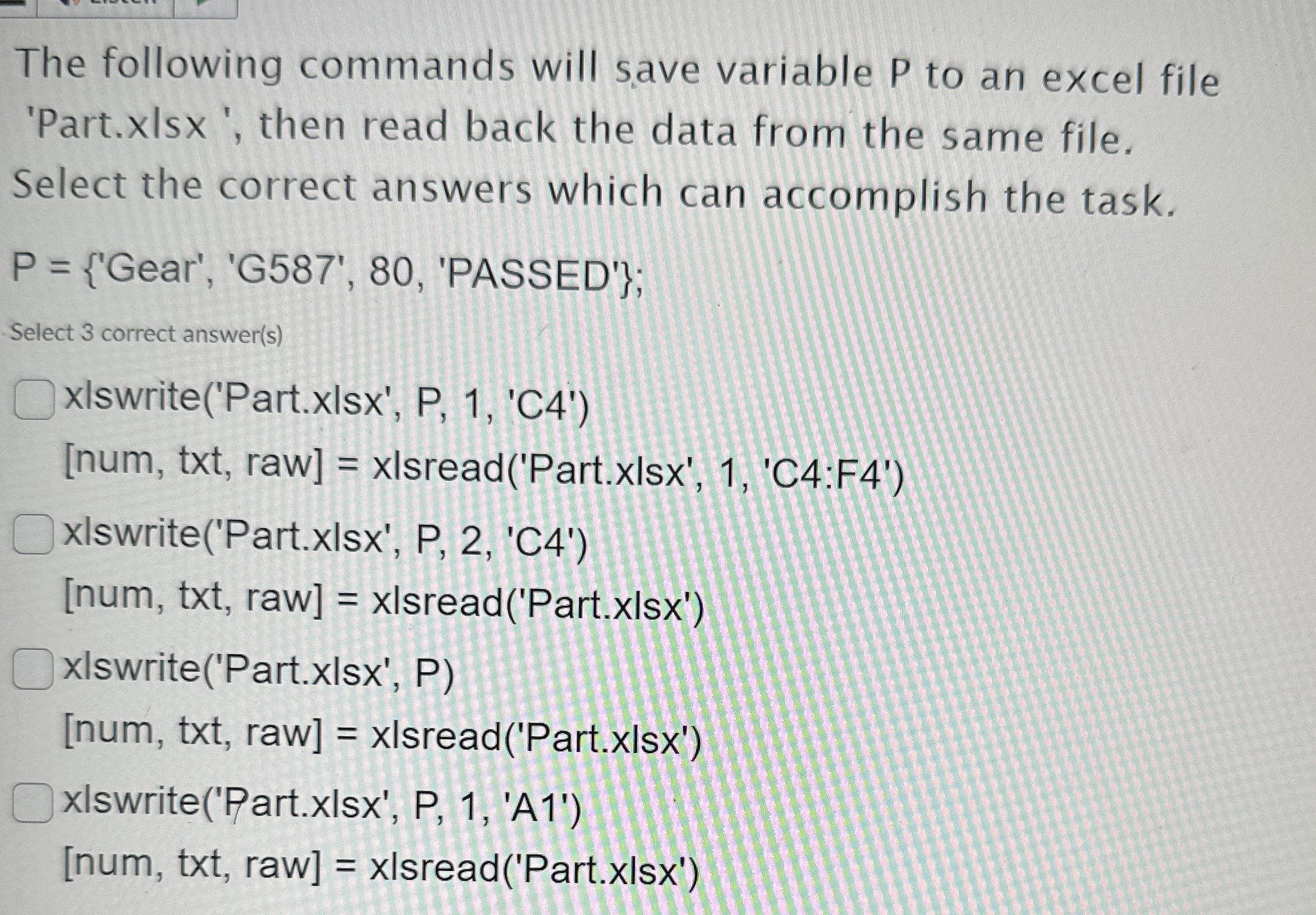
Question: Use Matlab! The following commands will save variable P to an excel file 'Part.xlsx ' , then read back the data from the same file.
Use Matlab!
The following commands will save variable to an excel file
'Part.xlsx then read back the data from the same file.
Select the correct answers which can accomplish the task.
Gear', 'PASSED';
Select correct answers
xlswritePartxlsx PC
num txt raw xlsreadPartxlsxC:F
xlswritePartxlsx PC
num txt raw xlsreadPartxlsx
xlswritePartxlsx P
num txt raw xlsreadPartxlsx
xlswritePartxlsx PA
num txt raw xlsreadPartxlsx
Step by Step Solution
There are 3 Steps involved in it
1 Expert Approved Answer
Step: 1 Unlock

Question Has Been Solved by an Expert!
Get step-by-step solutions from verified subject matter experts
Step: 2 Unlock
Step: 3 Unlock
 Study Help