







Question: USE MATLAB Write a script file called wet_bulb.m that calculates wetbulb temperature by using the MATLAB utility fzero to find the root of the function
USE MATLAB
Write a script file called wet_bulb.m that calculates wetbulb temperature by using the MATLAB utility fzero to find the root of the function ?q. Use Td and Ta as the endpoints of the interval containing the root T. Because fzero can only find the root of a function of one variable, you will have to use an anonymous function as input to fzero.
Ask the user to input the air temperature Ta (in ?F), the dew point Td (in ?F), and the atmospheric pressure pa (in hectopascals).
Convert the units of Ta and Td to K.
Use fzero to find the root of ?q (T, Ta, Td, pa) for the given values of Ta, Td, and pa.
Display the calculated value of the wetbulb temperature in ?F.
Be sure to include comments describing the script file.
Test your code using Ta = 79.5 ?F, Td = 55.2 ?F, and pa = 1013.6 hPa. (UMass Lowell data from July 10, 2008, provided by Dr. Colby.) You should get a value of 64.1 ?F.
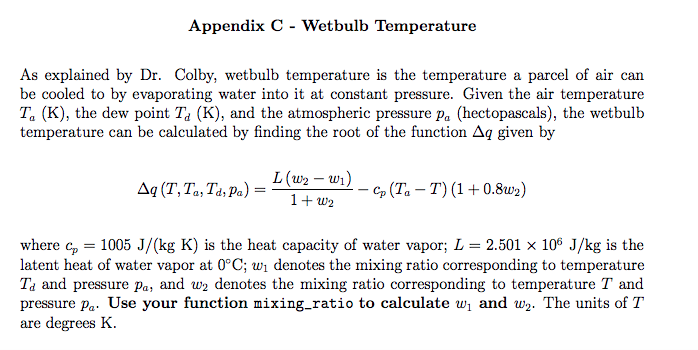
Appendix C - Wetbulb Temperature As explained by Dr. Colby, wetbulb temperature is the temperature a parcel of air can be cooled to by evaporating water into it at constant pressure. Given the air temperature Ta (K), the dew point Td (K), and the atmospheric pressure pa (hectopascals), the wetbulb temperature can be calculated by finding the root of the function Aq given by L(m - un) _ cp (Ta-T) (1 + 0.8u 2) where cp = 1005 J/(kg K) is the heat capacity of water vapor; L = 2.501 x 10⁶ J/kg is the latent heat of water vapor at 0C; wi denotes the mixing ratio corresponding to temperature Ta and pressure pa, and w2 denotes the mixing ratio corresponding to temperature T and pressure pa Use your function mixing-ratio to calculate wi and w2. The units of T are degrees K
Step by Step Solution
There are 3 Steps involved in it

Get step-by-step solutions from verified subject matter experts
 Study Help