







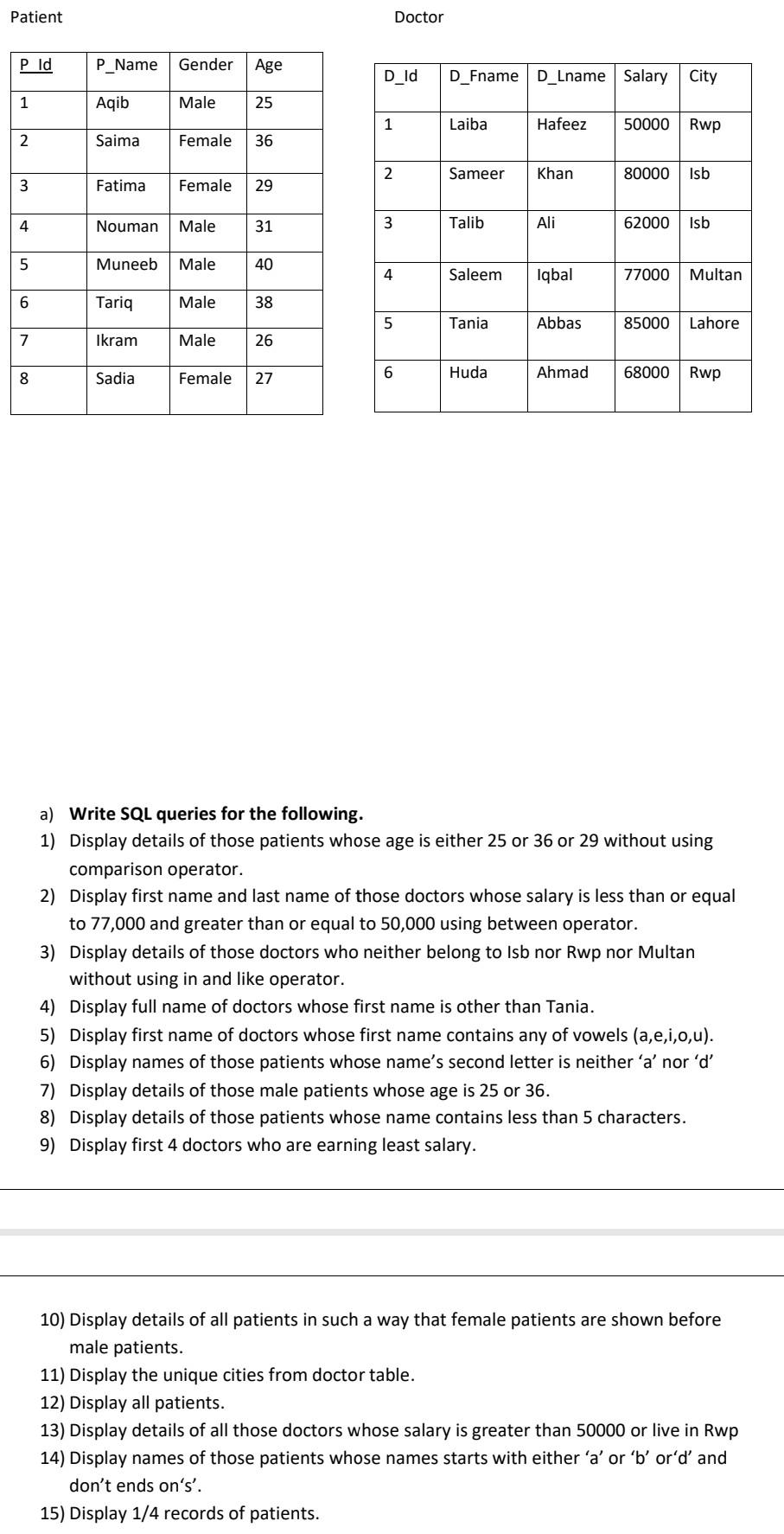
Question: Use Microsoft SQL SERVER MANAGEMENT And write queries from 1 to 15 ( all queries). Please do it fast in 1-2 hours.Thank you Patient Doctor
Use Microsoft SQL SERVER MANAGEMENT And write queries from 1 to 15 (all queries). Please do it fast in 1-2 hours.Thank you
Patient Doctor Pld P_Name Gender Age D_Id D_Fname D_Lname Salary City 1 Aqib Male 25 1 Laiba Hafeez 50000 Rwp 2 Saima Female 36 2 Sameer Khan 80000 Isb 3 Fatima Female 29 4 Nouman Male 31 3 Talib Ali 62000 Isb 5 Muneeb Male 40 4 Saleem Saleem Iqbal 77000 Multan 6 Tariq Male 38 5 Tania Abbas 85000 Lahore 7 Ikram Male 26 6 Huda 27 8 Female Ahmad Sadia 68000 Rwp a) Write SQL queries for the following. 1) Display details of those patients whose age is either 25 or 36 or 29 without using comparison operator. 2) Display first name and last name of those doctors whose salary is less than or equal to 77,000 and greater than or equal to 50,000 using between operator. 3) Display details of those doctors who neither belong to Isb nor Rwp nor Multan without using in and like operator. 4) Display full name of doctors whose first name is other than Tania. 5) Display first name of doctors whose first name contains any of vowels (a,e,i,o,u). 6) Display names of those patients whose name's second letter is neither 'a' nord 7) Display details of those male patients whose age is 25 or 36. 8) Display details of those patients whose name contains less than 5 characters. 9) Display first 4 doctors who are earning least salary. 10) Display details of all patients in such a way that female patients are shown before male patients. 11) Display the unique cities from doctor table. 12) Display all patients. 13) Display details of all those doctors whose salary is greater than 50000 or live in Rwp 14) Display names of those patients whose names starts with either 'a' or 'b' or'd' and don't ends on's'. 15) Display 1/4 records of patientsStep by Step Solution
There are 3 Steps involved in it
1 Expert Approved Answer
Step: 1 Unlock

Question Has Been Solved by an Expert!
Get step-by-step solutions from verified subject matter experts
Step: 2 Unlock
Step: 3 Unlock
 Study Help