







Question: use octave 5.2 software to create the program along with the calculation 14. Power Factor Correction Practice Simulation Exercise: Capacitors C are added to the
 use octave 5.2 software to create the program along with the calculation
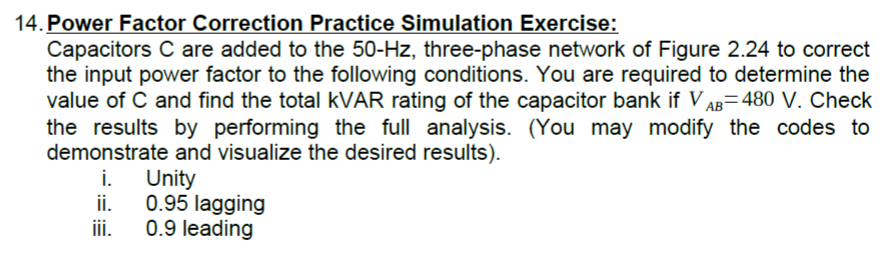
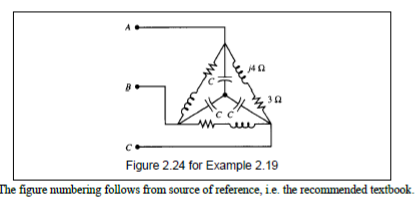
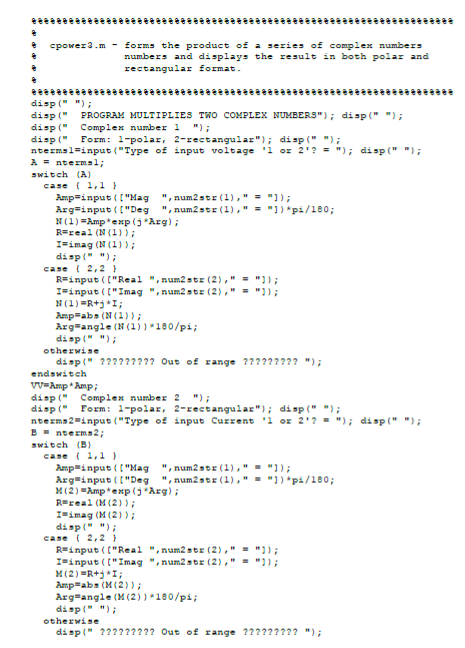
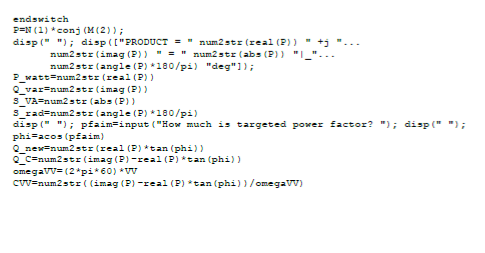
14. Power Factor Correction Practice Simulation Exercise: Capacitors C are added to the 50-Hz, three-phase network of Figure 2.24 to correct the input power factor to the following conditions. You are required to determine the value of C and find the total kVAR rating of the capacitor bank if V AB=480 V. Check the results by performing the full analysis. (You may modify the codes to demonstrate and visualize the desired results). i. Unity ji. 0.95 lagging ji. 0.9 leading 30 C Figure 2.24 for Example 2.19 The figure mumbering follows from source of reference, i.e. the recommended textbook. spower3.m - forms the product of a series of complex numbers numbers and displays the result in both polar and rectangular format. disp(" "); disp(" PROGRAM MULTIPLIES TWO COMPLEX NUMBERS"); disp(" "); disp(" Complex number 1 "); disp(" Form: 1-polar, 2-rectangular"); disp(" "); ntermsl=input("Type of input voltage 'i or 2'? = "); disp(" "); A = ntermal; switch (A) case (1,1) Amp=input("Mag ", num2 str(1)," = ")); Arg=input(["Deg ", num2 str(1)," ="]) pi/180; N(1) = Amp exp (Arg); R=real (N(1)); I=imag (N (1)); disp(" "); case ( 2,2 R=input(["Real ", num2 sty (2)," ="]); I=input(["Imag", num2 str (2)," = "]); N(1)=R+I; Amp=abs((1)); Arg angle (N (1))*180/pi; disp(""); otherwise displ" ????????? Out of range ????????? "); endswitch VV=Amp Amp; displ" Complex number 2 "); displ" Form: 1-polar, 2-rectangular"); disp(" "); nterms2=input("Type of input Current '1 or 2'? -"); disp(" "); B-nterms 2; switch (B) case (1,1) Amp=input("Mag "num2x(1)," "); Arg=input("Deg "num2str(1)," = "])*pi/180; M(2) Ampexp (jarg); Rereal (M(2)); I=imag (M(2)); disp(" "); case (2,2) R=input("Real", num2 str (2)," = "); I=input(["Imag", num2 str (2)," = "); M(2)=R+ I; Amp=abs((2)); Arg=angle (M(2)) 180/pi; disp(" "); otherwise displ" ????????? Out of range ????????? "); endswitch PEN (1) *conj (M(2)); disp(" "); disp(["PRODUCT = " num2 str (real (P)) " +j". num2 str(imag(2) " = "num2 str(abs (2) ""... num2 stz (angle (P) *180/pi) "deg"]); watt=num2str (real (P)) Q_varsnum2 str(imag (2) S_VA=num2 str (abs(P)) 3_rad=num2 str(angle (P) *180/pi) disp(" "); pfaim=input("How much is targeted power factor? "); disp(" "); phiace: phim) Q_nex=num2 str (real (P)*tan (phi)) Q_C=num2 str(imag(P)-real(2) *tan (phi)) omega1V=(2*pi*60) * WV CVV=num2stri (imag (2) -real (P)*tan (phi)/omegaVv) 14. Power Factor Correction Practice Simulation Exercise: Capacitors C are added to the 50-Hz, three-phase network of Figure 2.24 to correct the input power factor to the following conditions. You are required to determine the value of C and find the total kVAR rating of the capacitor bank if V AB=480 V. Check the results by performing the full analysis. (You may modify the codes to demonstrate and visualize the desired results). i. Unity ji. 0.95 lagging ji. 0.9 leading 30 C Figure 2.24 for Example 2.19 The figure mumbering follows from source of reference, i.e. the recommended textbook. spower3.m - forms the product of a series of complex numbers numbers and displays the result in both polar and rectangular format. disp(" "); disp(" PROGRAM MULTIPLIES TWO COMPLEX NUMBERS"); disp(" "); disp(" Complex number 1 "); disp(" Form: 1-polar, 2-rectangular"); disp(" "); ntermsl=input("Type of input voltage 'i or 2'? = "); disp(" "); A = ntermal; switch (A) case (1,1) Amp=input("Mag ", num2 str(1)," = ")); Arg=input(["Deg ", num2 str(1)," ="]) pi/180; N(1) = Amp exp (Arg); R=real (N(1)); I=imag (N (1)); disp(" "); case ( 2,2 R=input(["Real ", num2 sty (2)," ="]); I=input(["Imag", num2 str (2)," = "]); N(1)=R+I; Amp=abs((1)); Arg angle (N (1))*180/pi; disp(""); otherwise displ" ????????? Out of range ????????? "); endswitch VV=Amp Amp; displ" Complex number 2 "); displ" Form: 1-polar, 2-rectangular"); disp(" "); nterms2=input("Type of input Current '1 or 2'? -"); disp(" "); B-nterms 2; switch (B) case (1,1) Amp=input("Mag "num2x(1)," "); Arg=input("Deg "num2str(1)," = "])*pi/180; M(2) Ampexp (jarg); Rereal (M(2)); I=imag (M(2)); disp(" "); case (2,2) R=input("Real", num2 str (2)," = "); I=input(["Imag", num2 str (2)," = "); M(2)=R+ I; Amp=abs((2)); Arg=angle (M(2)) 180/pi; disp(" "); otherwise displ" ????????? Out of range ????????? "); endswitch PEN (1) *conj (M(2)); disp(" "); disp(["PRODUCT = " num2 str (real (P)) " +j". num2 str(imag(2) " = "num2 str(abs (2) ""... num2 stz (angle (P) *180/pi) "deg"]); watt=num2str (real (P)) Q_varsnum2 str(imag (2) S_VA=num2 str (abs(P)) 3_rad=num2 str(angle (P) *180/pi) disp(" "); pfaim=input("How much is targeted power factor? "); disp(" "); phiace: phim) Q_nex=num2 str (real (P)*tan (phi)) Q_C=num2 str(imag(P)-real(2) *tan (phi)) omega1V=(2*pi*60) * WV CVV=num2stri (imag (2) -real (P)*tan (phi)/omegaVv)
Step by Step Solution
There are 3 Steps involved in it

Get step-by-step solutions from verified subject matter experts
 Study Help