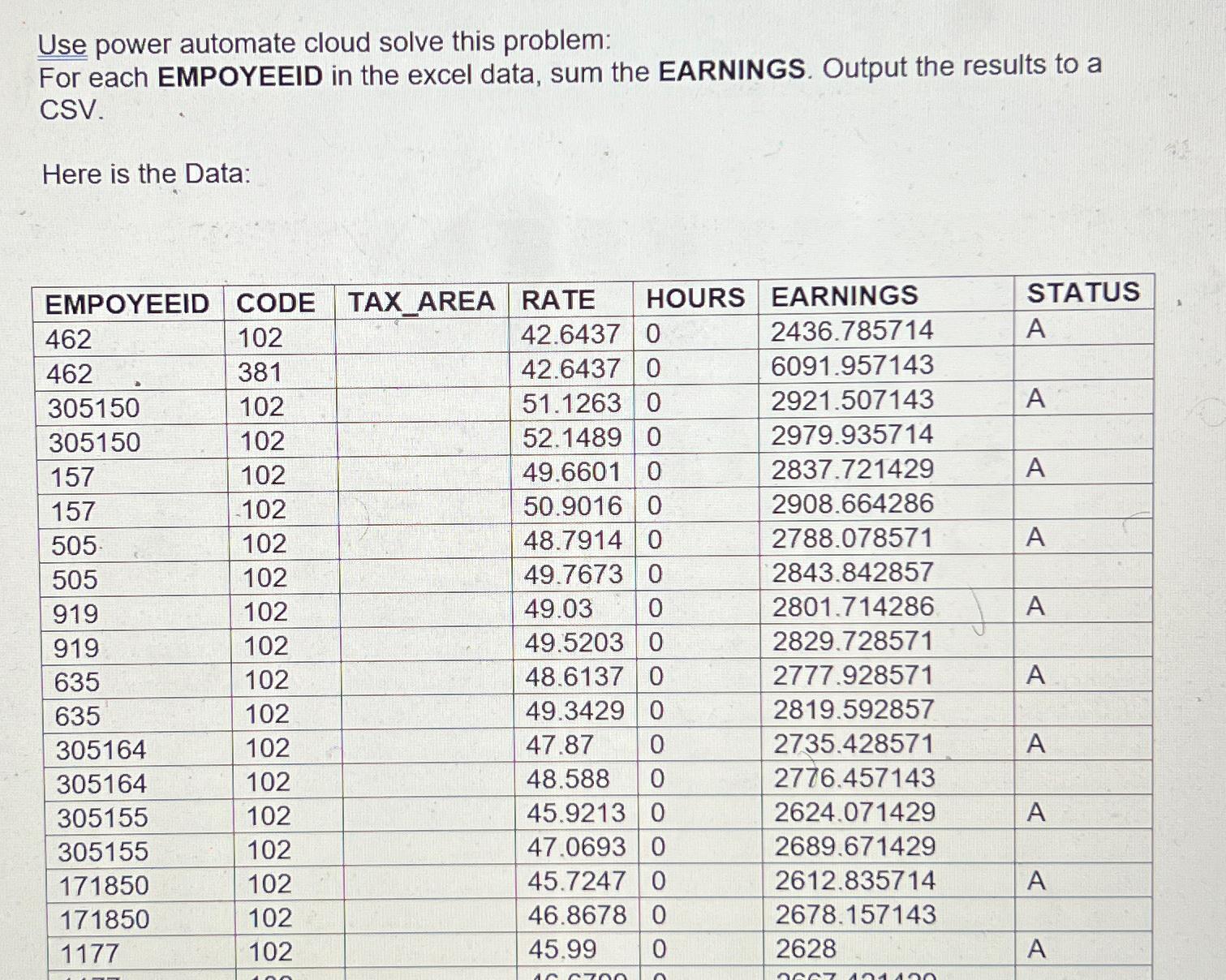
Question: Use power automate cloud solve this problem: For each EMPOYEEID in the excel data, sum the EARNINGS. Output the results to a CSV . Here

Use power automate cloud solve this problem:
For each EMPOYEEID in the excel data, sum the EARNINGS. Output the results to a CSV.
Here is the Data:
\table[[EMPOYEEID,CODE,TAX_AREA,RATE,HOURS,EARNINGS,STATUS],[462,102,,42.6437,0,2436.785714,A],[462,381,,42.6437,0,6091.957143,],[305150,102,,51.1263,0,2921.507143,A],[305150,102,,52.1489,0,2979.935714,],[157,102,,49.6601,0,2837.721429,A],[157,102,,50.9016,0,2908.664286,],[505,102,48.7914,0,2788.078571,A,],[505,102,,49.7673,0,2843.842857,],[919,102,,49.03,0,2801.714286,A],[919,102,49.5203,0,2829.728571,,],[635,102,48.6137,0,2777.928571,A,],[635,102,49.3429,0,2819.592857,,],[305164,102,,47.87,0,2735.428571,A],[305164,102,,48.588,0,2776.457143,],[305155,102,,45.9213,0,2624.071429,A],[305155,102,47.0693,0,2689.671429,,],[171850,102,45.7247,0,2612.835714,A,],[171850,102,46.8678,0,2678.157143,,],[1177,102,45.99,0,2628,A,]]
 Use power automate cloud solve this problem: For each EMPOYEEID in

Step by Step Solution

There are 3 Steps involved in it

1 Expert Approved Answer
Step: 1 Unlock blur-text-image

Question Has Been Solved by an Expert!

Get step-by-step solutions from verified subject matter experts

Step: 2 Unlock
Step: 3 Unlock

Students Have Also Explored These Related Databases Questions!