Question: use putty or ssh to finish question!!!! General Instructions: How to Submit Your Work You must submit your assignment answers electronically: Change into your subversion
use putty or ssh to finish question!!!!
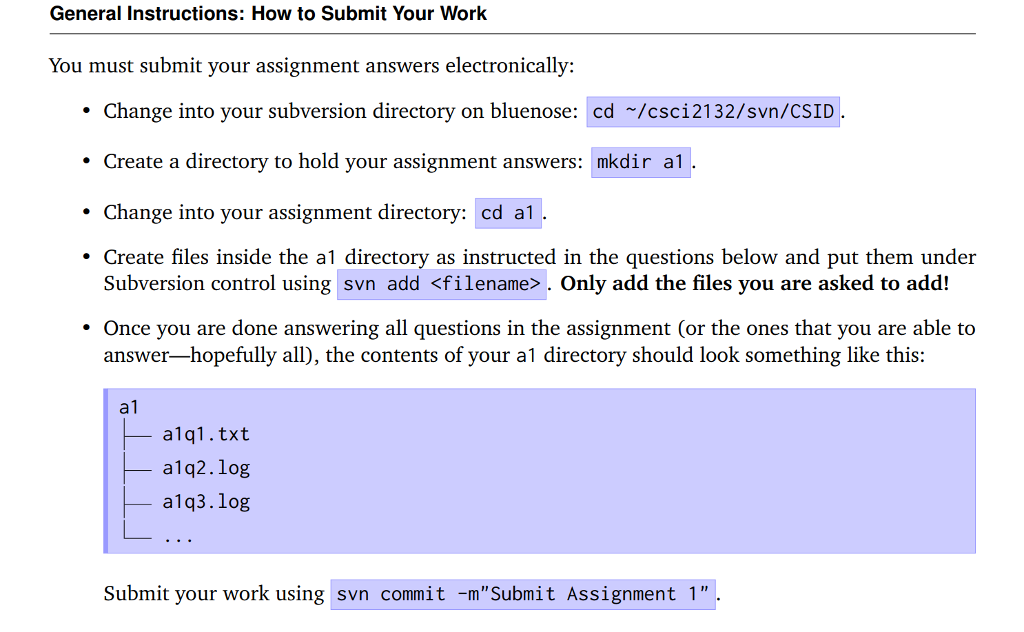
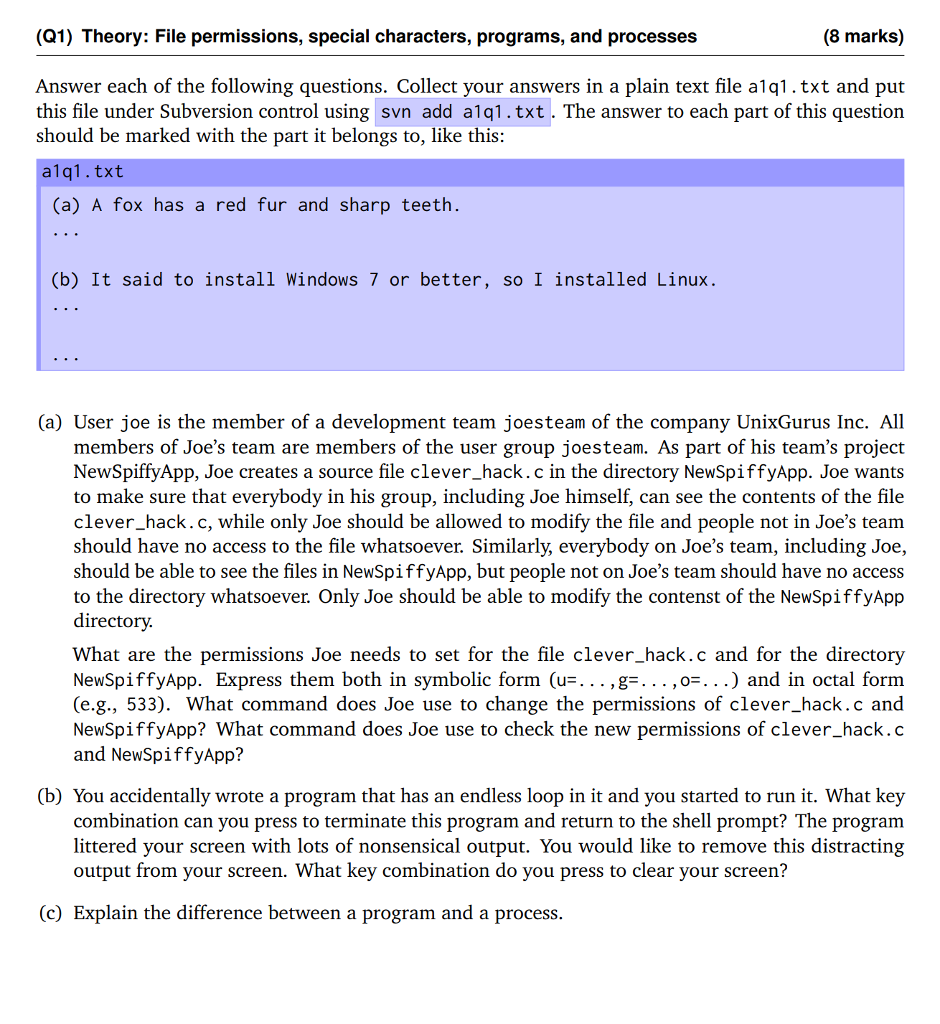
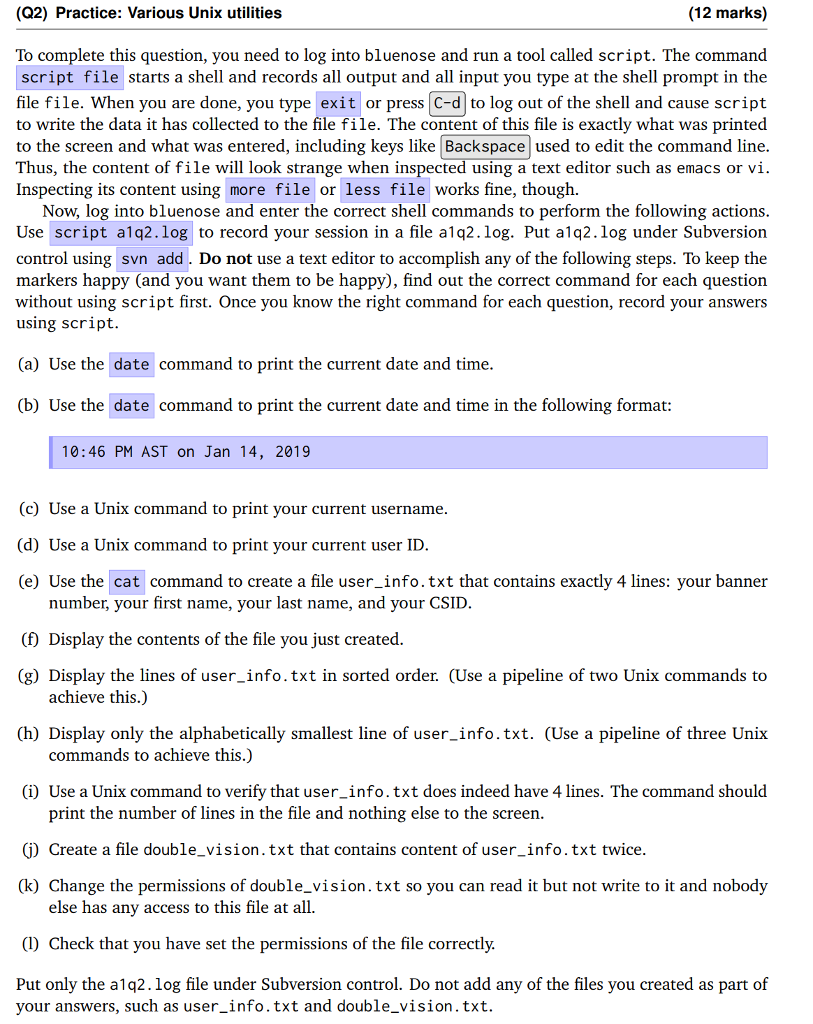
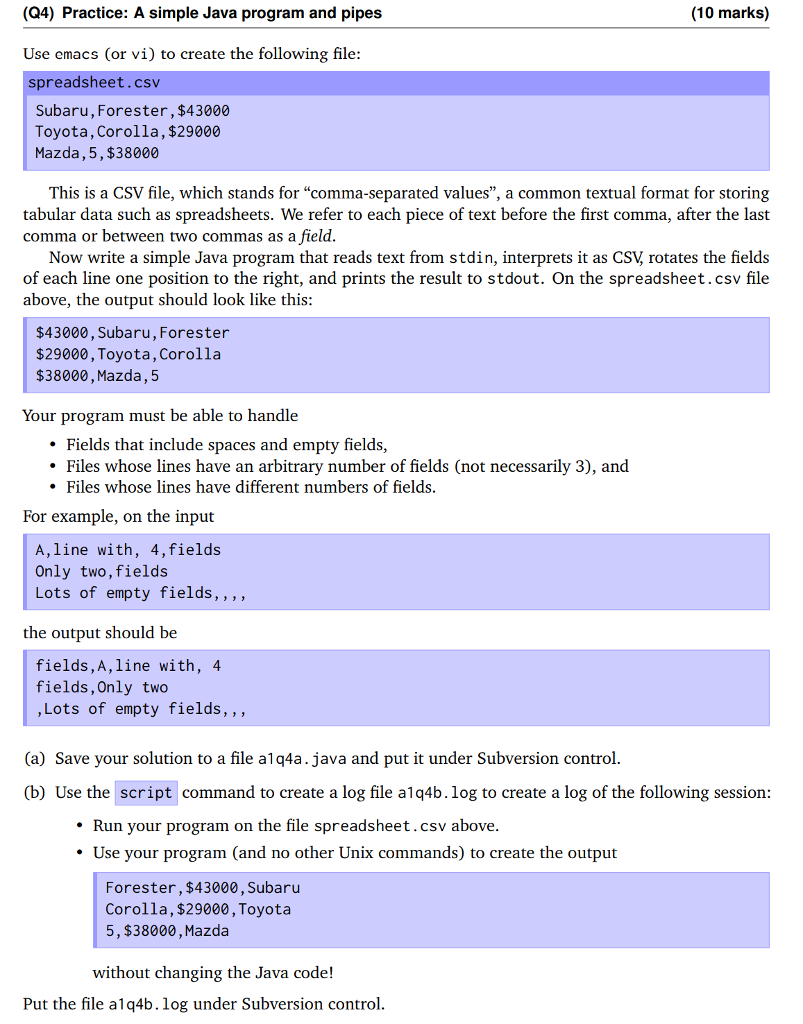
General Instructions: How to Submit Your Work You must submit your assignment answers electronically: Change into your subversion directory on bluenose: cd /csci2132/svn/CSID Create a directory to hold your assignment answers: mkdir al Change into your assignment directory: cd a1 Create files inside the al directory as instructed in the questions below and put them under Subversion control using svn add . Only add the files you are asked to add! Once you are done answering all questions in the assignment (or the ones that you are able to answer-hopefully all), the contents of your a1 directory should look something like this: alql.txt a1q2.log a1q3.log Submit your work using svn commit -m"Submit Assignment 1" (Q1) Theory: File permissions, special characters, programs, and processes (8 marks) Answer each of the following questions. Collect your answers in a plain text file a1q1.txt and put this file under Subversion control using svn add alq1.txt. The answer to each part of this question should be marked with the part it belongs to, like this alq1.txt (a) A fox has a red fur and sharp teeth (b) It said to install Windows 7 or better, so I installed Linux. (a) User joe is the member of a development team joesteam of the company UnixGurus Inc. All members of Joe's team are members of the user group joesteam. As part of his team's project NewSpiffyApp, Joe creates a source file clever_hack.c in the directory NewSpiffyApp. Joe wants to make sure that everybody in his group, including Joe himself, can see the contents of the file clever_hack.c, while only Joe should be allowed to modify the file and people not in Joe's team should have no access to the file whatsoever. Similarly, everybody on Joe's team, including Joe, should be able to see the files in NewSpiffyApp, but people not on Joe's team should have no access to the directory whatsoever. Only Joe should be able to modify the contenst of the NewSpiffyApp directory. What are the permissions Joe needs to set for the file clever_hack.c and for the directory NewSpiffyApp. Express them both in symbolic form (us. . . , g- ,o-. . .) and in octal form (e.g., 533). What command does Joe use to change the permissions of clever_hack.c and NewSpiffyApp? What command does Joe use to check the new permissions of clever_hack.c and NewSpiffyApp? (b) You accidentally wrote a program that has an endless loop in it and you started to run it. What key combination can you press to terminate this program and return to the shell prompt? The program littered your screen with lots of nonsensical output. You would like to remove this distracting output from your screen. What key combination do you press to clear your screen? (c) Explain the difference between a program and a process (Q2) Practice: Various Unix utilities (12 marks) To complete this question, you need to log into bluenose and run a tool called script. The command script file starts a shell and records all output and all input you type at the shell prompt in the file file. When you are done, you type exit or press C-d to log out of the shell and cause script to write the data it has collected to the file file. The content of this file is exactly what was printed to the screen and what was entered, including keys like Backspace used to edit the command line Thus, the content of file will look strange when inspected using a text editor such as emacs or vi. Inspecting its content using more file orless file works fine, though. Now, log into bluenose and enter the correct shell commands to perform the following actions Use script a1q2.log to record your session in a file a1q2.log. Put a1q2.log under Subversion control using svn add. Do not use a text editor to accomplish any of the following steps. To keep the markers happy (and you want them to be happy), find out the correct command for each questiorn without using script first. Once you know the right command for each question, record your answers using script (a) Use the date command to print the current date and time (b) Use the date command to print the current date and time in the following format 10:46 PM AST on Jan 14, 2019 (c) Use a Unix command to print your current username (d) Use a Unix command to print your current user ID (e) Use the cat command to create a file user_info.txt that contains exactly 4 lines: your banner number, your first name, your last name, and your CSID (f) Display the contents of the file you just created (g) Display the lines of user_info.txt in sorted order. (Use a pipeline of two Unix commands to achieve this.) (h) Display only the alphabetically smallest line of user_info.txt. (Use a pipeline of three Unix commands to achieve this.) (i) Use a Unix command to verify that user_info.txt does indeed have 4 lines. The command should print the number of lines in the file and nothing else to the screen (j) Create a file double_vision.txt that contains content of user_info.txt twice (k) Change the permissions of double_vision.txt so you can read it but not write to it and nobody else has any access to this file at all. (1) Check that you have set the permissions of the file correctly. Put only the a1q2.log file under Subversion control. Do not add any of the files you created as part of your answers, such as user_info.txt and double vision.txt (Q4) Practice: A simple Java program and pipes (10 marks) Use emacs (or vi) to create the following file: spreadsheet.csv Subaru, Forester, $43000 Toyota, Corolla, $29000 Mazda,5, $38000 This is a CSV file, which stands for "comma-separated values", a common textual format for storing tabular data such as spreadsheets. We refer to each piece of text before the first comma, after the last comma or between two commas as a field Now write a simple Java program that reads text from stdin, interprets it as CSV, rotates the fields of each line one position to the right, and prints the result to stdout. On the spreadsheet.csv file above, the output should look like this $43000, Subaru, Forester $29000, Toyota, Corolla $38000, Mazda,5 Your program must be able to handle Fields that include spaces and empty fields, . Files whose lines have an arbitrary number of fields (not necessarily 3), and Files whose lines have different numbers of fields. For example, on the input A,line with, 4,fields Only two,fields Lots of empty fields,,,, the output should be fields,A,line with, 4 fields, Only two , Lots of empty fields, , , (a) Save your solution to a file alq4a.java and put it under Subversion control. (b) Use the script command to create a log file a1q4b.log to create a log of the following session Run your program on the file spreadsheet.csv above Use your program (and no other Unix commands) to create the output Forester, $43000, Subaru Corolla, $29000, Toyota 5, $38000,Mazda without changing the Java code! Put the file a1q4b.log under Subversion control









 Study Help