







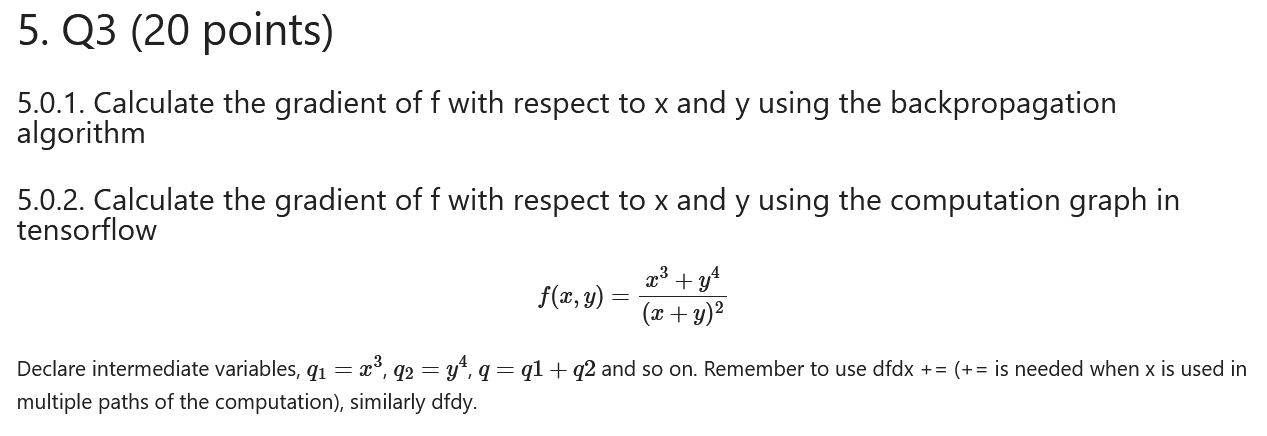
Question: Use python jupyter lab, NO AI PLZZZZZZ: Question ( check the pic ) : Declare intermediate variables, q 1 = x 3 , q 2
Use python jupyter lab, NO AI PLZZZZZZ:
Question check the pic:
Declare intermediate variables, and so on Remember to use dfdx is needed when is used in
multiple paths of the computation similarly dfdy
Code:
import sys
from packaging import version
import sklearn
import matplotlib.pyplot as plt
import numpy as np
import tensorflow as tf
from sklearn.preprocessing import adddummyfeature
from sklearn.datasets import makeblobs
from sklearn import metrics #Import scikitlearn metrics module for accuracy calculation
from sklearn.modelselection import traintestsplit
from sklearn.metrics import confusionmatrix, ConfusionMatrixDisplay
from sklearn.datasets import makeclassification
printSklearn package",sysversioninfo
printSklearn package",sklearn.version
printTensorFlow version:", tfversion
assert sysversioninfo
assert version.parsesklearnversion version.parse
pltrcfont size
pltrcaxes labelsize titlesize
pltrclegend fontsize
pltrcxtick labelsize
pltrcytick labelsize
##
x
y
#Forward pass
#Backward pass
#printf
#printdfdxdfdy
#f
#dfdx
#dfdy
##
#using computation graph from tensorflow
x tfVariable
y tfVariable
#printf
#printgradxgrady
Question check pic:
Q points
Calculate the gradient of with respect to and using the backpropagation
algorithm
cdots
Code:
# Using backpropagation, construct some intermediate
# variables for $qy$ and z xq then finally f npsumz
x nparray
y nparray
m xshape
printx
printy
#Forward Pass
#Backward Pass
#printff
#printdfdxdfdx
#printdfdydfdy
#Sample output
#f
#dfdq
#dfdx
#dfdy
Question check pic:
Calculate the gradient of with respect to and using the computation graph in
tensorflow
Code:
#using tensorflow
x tfVariable trainable True, namex
y tfVariable trainable True, namey
#tfprintff
#gradx grady tpgradientfxy
#tfprintgradxgradx
#tfprintgradygrady
#Sample output
#f
#gradx
#grady
Step by Step Solution
There are 3 Steps involved in it
1 Expert Approved Answer
Step: 1 Unlock

Question Has Been Solved by an Expert!
Get step-by-step solutions from verified subject matter experts
Step: 2 Unlock
Step: 3 Unlock
 Study Help