







Question: use python TipTaxCalculator.py 1 meal_cost = 10.00 2 tax rate = 0.08 3 tip_rate = 0.20 4 5 #You may modify the lines of code
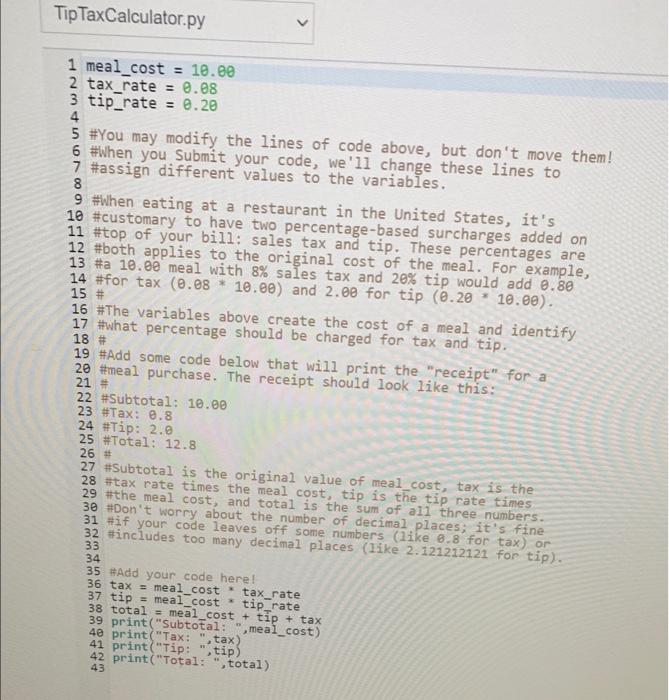
TipTaxCalculator.py 1 meal_cost = 10.00 2 tax rate = 0.08 3 tip_rate = 0.20 4 5 #You may modify the lines of code above, but don't move them! 6 #When you Submit your code, we'll change these lines to 7 #assign different values to the variables. 8 9 #when eating at a restaurant in the United States, it's 10 #customary to have two percentage-based surcharges added on 11 #top of your bill: sales tax and tip. These percentages are 12 #both applies to the original cost of the meal. For example, 13 #a 10.00 meal with 8% sales tax and 20% tip would add 0.80 14 #for tax (0.08 * 10.00) and 2.00 for tip (0.20 * 10.00). 15 16 #The variables above create the cost of a meal and identify 17 #what percentage should be charged for tax and tip. 18 # 19 #Add some code below that will print the "receipt" for a 20 #meal purchase. The receipt should look like this: 21 22 #Subtotal: 10.00 23 #Tax: 0.8 24 #Tip: 2.0 25 #Total: 12.8 26 # 27 #Subtotal is the original value of meal_cost, tax is the 28 tax rate times the meal cost, tip is the tip rate times 29 #the meal cost, and total is the sum of all three numbers. 30 #Don't worry about the number of decimal places; it's fine 31 #if your code leaves off some numbers (like 8.8 for tax) or 32 #includes too many decimal places (like 2.121212121 for tip). 33 34 35 Add your code here! 36 tax = meal_cost * tax_rate 37 tip = meal cost * tip rate 38 total = meal_cost + tip + tax 39 print("Subtotal: ".meal_cost) 40 print("Tax: tax) 41 print("Tip: ", tip) 42 print("Total: total) 43 TipTaxCalculator.py 1 meal_cost = 10.00 2 tax rate = 0.08 3 tip_rate = 0.20 4 5 #You may modify the lines of code above, but don't move them! 6 #When you Submit your code, we'll change these lines to 7 #assign different values to the variables. 8 9 #when eating at a restaurant in the United States, it's 10 #customary to have two percentage-based surcharges added on 11 #top of your bill: sales tax and tip. These percentages are 12 #both applies to the original cost of the meal. For example, 13 #a 10.00 meal with 8% sales tax and 20% tip would add 0.80 14 #for tax (0.08 * 10.00) and 2.00 for tip (0.20 * 10.00). 15 16 #The variables above create the cost of a meal and identify 17 #what percentage should be charged for tax and tip. 18 # 19 #Add some code below that will print the "receipt" for a 20 #meal purchase. The receipt should look like this: 21 22 #Subtotal: 10.00 23 #Tax: 0.8 24 #Tip: 2.0 25 #Total: 12.8 26 # 27 #Subtotal is the original value of meal_cost, tax is the 28 tax rate times the meal cost, tip is the tip rate times 29 #the meal cost, and total is the sum of all three numbers. 30 #Don't worry about the number of decimal places; it's fine 31 #if your code leaves off some numbers (like 8.8 for tax) or 32 #includes too many decimal places (like 2.121212121 for tip). 33 34 35 Add your code here! 36 tax = meal_cost * tax_rate 37 tip = meal cost * tip rate 38 total = meal_cost + tip + tax 39 print("Subtotal: ".meal_cost) 40 print("Tax: tax) 41 print("Tip: ", tip) 42 print("Total: total) 43
Step by Step Solution
There are 3 Steps involved in it

Get step-by-step solutions from verified subject matter experts
 Study Help