







Question: Use Python to create address book. ( We are working with the latest information) Add a new entry (name, email addresses, and phone numbers) Think
Use Python to create address book. (We are working with the latest information)
- Add a new entry (name, email addresses, and phone numbers)
- Think about the required field(s), one or more email addresses, one or more phone numbers
- Update (any portion of) an existing entry
- Delete an entry
- Look up contact information (by name, email address or phone number)
- One should be able to search by first or last name; even a portion of a name; do you know how to spell Arnold Schwarzenegger?
- Display current list of contacts
- On exit, save a copy of the (latest) address book to a file
- On start, load the most current address book
Here is an example photo of output:
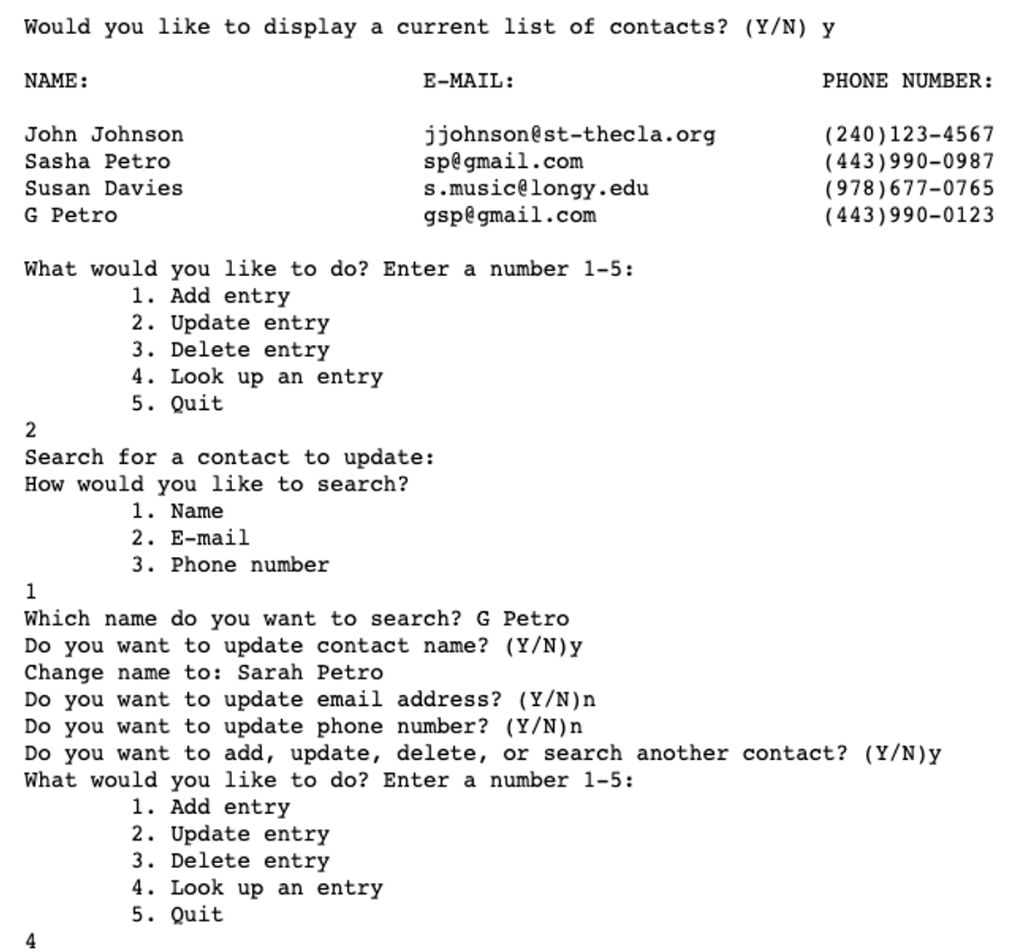
Would you like to display a current list of contacts? (Y/N) y NAME: E-MAIL: PHONE NUMBER: John Johnson Sasha Petro Susan Davies G Petro jjohnson@st-thecla.org sp@gmail.com s.music@longy.edu gsp@gmail.com (240)123-4567 (443)990-0987 (978) 677-0765 (443) 990-0123 What would you like to do? Enter a number 1-5: 1. Add entry 2. Update entry 3. Delete entry 4. Look up an entry 5. Quit 2 Search for a contact to update: How would you like to search? 1. Name 2. E-mail 3. Phone number 1 Which name do you want to search? G Petro Do you want to update contact name? (Y/N)y Change name to: Sarah Petro Do you want to update email address? (Y/N)n Do you want to update phone number? (Y/N)n Do you want to add, update, delete, or search another contact? (Y/N)y What would you like to do? Enter a number 1-5: 1. Add entry 2. Update entry 3. Delete entry 4. Look up an entry 5. Quit 4
Step by Step Solution
There are 3 Steps involved in it

Get step-by-step solutions from verified subject matter experts
 Study Help