







Question: Use python3 language please def sum_mult_in_range (start, end, m): This function accepts a range of numbers [start, end and computes the sum of all values
Use python3 language please
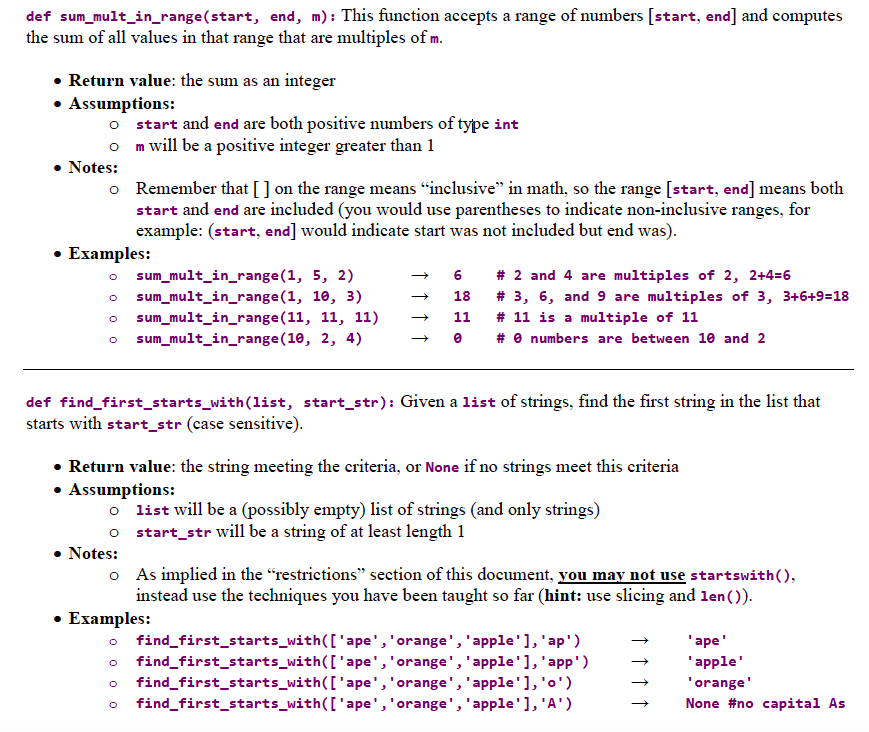
def sum_mult_in_range (start, end, m): This function accepts a range of numbers [start, end and computes the sum of all values in that range that are multiples of m Return value: the sum as an integer ASSumptions: o start and end are both positive numbers of type int o m will be a positive integer greater than 1 Notes: Remember that [] on the range means "inclusive" in math, so the range [start, end] means both start and end are included (you would use parentheses to indicate non-inclusive ranges, for example: (start, end] would indicate start was not included but end was) o Examples: sum mult in range(1, 5, 2) # 2 and 4 are multiples of 2, 2+4=6 o sum mult in range(1, 10, 3) o sum mult in range(11, 11, 11) o sum_mult_in_range (10, 2, 4) 18 # 3, 6, and 9 are multiples of 3, 3+6+9:18 11 # 11 is a multiple of 11 # numbers are between 10 and 2 def find_first_starts_with(list, start str): Given a list of strings, find the first string in the list that starts with start_str (case sensitive . Return value: the string meeting the criteria, or None if no strings meet this criteria ASSumptions: o list will be a (possibly empty) list of strings (and only strings) o start_str will be a string of at least length 1 Notes: o As implied in the "restrictions" section of this document, vou may not use startswith() instead use the techniques you have been taught so far (hint: use slicing and len()) * Examples: o find_first_starts_with(I'ape', 'orange', 'apple'], 'ap') o find first_starts_with(['ape', 'orange, 'apple'], 'app') o find first_starts_with(['ape', 'orange, 'apple'], 'o') o find_first_starts_with(I'ape', 'orange', 'apple'], 'A) ape apple orange' None #no capital As
Step by Step Solution
There are 3 Steps involved in it

Get step-by-step solutions from verified subject matter experts
 Study Help