







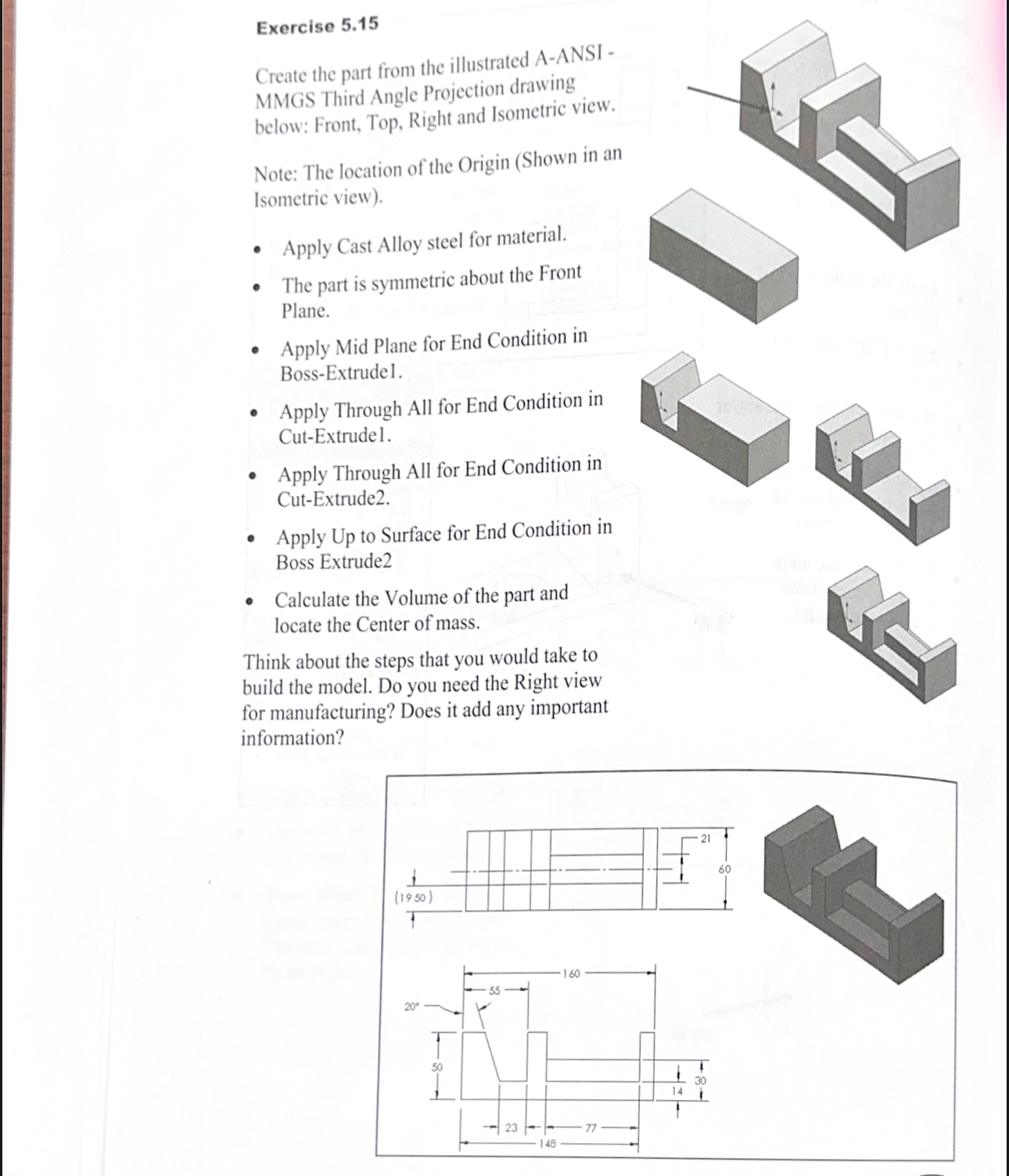
Question: USE SOLIDWORKS Exercise 5 . 1 5 Create the part from the illustrated A - ANSI - MMGS Third Angle Projection drawing below: Front, Top,
USE SOLIDWORKS
Exercise
Create the part from the illustrated AANSI
MMGS Third Angle Projection drawing
below: Front, Top, Right and Isometric view.
Note: The location of the Origin Shown in an
Isometric view
Apply Cast Alloy steel for material.
The part is symmetric about the Front
Plane.
Apply Mid Plane for End Condition in
BossExtrudel.
Apply Through All for End Condition in
CutExtrude
Apply Through All for End Condition in
CutExtrude
Apply Up to Surface for End Condition in
Boss Extrude
Calculate the Volume of the part and
locate the Center of mass.
Think about the steps that you would take to
build the model. Do you need the Right view
for manufacturing? Does it add any important
information?
Step by Step Solution
There are 3 Steps involved in it
1 Expert Approved Answer
Step: 1 Unlock

Question Has Been Solved by an Expert!
Get step-by-step solutions from verified subject matter experts
Step: 2 Unlock
Step: 3 Unlock
 Study Help