







Question: use strict; var formValidity = true; function validateRequired() { //validates required fields var inputElements = document.querySelectorAll(#contactinfo input); var errorDiv = document.getElementById(errorText); var elementCount = inputElements.length;
"use strict"; var formValidity = true;
function validateRequired() { //validates required fields var inputElements = document.querySelectorAll("#contactinfo input"); var errorDiv = document.getElementById("errorText"); var elementCount = inputElements.length; var requiredValidity = true; var currentElement;
try { for (var i = 0; i
if (currentElement.value === "") { currentElement.style.background = "rgb(255,233,233)"; requiredValidity = false;
} else { currentElement.style.background = "white"; } } if (requiredValidity === false) { throw "Please complete all fields."; } errorDiv.style.display = "none"; errorDiv.innerHTML = ""; } catch(msg) { errorDiv.style.display = "block"; errorDiv.innerHTML = msg; formValidity = false; } } function createEventListeners() { //create event listeners var form = document.getElementsByTagName("form")[0]; if (form.addEventListener) { form.addEventListener("submit", validateForm, false); }
else if (form.attachEvent) { form.attachEvent("onsubmit", validateForm); } }
function validateForm(evt) { //validates form
if (evt.preventDefault) { evt.preventDefault(); //prevents form from submitting
} else { evt.returnValue = false; //prevents form from submitting in IE8 } formValidity = true; //resets value for revalidation validateRequired();
if (formValidity === true) { document.getElementsByTagName("form")[0].submit(); } }
function validateNumbers() { //validates number fields for older browsers var numberInputs = document.querySelectorAll("#contactinfo input[type=number]"); var elementCount = numberInputs.length; var numErrorDiv = document.getElementById("numErrorText"); var numbersValidity = true; var currentElement;
try {
for (var i = 0; i
if (isNan(currentElement.value) || (currentElement.valud === "")) { currentElement.style.background = "rgb(255,233,233"; numbersValidity = false;
} else { currentElement.style.background = "white"; } } if (numbersValidity === false) { throw } numErrorDiv.Style.display = "none"; numErrorDiv.innerHTML = ""; } catch(msg){ numErrorDiv.style.display = "block"; numErrorDiv.innerHTML = msg; formValidity = false; } }
function validateForm(evt) {
if (evt.preventDefault) { evt.preventDefault(); //prevent form from submitting
} else { evt.returnValue = false; //prevent form from submitting in IE8 formValidity = true; //reset value for revalidation validateRequired(); validateNumbers();
if (formValidity === true) { document.getElementsByTagName("form")[0].submit(); } } }
function zeroPlaceholder() { //remove fallback placeholder text var addressBox = document.getElementById("addrinput"); addressBox.style.color = "black";
if (addressBox.value === addressBox.placeholder) { addressBox.value = ""; } }
function checkPlaceholder() { //restores placeholder text if box contains no user entry var addressBox = document.getElementById("addrinput");
if (addressBox.value === "") { addressBox.style.color = "rgb(178,184,183)"; addrsesBox.value = addressBox.placeholder; } }
function generatePlaceholder() { //adds placeholder text for browsers that don't support the placeholder attribute if (!Modernizr.input.placehoder) { var addressBox = document.getElementById("addrinput"); addressBox.value = addressBox.placeholder; addressBox.style.color = "rgb(178,184,183)";
if (addressBox.addEventListener) { addressBox.addEventListener("focus", zeroPlaceholder, false);
} else if (addressBox.attachEvent) { addressBox.attachEvent("onfocus", zeroPlaceholder); addressBox.attachEvent("onblur", checkPlaceholder); } } }
if (window.addEventListener) { //run setup fnction when page finishes loading //window.addEventListener("load", createEventListeners, false); window.addEventListener("load", setUpPage, false);
} else if (window.attachEvent) { //window.attachEvent("onload", createEventListeners); window.attachEvent("onload", setUpPage); }
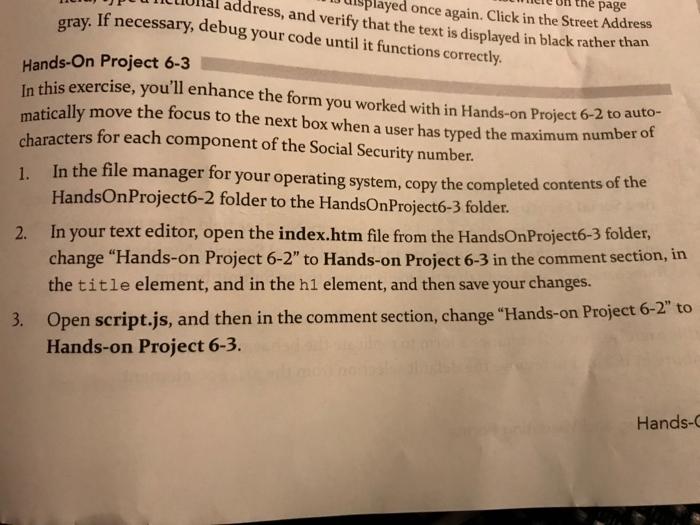
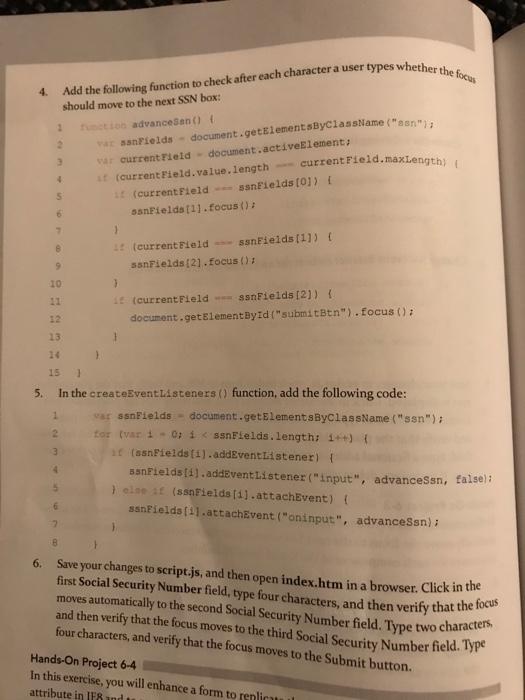
once again. Click in the Street Address ddress, and verify that the text is displayed in black rather than page gray. If necessary, debug your code until it functions correctly. Hands-On Project 6-3 In this exercise, you'll enhance the form you worked with in Hands-on Project 6-2 to auto- matically move the focus to the next box when a user has typed the maximum number of characters for each component of the Social Security number. In the file manager for your operating system, copy the completed contents of the HandsOnProject6-2 folder to the HandsOnProject6-3 folder. 2. In your text editor, open the index.htm file from the HandsOn Project6-3 folder, change "Hands-on Project 6-2" to Hands-on Project 6-3 in the comment section, in the title element, and in the hi element, and then save your changes. 3. Open script.js, and then in the comment section, change "Hands-on Project 6-2" to Hands-on Project 6-3. 1. Hands- moves automatically to the second Social Security Number field. Type two characters fed the following function to check after each character a user types whether the fire 4. should move to the next SSN box: to advancesan() { 2 wat aanfields - document.getElementsByClassName("an"), var current Field - document.activeElement; current Field.maxlength 4 it current Field.value.length --- 5 t(current Field -- ss Fields (0) sanFields [1].focus(); 1 1 (current Field sanFields(11) sanFields [2). Focus(); 10 3 it (current Field ---SanFields [2)) { document.getElementById("submitBtn").focus(); 13 1 B 1 5. 15 In the createEventListeners () function, add the following code: 1 war sanFields - document.getElementsByClassName("ss"); 2 for (var i 0; i
Step by Step Solution
There are 3 Steps involved in it

Get step-by-step solutions from verified subject matter experts
 Study Help