







Question: Use Super Class and 2 or 3 class . Please help me. Thanks. Description In this assignment, you are required to implement a flight database
Use Super Class and 2 or 3 class .
Please help me.
Thanks.
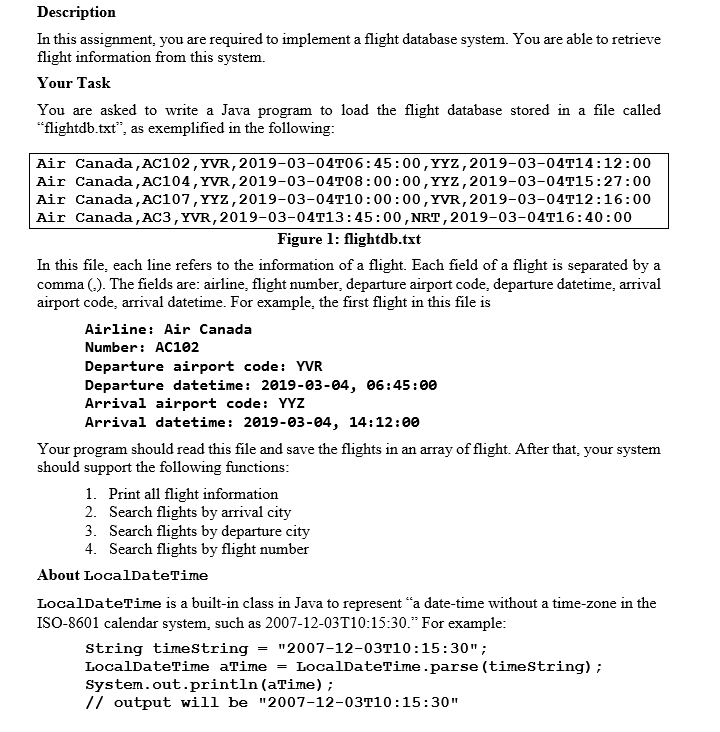
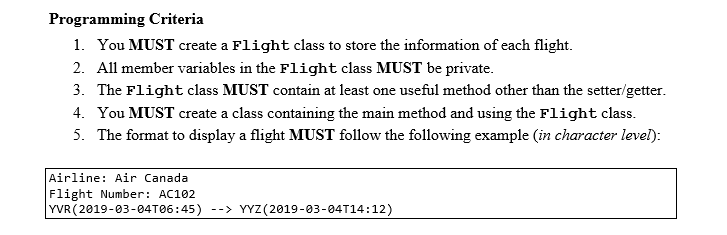
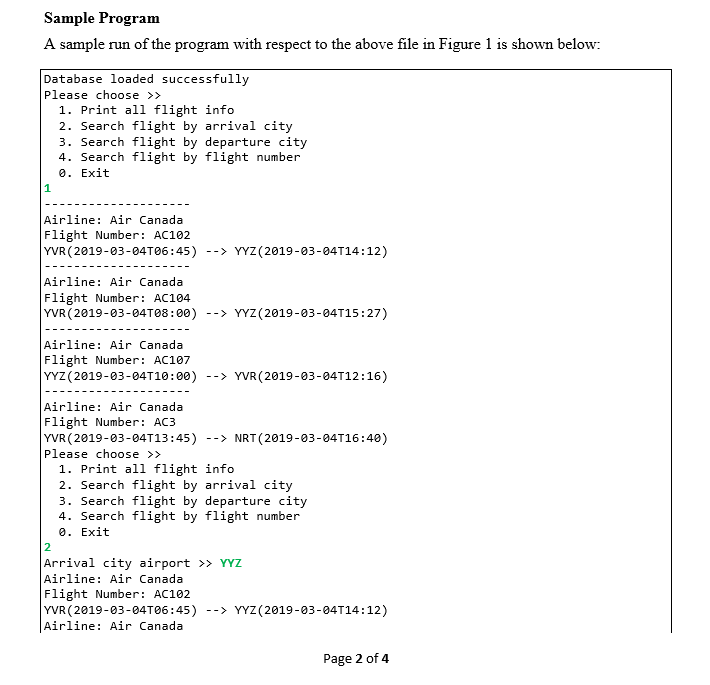
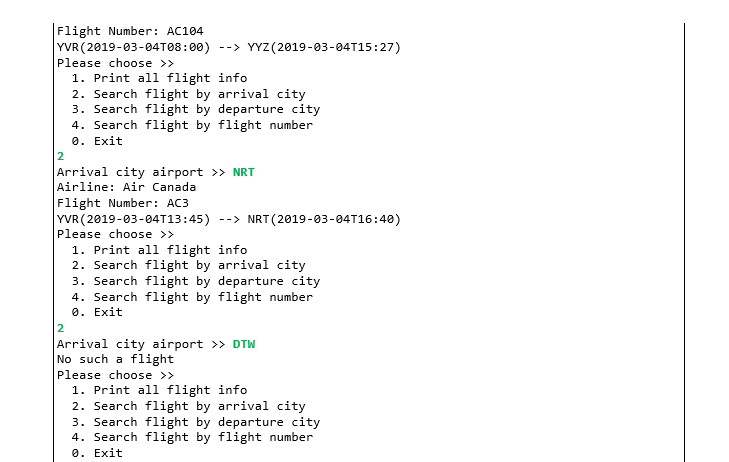
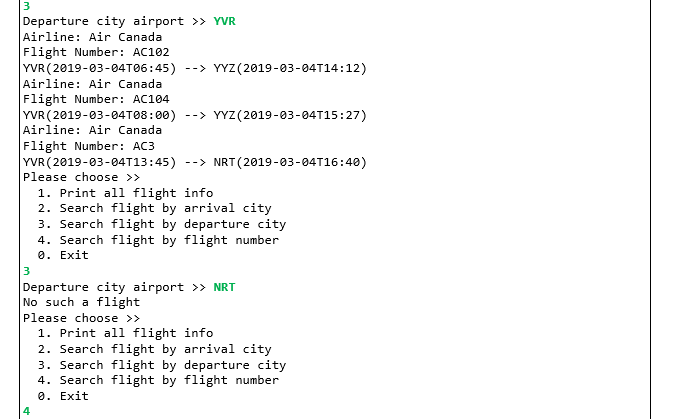
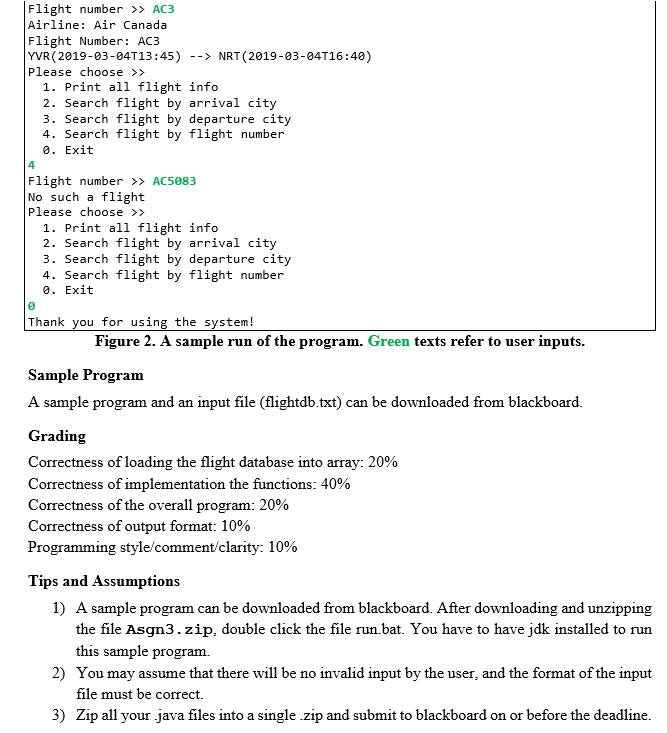
Description In this assignment, you are required to implement a flight database system. You are able to retrieve flight information from this system. Your Task You are asked to write a Java program to load the flight database stored in a file called flightdb.txt", as exemplified in the following: Air Canada, AC102,YVR,2019-03-04T06:45: 00, YYZ,2019-03-04T14:12:00 Air Canada, AC104,YVR,2019-03-04T08:00: 00, YYZ,2019-03-04T15:27:00 Air Canada,AC107,YYz,2019-03-04T10 : 00 :00,YVR,2019-03-04T12:16:00 Air Canada,AC3, YVR,2019-03-04T13: 45:00,NRT,2019-03-04T16:40:00 Figure 1: flightdb.txt In this file, each line refers to the information of a flight. Each field of a flight is separated by a comma (). The fields are: airline, flight number, departure airport code, departure datetime, arrival airport code, arrival datetime. For example, the first flight in this file i:s Airline: Air Canada Number AC102 Departure airport code: YVR Departure datetime : 2019-03-04, 06:45:00 Arrival airport code: YYZ Arrival datetime: 2019-03-04, 14:12:00 Your program should read this file and save the flights in an array of flight. After that, your system should support the following functions 1. 2. 3. 4. Print all flight information Search flights by arrival city Search flights by departure city Search flights by flight number About LocalDateTime LocalDateTime is a built-in class in Java to represent "a date-time without a time-zone in the ISO-8601 calendar system, such as 2007-12-03T10:15:30." For example String timestring - "2007-12-03T10:15:30" LocalDateTime aTime-LocalDateTime.parse (timestring); System.out.println (aTime); // output will be "2007-12-03T10:15:30" Programming Criteria 1. You MUST create a Flight class to store the information of each flight 2. All member variables in the Flight class MUST be private. 3. The Flight class MUST contain at least one useful method other than the setter/getter. 4. You MUST create a class containing the main method and using the Flight class. 5. The format to display a flight MUST follow the following example (in character level): Airline: Air Canada Flight Number: AC102 YVR (2019-03-04T06:45) YYZ(2019-03-04T14:12) Sample Program A sample run of the program with respect to the above file in Figure 1 is shown below: Database loaded successfully Please choose >> 1. Print all flight info 2. Search flight by arrival city 3. Search flight by departure city 4. Search flight by flight number 0. Exit Airline: Air Canada Flight Number: AC102 YVR (2019-03-04T06:45) YYZ(2019-03-04T14:12) Airline: Air Canada Flight Number: AC104 YVR (2019-03-04T08:00) YYZ(2019-03-04T15:27) Airline: Air Canada Flight Number: AC107 YYZ (2019-03-04T10:00) YVR(2019-03-04T12:16) Airline: Air Canada Flight Number: AC3 YVR (2019-03-04T13:45) NRT (2019-03-04T16:40) Please choose >> 1. Print all flight info 2. Search flight by arrival city 3. Search flight by departure city 4. Search flight by flight number 0. Exit Arrival city airport > YYZ Airline: Air Canada Flight Number: AC102 YVR (2019-03-04T06:45) YYZ(2019-03-04T14:12) Airline: Air Canada Page 2 of4 Flight Number: AC104 YVR (2019-03-04T08:00) YYZ(2019-03-04T15:27) Please choose >> 1. Print all flight info 2. Search flight by arrival city 3. Search flight by departure city 4. Search flight by flight number 0. Exit Arrival city airport > NRT Airline: Air Canada Flight Number: AC3 YVR (2019-03-04T13:45) NRT (2019-03-04T16:40) Please choose >> 1. Print all flight info 2. Search flight by arrival city 3. Search flight by departure city 4. Search flight by flight number 0. Exit Arrival city airport > DTW No such a flight Please choose >> 1. Print all flight info 2. Search flight by arrival city 3. Search flight by departure city 4. Search flight by flight number 0. Exit Departure city airport >> YVR Airline: Air Canada Flight Number: AC102 YVR (2019-03-04T06:45) -YYZ(2019-03-04T14:12) Airline: Air Canada Flight Number: AC104 YVR (2019-03-04T08:00) YYZ(2019-03-04T15:27) Airline: Air Canada Flight Number: AC3 YVR (2019-03-04T13:45) NRT (2019-03-04T16:40) Please choose >> 1. Print all flight info 2. Search flight by arrival city 3. Search flight by departure city 4. Search flight by flight number 0. Exit Departure city airport >> NRT No such a flight Please choose>> 1. Print all flight info 2. Search flight by arrival city 3. Search flight by departure city 4. Search flight by flight number 0. Exit 4 Flight numbrAC3 Airline: Air Canada Flight Number: AC3 YVR (2019-03-04T13:45) NRT (2019-03-04T16:40) Please choose >> 1. Print all flight info 2. Search flight by arrival city 3. Search flight by departure city 4. Search flight by flight number 0. Exit 4 Flight number > AC5083 No such a flight Please choose >> 1. Print all flight info 2. Search flight by arrival city 3. Search flight by departure city 4. Search flight by flight number 0. Exit Thank you for using the system! Figure 2. A sample run of the program. Green texts refer to user inputs. Sample Program A sample program and an input file (flightdb.txt) can be downloaded from blackboard Grading Correctness of loading the flight database into array: 20% Correctness of implementation the functions: 40% Correctness of the ov Correctness of output format: 10% Programming style comment clarity: 10% erall program: 20% Tips and Assumptions 1) A sample program can be downloaded from blackboard. After downloading and unzipping the file Asgn3.zip, double click the file run.bat. You have to have jdk installed to run this sample program. You may assume that there will be no invalid input by the user, and the format of the input file must be correct. 2) 3) Zip all your .java files into a single zip and submit to blackboard on or before the deadline
Step by Step Solution
There are 3 Steps involved in it

Get step-by-step solutions from verified subject matter experts
 Study Help