







Question: Use the code below to answer the next three questions: Private Sub btnCompute_Click (... Dim n As Integer Dim y As Integer n = CInt
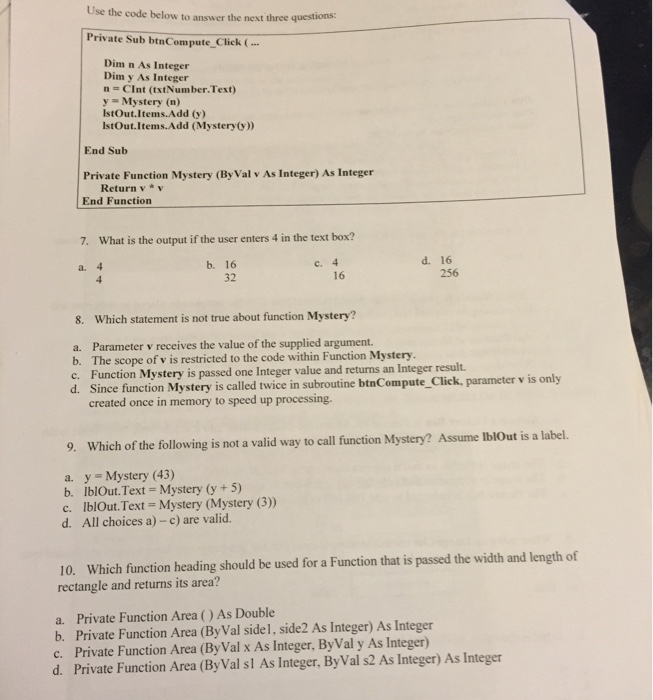
Use the code below to answer the next three questions: Private Sub btnCompute_Click (... Dim n As Integer Dim y As Integer n = CInt (txtNumber Text) y = Mystery (n) lstout. Items. Add (y) lstOut.Items. Add (Mystery (y)) End Sub Private Function Mystery(By Val v As Integer) As Integer Return v * v End Function What is the output if the user enters 4 in the text box? 4 4 16 32 4 16 16 256 Which statement is not true about function Mystery? Parameter v receives the value of the supplied argument. The scope of v is restricted to the code within Function Mystery. Function Mystery is passed one Integer value and returns an Integer result. Since function Mystery is called twice in subroutine btnCompute_Click, parameter v is only created once in memory to speed up processing. Which of the following is not a valid w to call function Mystery? Assume Iblout is a label. Y = Mystery (43) Ibl.Out Text = Mystery (y +5) lblOut. Text = Mystery (Mystery (3)) All choices a) - c) are valid. Which function heading should be used for a Function that is passed the width and length of rectangle and returns its area? Private Function Area ()As Double Integer Private Function Area (ByVal side1, side2) As Integer)) As Integer Private Function Area (ByVal x As Integer, ByVal y As Integer) As Integer Private Function Area (ByVal sl As Integer, ByVal s2 As Integer)) As Integer
Step by Step Solution
There are 3 Steps involved in it

Get step-by-step solutions from verified subject matter experts
 Study Help