







Question: Use the DoublyLinkedList.hpp and the Queue.hpp to help create the simulation. #ifndef DOUBLYLINKEDLIST_HPP #define DOUBLYLINKEDLIST_HPP #include EmptyException.hpp #include IteratorException.hpp template class DoublyLinkedList { // The
Use the DoublyLinkedList.hpp and the Queue.hpp to help create the simulation.
#ifndef DOUBLYLINKEDLIST_HPP #define DOUBLYLINKEDLIST_HPP #include "EmptyException.hpp" #include "IteratorException.hpp" template
----------------------------------------------------------------------------
#ifndef QUEUE_HPP #define QUEUE_HPP #include "DoublyLinkedList.hpp" template
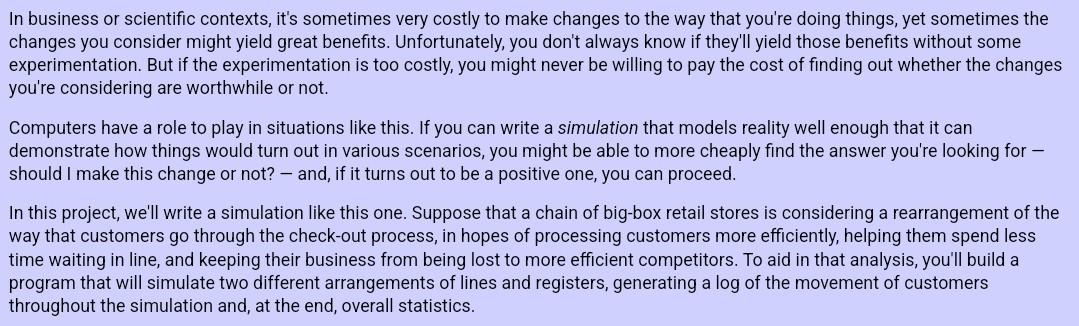
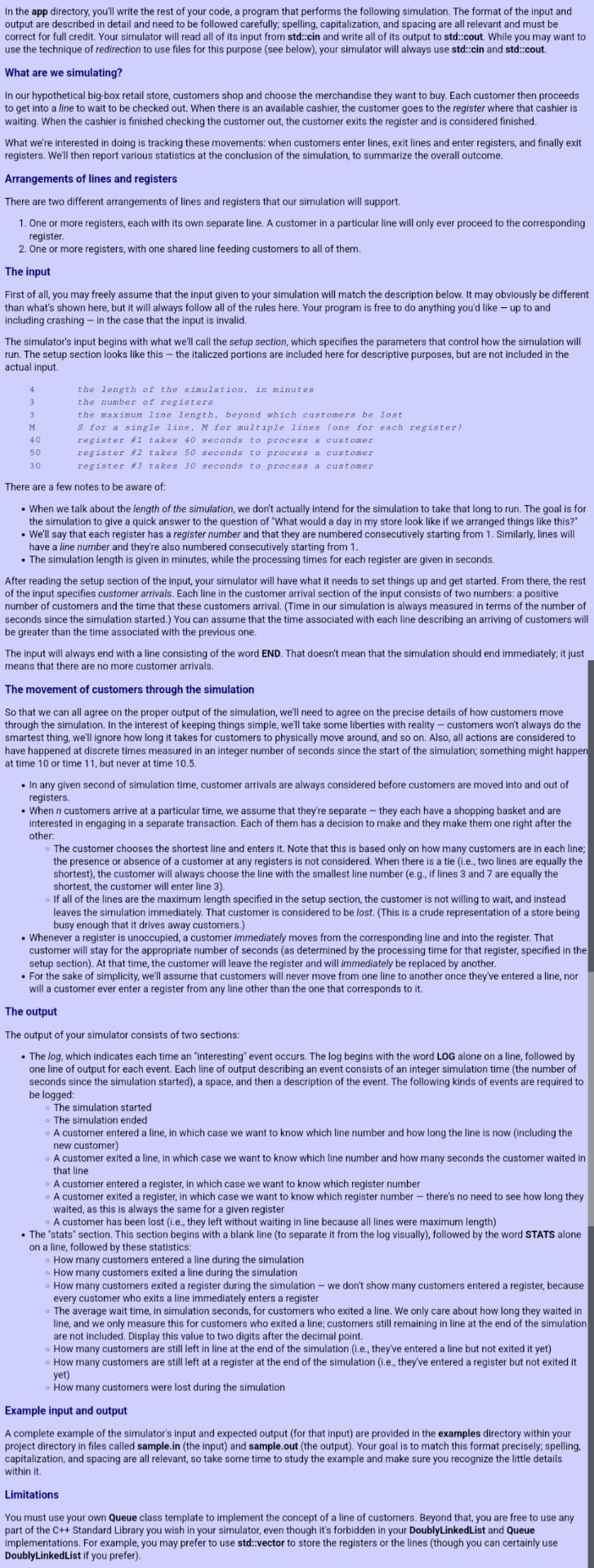
In business or scientific contexts, it's sometimes very costly to make changes to the way that you're doing things, yet sometimes the changes you consider might yield great benefits. Unfortunately, you don't always know if they'll yield those benefits without some experimentation. But if the experimentation is too costly, you might never be willing to pay the cost of finding out whether the changes you're considering are worthwhile or not. Computers have a role to play in situations like this. If you can write a simulation that models reality well enough that it can demonstrate how things would turn out in various scenarios, you might be able to more cheaply find the answer you're looking for should I make this change or not? - and, if it turns out to be a positive one, you can proceed. In this project, we'll write a simulation like this one. Suppose that a chain of big-box retail stores is considering a rearrangement of the way that customers go through the check-out process, in hopes of processing customers more efficiently, helping them spend less time waiting in line, and keeping their business from being lost to more efficient competitors. To aid in that analysis, you'll build a program that will simulate two different arrangements of lines and registers, generating a log of the movement of customers throughout the simulation and, at the end, overall statistics. In the app directory, you'll write the rest of your code, a program that performs the following simulation. The format of the input and output are described in detail and need to be followed carefully, spelling, capitalization, and spacing are all relevant and must be correct for full credit. Your simulator will read all of its input from std::cin and write all of its output to std::cout. While you may want to use the technique of redirection to use files for this purpose (see below), your simulator will always use std::cin and std::cout. What are we simulating? In our hypothetical big-box retail store, customers shop and choose the merchandise they want to buy. Each customer then proceeds to get into a line to wait to be checked out. When there is an available cashier, the customer goes to the register where that cashier is waiting. When the cashier is finished checking the customer out, the customer exits the register and is considered finished, What we're interested in doing is tracking these movements: when customers enter lines, exit lines and enter registers, and finally exit registers. We'll then report various statistics at the conclusion of the simulation, to summarize the overall outcome. Arrangements of lines and registers There are two different arrangements of lines and registers that our simulation will support. 1. One or more registers, each with its own separate line. A customer in a particular line will only ever proceed to the corresponding register 2. One or more registers, with one shared line feeding customers to all of them. The input First of all, you may freely assume that the input given to your simulation will match the description below. It may obviously be different than what's shown here, but it will always follow all of the rules here. Your program is free to do anything you'd like - up to and including crashing - In the case that the input is invalid. The simulator's input begins with what we'll call the setup section, which specifies the parameters that control how the simulation will run. The setup section looks like this - the Italiczed portions are included here for descriptive purposes, but are not included in the actual input M 40 50 30 the length of the simulation. in minutes 3 the number of registere the maximum line length, beyond which customers be lost s for a single line, M for multiple lines fone for each register register #1 takes 40 seconds to process a customer register #2 takes 50 seconds to process a customer register #3 takes 30 seconds to process a customer There are a few notes to be aware of: . When we talk about the length of the simulation, we don't actually intend for the simulation to take that long to run. The goal is for the simulation to give a quick answer to the question of "What would a day in my store look like if we arranged things like this?" . We'll say that each register has a register number and that they are numbered consecutively starting from 1. Similarly, lines will have a line number and they're also numbered consecutively starting from 1. The simulation length is given in minutes, while the processing times for each register are given in seconds. After reading the setup section of the input your simulator will have what it needs to set things up and get started. From there, the rest of the input specifies customer arrivals. Each line in the customer arrival section of the input consists of two numbers: a positive number of customers and the time that these customers arrival. (Time in our simulation is always measured in terms of the number of seconds since the simulation started. You can assume that the time associated with each line describing an arriving of customers will be greater than the time associated with the previous one, The input will always end with a line consisting of the word END. That doesn't mean that the simulation should end immediately, it just means that there are no more customer arrivals. The movement of customers through the simulation So that we can all agree on the proper output of the simulation, we'll need to agree on the precise details of how customers move through the simulation. In the interest of keeping things simple, we'll take some liberties with reality - customers won't always do the smartest thing, we'll ignore how long it takes for customers to physically move around, and so on. Also, all actions are considered to have happened at discrete times measured in an integer number of seconds since the start of the simulation; something might happen at time 10 or time 11, but never at time 10.5. In any given second of simulation time, customer arrivals are always considered before customers are moved into and out of registers. . When n customers arrive at a particular time, we assume that they're separate - they each have a shopping basket and are Interested in engaging in a separate transaction. Each of them has a decision to make and they make them one right after the other: The customer chooses the shortest line and enters it. Note that this is based only on how many customers are in each line; the presence or absence of a customer at any registers is not considered. When there is a tie (1.e., two lines are equally the shortest), the customer will always choose the line with the smallest line number (e.g., if lines 3 and 7 are equally the away shortest, the customer will enter line 3). If all of the lines are the maximum length specified in the setup section, the customer is not willing to wait, and instead leaves the simulation immediately. That customer is considered to be lost. (This is a crude representation of a store being busy enough that it drives away customers.) sien . Whenever a register is unoccupied, a customer immediately moves from the corresponding line and into the register. That customer will stay for the appropriate number of seconds (as determined by the processing time for that register, specified in the setup section). At that time, the customer will leave the register and will immediately be replaced by another. . For the sake of simplicity, we'll assume that customers will never move from one line to another once they ve entered a line, nor will a customer ever enter a register from any line other than the one that corresponds to it. The output The output of your simulator consists of two sections: The log, which indicates each time an interesting' event occurs. The log begins with the word LOG alone on a line, followed by one line of output for each event. Each line of output describing an event consists of an integer simulation time (the number of seconds since the simulation started), a space, and then a description of the event. The following kinds of events are required to be logged: The simulation started The simulation ended A customer entered a line, in which case we want to know which line number and how long the line is now (including the new customer) A customer exited a line, in which case we want to know which line number and how many seconds the customer waited in that line A customer entered a register, in which case we want to know which register number A customer exited a register, in which case we want to know which register number - there's no need to see how long they waited, as this is always the same for a given register A customer has been lost (i.e., they left without waiting in line because all lines were maximum length) The "stats' section. This section begins with a blank line (to separate it from the log visually), followed by the word STATS alone on a line, followed by these statistics: How many customers entered a line during the simulation How many customers exited a line during the simulation How many customers exited a register during the simulation - we don't show many customers entered a register, because every customer who exits a line immediately enters a register The average wait time, in simulation seconds, for customers who exited a line. We only care about how long they waited in line, and we only measure this for customers who exited a line customers still remaining in line at the end of the simulation , are not included. Display this value to two digits after the decimal point. How many customers are still left in line at the end of the simulation (.e., they've entered a line but not exited it yet) How many customers are still left at a register at the end of the simulation (ie, they've entered a register but not exited it yet) How many customers were lost during the simulation Example input and output A complete example of the simulator's input and expected output (for that input) are provided in the examples directory within your project directory in files called sample.in (the input) and sample out the output). Your goal is to match this format precisely, spelling, capitalization, and spacing are all relevant, so take some time to study the example and make sure you recognize the little details within it Limitations You must use your own Queue class template to implement the concept of a line of customers. Beyond that you are free to use any part of the C++ Standard Library you wish in your simulator, even though it's forbidden in your DoublyLinkedList and Queue implementations. For example, you may prefer to use std::vector to store the registers or the lines (though you can certainly use DoublyLinkedlist if you prefer)
Step by Step Solution
There are 3 Steps involved in it

Get step-by-step solutions from verified subject matter experts
 Study Help