







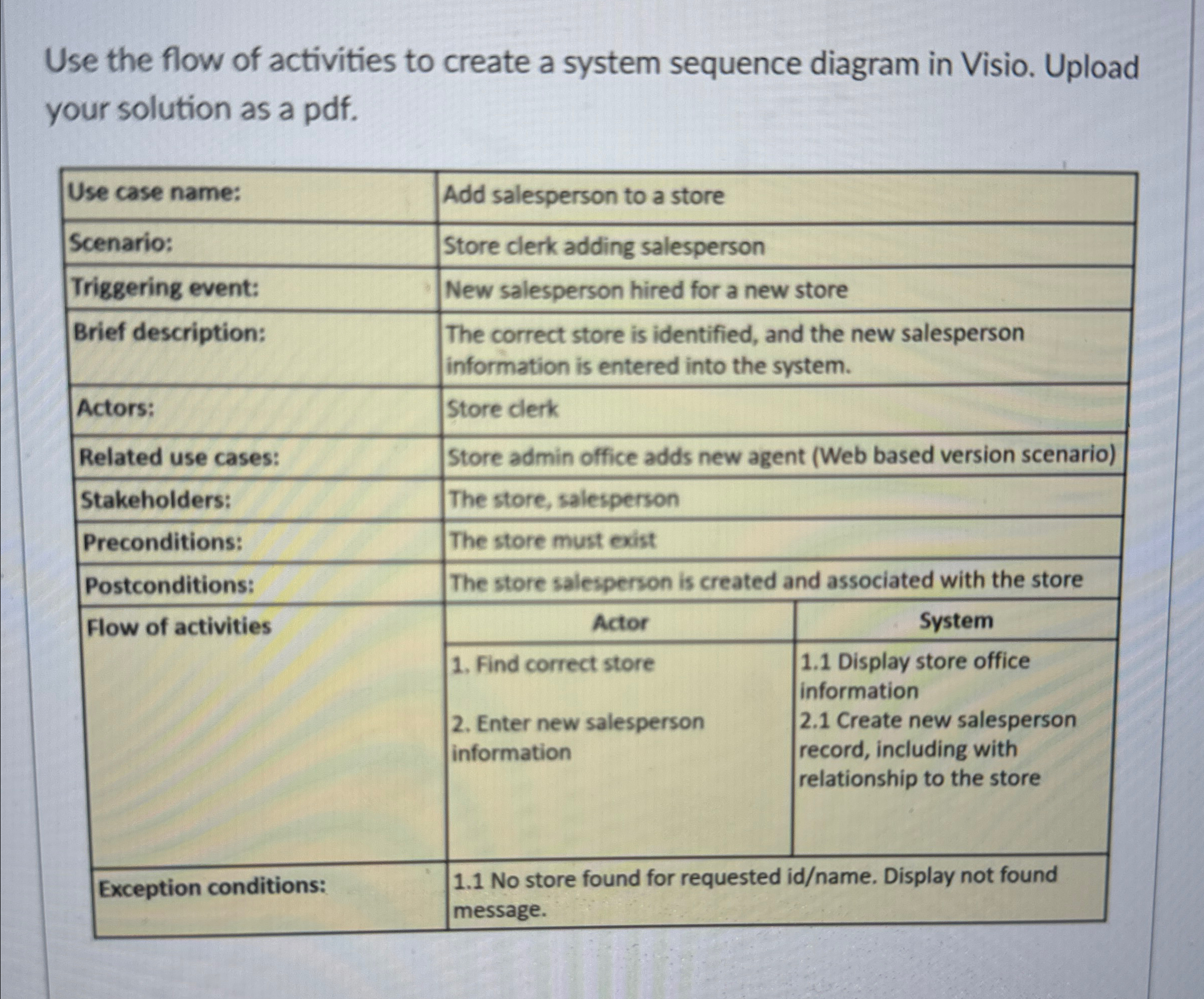
Question: Use the flow of activities to create a system sequence diagram in Visio. Upload your solution as a pdf . table [ [ Use
Use the flow of activities to create a system sequence diagram in Visio. Upload your solution as a pdf
tableUse case name:,Add salesperson to a storeScenario:Store clerk adding salespersonTriggering event:,New salesperson hired for a new storeBrief description:,tableThe correct store is identified, and the new salespersoninformation is entered into the system.Actors:Store clerkRelated use cases:,Store admin office adds new agent Web based version scenarioStakeholders:The store, salespersonPreconditions:The store must existPostconditions:The store salesperson is created and associated with the storeFlow of activities,Actor,Systemtable Find correct store Enter new salespersoninformationtable Display store officeinformation Create new salespersonrecord including withrelationship to the storeException conditions:,table No store found for requested idname Display not foundmessage
Step by Step Solution
There are 3 Steps involved in it
1 Expert Approved Answer
Step: 1 Unlock

Question Has Been Solved by an Expert!
Get step-by-step solutions from verified subject matter experts
Step: 2 Unlock
Step: 3 Unlock
 Study Help