







Question: Use the following script to insert data from your import table into your destination table
Use the following script to insert data from your import table into your destination table
INSERT INTO destination_table (Field1, Field2,... FieldN)
SELECT DISTINCT Field1, Field2,... FieldN
FROM import_table;
2. Complete step (1) for each destination table you forward engineered.Insert data into your parents tables before its children to avoid insert errors. Remember to include the foreign key columns in your INSERT and SELECT.
3. If you get a key violation error inserting into ADDRESS, go to your ADDRESS table and allow for nulls. (Click the ADDRESS table in the object browser, select Column, click Edit, turn Not Null toggle off). Then reattempt the insert.
4. If you get an error inserting dates into PURCHASE, replace your date columns in your SELECT then reattempt the insert.
DeliveryDate becomes .... to_date(DeliveryDate, 'DD-MM-YYYY')
Purchase Date becomes... to_date(PurchaseDate, 'DD-MM-YYYY')
5. Delete all your destination table data using DELETE FROM
6. Re-run your Import into ADDRESS scripts that uses IMPORT_EMPLOYEE.
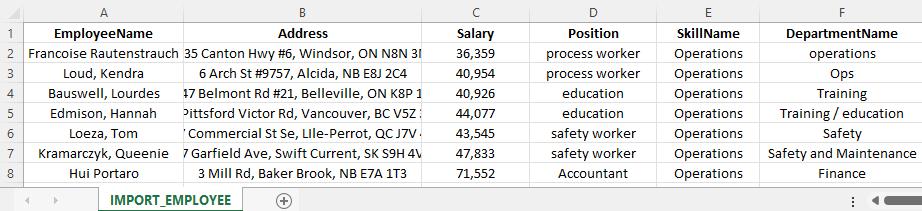
1 2 Francoise Rautenstrauch 3 45 5 67 A EmployeeName 8 Loud, Kendra Bauswell, Lourdes Edmison, Hannah Loeza, Tom Kramarczyk, Queenie Hui Portaro B Address 35 Canton Hwy #6, Windsor, ON N8N 31 6 Arch St # 9757, Alcida, NB E8J 2C4 17 Belmont Rd #21, Belleville, ON K8P 1 Pittsford Victor Rd, Vancouver, BC V5Z Commercial St Se, Lile-Perrot, QC J7V 7 Garfield Ave, Swift Current, SK S9H 4V 3 Mill Rd, Baker Brook, NB E7A 1T3 IMPORT EMPLOYEE C Salary 36,359 40,954 40,926 44,077 43,545 47,833 71,552 D Position process worker process worker education education safety worker safety worker Accountant E SkillName Operations Operations Operations Operations Operations Operations Operations F DepartmentName operations Ops Training Training/education Safety Safety and Maintenance Finance
Step by Step Solution
3.48 Rating (155 Votes )
There are 3 Steps involved in it
1 Insert data from the import table into the destination table Make sure to include all the fields c... View full answer

Get step-by-step solutions from verified subject matter experts
 Study Help