







Question: Use the given Relational Data Model below to create a Microsoft Access database with the following considerations 1. Within the Microsoft Access database, create one
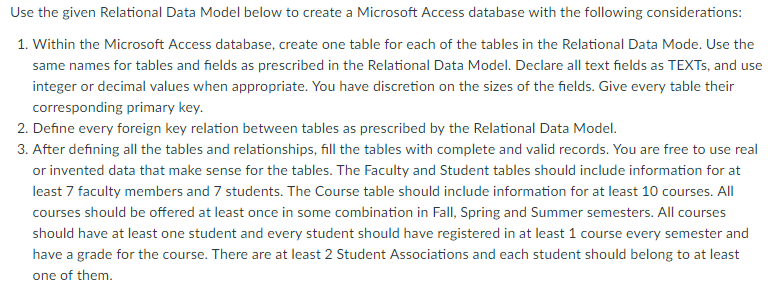
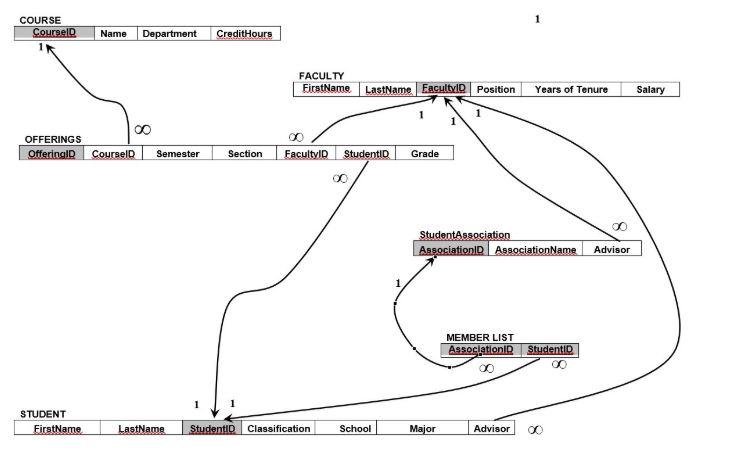
Use the given Relational Data Model below to create a Microsoft Access database with the following considerations 1. Within the Microsoft Access database, create one table for each of the tables in the Relational Data Mode. Use the same names for tables and fields as prescribed in the Relational Data Model. Declare all text fields as TEXTs, and use integer or decimal values when appropriate. You have discretion on the sizes of the fields. Give every table their corresponding primary key. 3. After defining all the tables and relationships, fill the tables with complete and valid records. You are free to use real or invented data that make sense for the tables. The Faculty and Student tables should include information for at least 7 faculty members and 7 students. The Course table should include information for at least 10 courses. All courses should be offered at least once in some combination in Fall, Spring and Summer semesters. All courses should have at least one student and every student should have registered in at least 1 course every semester and have a grade for the course. There are at least 2 Student Associations and each student should belong to at least On: of iicen. COURSE Coursel Name Department CreditHours FACULTY FirstName Lastae ultYiD Position Years of Tenure Salary OFFERINGS Semester Section Grade o0 StudentAssociation AssociationName Advisor MEMBER LIST STUDENT FirstName LastName studentiD Classification School Majr Advisor oo
Step by Step Solution
There are 3 Steps involved in it

Get step-by-step solutions from verified subject matter experts
 Study Help