







Question: Use the grid layout module to create the columns and rows for the layout below. Use the given width and height values below to determine
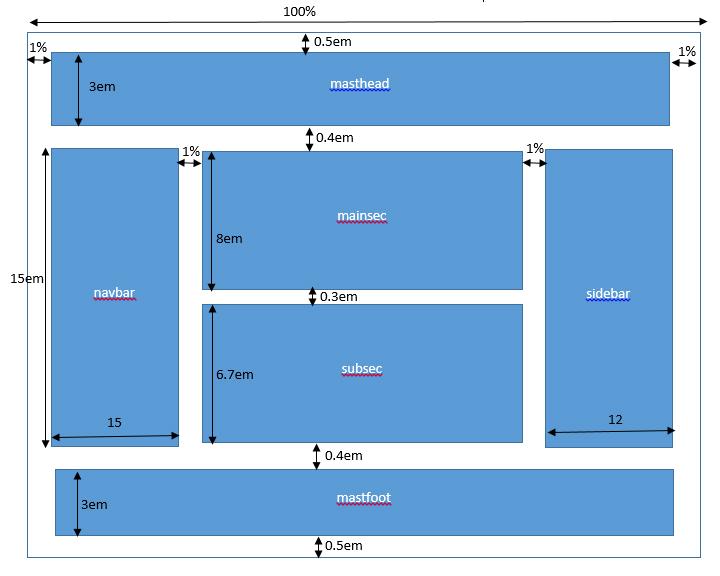
- Use the grid layout module to create the columns and rows for the layout below. Use the given width and height values below to determine the space needed between the grids and for the grids.
- Create a section for each blue colored rectangular box shape below, add a paragraph inside each section, set a different background and foreground color for each section.
- Use the labels presented below to set for the grid area names.
- Use the given margin values for the spacing between the sections. Set 0.5em padding on all sides of all sections
I am having a hard time finding the solution, any help would be appreciated.
100% 1% 0.5em 1% 3em masthead 0.4em 1% 1% mainsec sem 15em navbar 10.3em Sidebar 6.7em subsec 15 12 0.4em mastfoot 3em 0.5em 100% 1% 0.5em 1% 3em masthead 0.4em 1% 1% mainsec sem 15em navbar 10.3em Sidebar 6.7em subsec 15 12 0.4em mastfoot 3em 0.5em
Step by Step Solution
There are 3 Steps involved in it
1 Expert Approved Answer
Step: 1 Unlock

Question Has Been Solved by an Expert!
Get step-by-step solutions from verified subject matter experts
Step: 2 Unlock
Step: 3 Unlock
 Study Help