







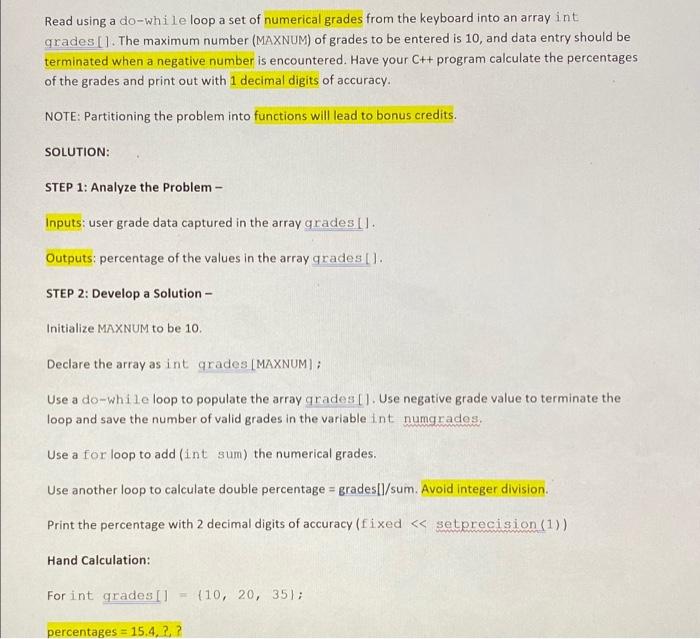
Question: Use the instructions and steps to answer the question. The code has been written but dont understand why the int grades [MAXNUM]; is highlighted in
![been written but dont understand why the "int grades [MAXNUM];" is highlighted](https://dsd5zvtm8ll6.cloudfront.net/si.experts.images/questions/2024/09/66f3d3533fdfb_37866f3d352cd813.jpg)
Read using a do-while loop a set of numerical grades from the keyboard into an array int grades [1. The maximum number (MAXNUM) of grades to be entered is 10, and data entry should be terminated when a negative number is encountered. Have your C++ program calculate the percentages of the grades and print out with 1 decimal digits of accuracy. NOTE: Partitioning the problem into functions will lead to bonus credits. SOLUTION: STEP 1: Analyze the Problem - Inputs: user grade data captured in the array gradesl. Outputs: percentage of the values in the array grades (1. STEP 2: Develop a Solution - Initialize MAXNUM to be 10. Declare the array as int grades [MAXNUM); Use a do-while loop to populate the array grades ). Use negative grade value to terminate the loop and save the number of valid grades in the variable int numgrades. Use a for loop to add (int sum) the numerical grades, Use another loop to calculate double percentage = grades[l/sum. Avoid integer division Print the percentage with 2 decimal digits of accuracy (fixed setprecision (1)) Hand Calculation: For int grades Il (10, 20, 35); percentages = 15.4.2.2 5 6 7 3 #include
Step by Step Solution
There are 3 Steps involved in it

Get step-by-step solutions from verified subject matter experts
 Study Help