







Question: Use the Packet Tracer program and design the below network topology. A . Assign hostname as SW 1 for the switch. B . Configure console,
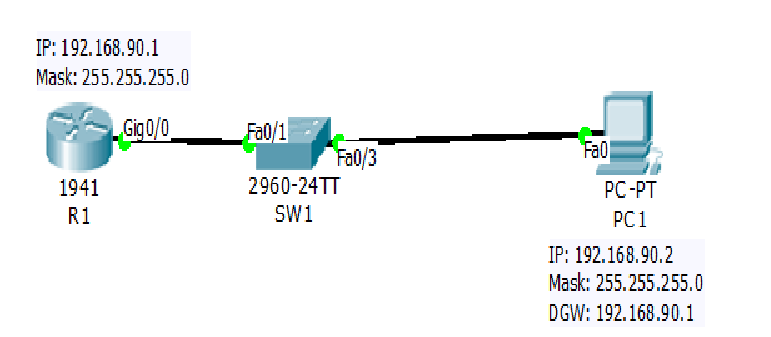
Use the Packet Tracer program and design the below network topology.
A Assign hostname as SW for the switch.
B Configure console, Telnet vty and secure passwords on SW as Cisco
C You will use Telnet to remotely access SW Enable the Telnet on SW
D Configure the default SW management interface VLAN so that it will accept connections
over the network from local and remote hosts Hints: Use Interface Vlan command
use correct IP address and ip defaultgateway use correct DGW IP address
E Open the R Command Line Interface CLI and assign a hostname as R
F Configure console, Telnet vty and secure passwords on R as Cisco
G You will use SSH to remotely access and manage on R Enable and configure Secure Shell SSH
on R
H Configure fa or G on R with IP address.
I. On SW create a VLAN as VLAN
J Name the new VLAN as Managers
K Assign one access port Fa to VLAN
L Configure PC with static IP and Default Gateway Router IP
M Test to see if PC can ping its own Default Gateway Router
N Using the command prompt on PC Telnet to SWVerify if you can access.
O Using the command prompt on PC attempt to log in to R using SSH TelnetVerify if you can
access.
Step by Step Solution
There are 3 Steps involved in it
1 Expert Approved Answer
Step: 1 Unlock

Question Has Been Solved by an Expert!
Get step-by-step solutions from verified subject matter experts
Step: 2 Unlock
Step: 3 Unlock
 Study Help