







Question: Use the processing to write codes that follow the under instruction Here is a description of the simulation: 1. When your simulation begins, the archery
Use the processing to write codes that follow the under instruction
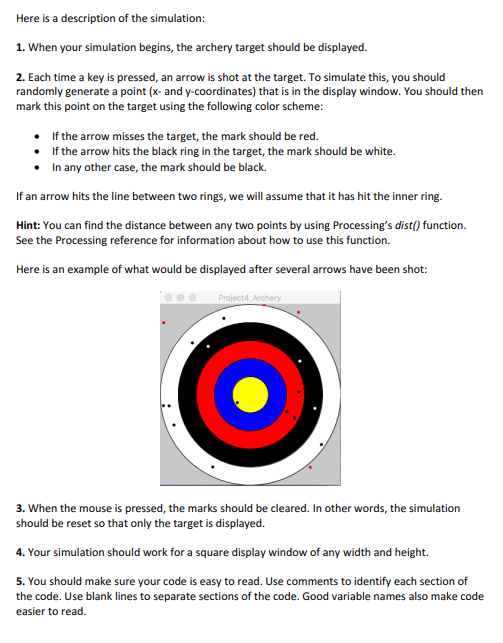
Here is a description of the simulation: 1. When your simulation begins, the archery target should be displayed. 2. Each time a key is pressed, an arrow is shot at the target. To simulate this, you should randomly generate a point (x- and y-coordinates) that is in the display window. You should then mark this point on the target using the following color scheme: If the arrow misses the target, the mark should be red. If the arrow hits the black ring in the target, the mark should be white. In any other case, the mark should be black. If an arrow hits the line between two rings, we will assume that it has hit the inner ring. Hint: You can find the distance between any two points by using Processing's dist() function. See the Processing reference for information about how to use this function. Here is an example of what would be displayed after several arrows have been shot: Project4 Archery 3. When the mouse is pressed, the marks should be cleared. In other words, the simulation should be reset so that only the target is displayed. 4. Your simulation should work for a square display window of any width and height. 5. You should make sure your code is easy to read. Use comments to identify each section of the code. Use blank lines to separate sections of the code. Good variable names also make code easier to read. Here is a description of the simulation: 1. When your simulation begins, the archery target should be displayed. 2. Each time a key is pressed, an arrow is shot at the target. To simulate this, you should randomly generate a point (x- and y-coordinates) that is in the display window. You should then mark this point on the target using the following color scheme: If the arrow misses the target, the mark should be red. If the arrow hits the black ring in the target, the mark should be white. In any other case, the mark should be black. If an arrow hits the line between two rings, we will assume that it has hit the inner ring. Hint: You can find the distance between any two points by using Processing's dist() function. See the Processing reference for information about how to use this function. Here is an example of what would be displayed after several arrows have been shot: Project4 Archery 3. When the mouse is pressed, the marks should be cleared. In other words, the simulation should be reset so that only the target is displayed. 4. Your simulation should work for a square display window of any width and height. 5. You should make sure your code is easy to read. Use comments to identify each section of the code. Use blank lines to separate sections of the code. Good variable names also make code easier to read
Step by Step Solution
There are 3 Steps involved in it

Get step-by-step solutions from verified subject matter experts
 Study Help