







Question: Use the provided C# (C-Sharp) program and make the required adjustments. Based on Receipt Version 3 (provided on the bottom), add input validation with regular
Use the provided C# (C-Sharp) program and make the required adjustments.
Based on Receipt Version 3 (provided on the bottom), add input validation with regular expression.
1. Item name filed. -- Allow multiple words to be entered -- Uppercase/lowercase letters allowded -- 0 to 9 allowed -- White space, (), &, _, -, ., + allowed
2. Quantity field. -- 0 to 9 allowed
3. Price field. -- 0 to 9 allowed
using System; using System.Collections.Generic; using System.Linq; using System.Text; using System.Threading.Tasks;
namespace Receipt3.cs { class Program { static void Main(string[] args) { int count = 0; string[,] items = new string[100, 4]; bool repeat = true; string name; decimal price, subtotal = 0.0M, tax, total; int quantity;
Console.Write("\t\t\tScan Items Now");
do { for (int i = 0; i
Console.Write(" Item Name (enter 0 to stop):\t"); name = Console.ReadLine();
if (name.Trim() == "0") { repeat = false; break; } else { Console.Write(" Item Price:\t\t\t$"); price = Convert.ToDecimal(Console.ReadLine().Replace('$', ' ').Trim());
Console.Write(" Quantity:\t\t\t"); quantity = Convert.ToInt32(Console.ReadLine());
subtotal = price * quantity;
items[i, 0] = name; items[i, 1] = price.ToString(); items[i, 2] = quantity.ToString(); items[i, 3] = subtotal.ToString(); count++; } } } while (repeat);
subtotal = 0.0M; for (int i = 0; i
tax = subtotal * Convert.ToDecimal(0.065); total = subtotal + tax;
for (int i = 0; i
Console.WriteLine(" \t\t\tYour Receipt "); Console.WriteLine("Item\t\tPrice\t Quantity\t Subtotal "); for (int i = 0; i
Console.WriteLine(" ---------------------------------------------------"); Console.WriteLine( " "+ count + " Items."); Console.WriteLine(" Subtotal:\t\t$" + subtotal.ToString("0.00")); Console.WriteLine(" Tax(0.065%):\t\t$" + tax.ToString("0.00")); Console.WriteLine(" Total:\t\t\t$" + total.ToString("0.00")); Console.WriteLine(" Press any key to exit..."); Console.ReadKey(); } } }
The output should looke like this: 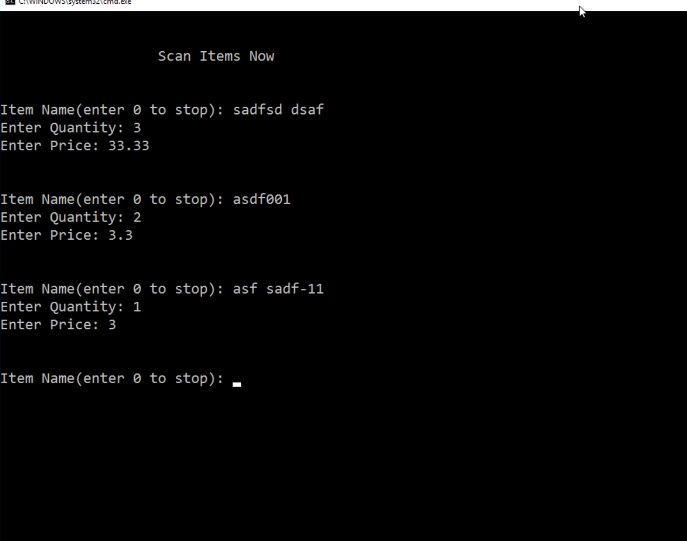
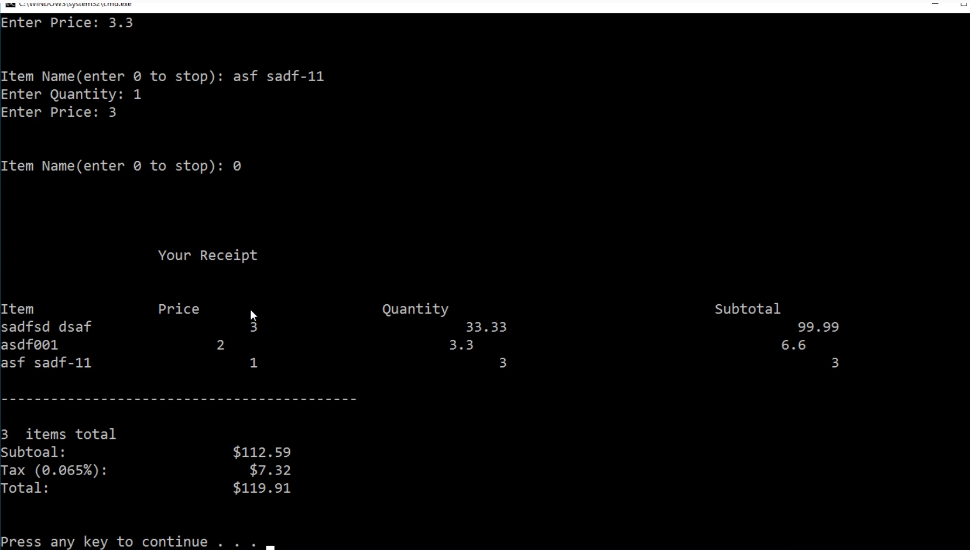
Please compile to verify output.
Scan Items Now Item Name (enter 0 to stop) sadfsd dsaf Enter Quantity: 3 Enter Price 33.33 Item Name (enter 0 to stop) asdf001 Enter Quantity: 2 Enter Price 3.3 Item Name (enter 0 to stop) asf sadf-11 Enter Quantity: 1 Enter Price: 3 Item Name enter 0 to stop)
Step by Step Solution
There are 3 Steps involved in it

Get step-by-step solutions from verified subject matter experts
 Study Help