







Question: Use the skeleton code for the Cashier.java class. Create a sample project in your chosen IDE. The commented code in the files should provide you
Use the skeleton code for the Cashier.java class. Create a sample project in your chosen IDE. The commented code in the files should provide you with instructions to fulfill the tasks for each. Add both files to your src directory in the IDE project files. Fulfill the tasks asked in the comments and run the code. Cashier.Java Sample Code: public class Cashier { public static final double FIVER_VALUE = 5.0; public static final double TOONIE_VALUE = 2.0; public static final double LOONIE_VALUE = 1.0; public static final double QUARTER_VALUE = 0.25; public static final double DIME_VALUE = 0.1; public static final double NICKEL_VALUE = 0.05; public static final double PENNY_VALUE = 0.01; int fivers,loonies, toonies, quarters, dimes, nickels, pennies; double cashInside, cashLimit, purchase; public Cashier(double cashInside, double cashLimit){ // populate cashier with internal cash and a purchase limit // most cashiers have to have a minimum amount of cash in them (predetermined) // cash is measured in dollars for division purposes this.cashInside = cashInside; this.cashLimit = cashLimit; this.fivers = 5; this.loonies = 10; this.toonies = 10; this.quarters = 20; this.dimes = 20; this.nickels = 50; this.pennies = 50; cashInRegister(); } public void cashInRegister(){ System.out.printf("%Use print formatting to properly display the data as shown in expected output% ", this.fivers, this.toonies, this.loonies, this.quarters, this.dimes, this.nickels, this.pennies); } public void purchase(double itemPrice){ // update purchase total } private double totalCash(int fivers, int toonies,int loonies,int quarters,int dimes,int nickels,int pennies){ // create singular cash value from the multiple coin and bill types given return cash; } public void checkout(int fivers, int toonies,int loonies,int quarters,int dimes,int nickels,int pennies){ double cashGiven = // get total cash from coins and bills given double change = // create probable change amount to be returned by comparing cash given to total purchase amount if(/* if there is enough money given for the purchase and enough money in the register*/){ System.out.println("Successfull purchase of items"); // update the cash inside the cashier object if(/*if cash given is more than the total purchase amount*/){ System.out.println("Your change is: " /* add previous change value*/); // calculate exact coin value regarding the total change amount previously calculated } else{ System.out.println("No change given."); } // the purchase has been made and can be reset to 0 } else if(/* if there is not enough in register*/){ System.out.println("Not enough money in register for items"); } else if(/* if there is not enough money given for the total purchase */){ System.out.println("Not enough money from customer for items"); } } private boolean enoughMoney(double totalPurchase, double cashGiven){ // determine if the cash given is enough for the total purchase } private boolean enoughInRegister(double change){ if(/* find the money available in the register after removing the minimum cash needed inside*/ >= /* compare against the change needed to give out*/){ return true; } else{ return false; } } private void giveChange(double change){ // find all possible five dollar bills that can be found in the change, HINT: you may need to do some typecasting // update the internal register's count on five dollar bills // use the remainder operation to update the change to the remainder after diving the total change value by the fiver value // find all possible toonies that can be found in the change, HINT: you may need to do some typecasting // update the internal register's count on toonies // use the remainder operation to update the change to the remainder after diving the total change value by the toonie value // find all possible loonies that can be found in the change, HINT: you may need to do some typecasting // update the internal register's count on loonies // use the remainder operation to update the change to the remainder after diving the total change value by the loonie value // find all possible quarters that can be found in the change, HINT: you may need to do some typecasting // update the internal register's count on quarters // use the remainder operation to update the change to the remainder after diving the total change value by the quarter value // find all possible dimes that can be found in the change, HINT: you may need to do some typecasting // update the internal register's count on dimes // use the remainder operation to update the change to the remainder after diving the total change value by the dime value // find all possible nickels that can be found in the change, HINT: you may need to do some typecasting // update the internal register's count on quarters // use the remainder operation to update the change to the remainder after diving the total change value by the quarter value // find all possible pennies that can be found in the change, HINT: you may need to do some typecasting // update the internal register's count on pennies // use the remainder operation to update the change to the remainder after diving the total change value by the pennies value System.out.printf("% use proper print formatting context to fit returned change values based on the expected output %", fivers, toonies, loonies, quarters, dimes, nickels, pennies); } public static void main(String[] arguments){ Cashier cashier = new Cashier(49.37, 20); cashier.purchase(6.25); cashier.checkout(1, 2, 1, 0, 0, 0, 0); cashier.cashInRegister(); cashier.purchase(6.25); cashier.purchase(6.25); cashier.checkout(1, 2, 1, 0, 0, 0, 0); cashier.cashInRegister(); cashier.purchase(25); cashier.purchase(25); cashier.checkout(60, 0, 0, 0, 0, 0, 0); cashier.cashInRegister(); } } 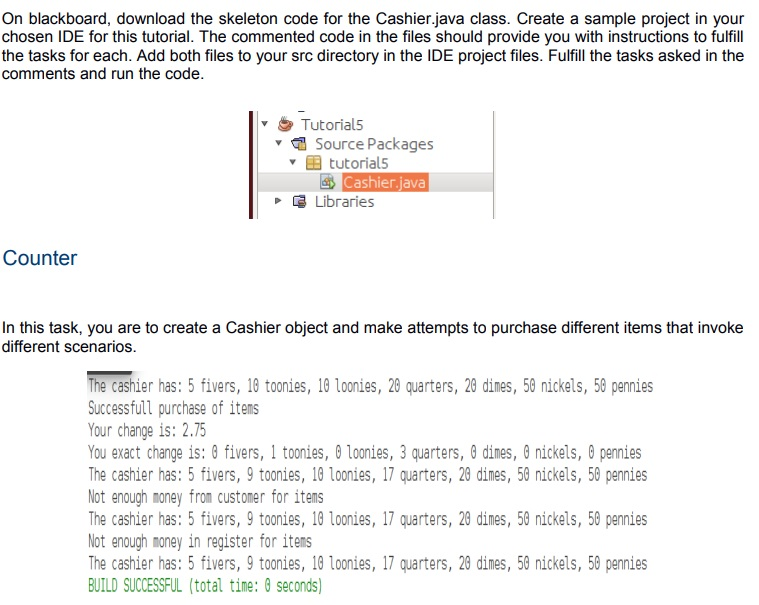
On blackboard, download the skeleton code for the Cashierjava class. Create a sample project in your chosen IDE for this tutorial. The commented code in the files should provide you with instructions to fulfill the tasks for each. Add both files to your src directory in the IDE project files. Fulfill the tasks asked in the comments and run the code. * Tutorials Y A Source Packages I tutorial5 3 Cashier javal & Libraries Counter In this task, you are to create a Cashier object and make attempts to purchase different items that invoke different scenarios. The cashier has: 5 fivers, 18 toonies, 10 loonies, 28 quarters, 28 dines, 50 nickels, 50 pennies Successfull purchase of items Your change is: 2.75 You exact change is: B fivers, 1 toonies, O loonies, 3 quarters, 0 dines, O nickels, 0 pennies The cashier has: 5 fivers, 9 toonies, 10 loonies, 17 quarters, 28 dines, 50 nickels, 56 pennies Not enough money from customer for items The cashier has: 5 fivers, 9 toonies, 13 loonies, 17 quarters, 28 dines, 50 nickels, 50 pennies Not enough money in register for items The cashier has: 5 fivers, 9 toonies, 10 loonies, 17 quarters, 28 dimes, 50 nickels, 56 pennies BUILD SUCCESSFUL (total time: 3 seconds)
Step by Step Solution
There are 3 Steps involved in it

Get step-by-step solutions from verified subject matter experts
 Study Help