







Question: Use this link: https://phet.colorado.edu/en/simulations/beta-decay Click on the link and select Multiple Atoms. Select the 1st option under Multiple Atoms (Run CHEERPJ...). It takes a little
Use this link:
https://phet.colorado.edu/en/simulations/beta-decay
Click on the link and select Multiple Atoms. Select the 1st option under Multiple Atoms (Run CHEERPJ...). It takes a little time to load. While still on the Multiple Atoms tab, scroll down on the right to the Custom (Decayed) option and select it. Then move the green arrow to about 5 years. Then under the Bucket o Atoms, quickly click 3 times where it says Add 10 and start counting how many decays there are in each 5 year increment. Write those values in the 1st column. For the 2nd column, divide each of the 1st columns #s by 5.
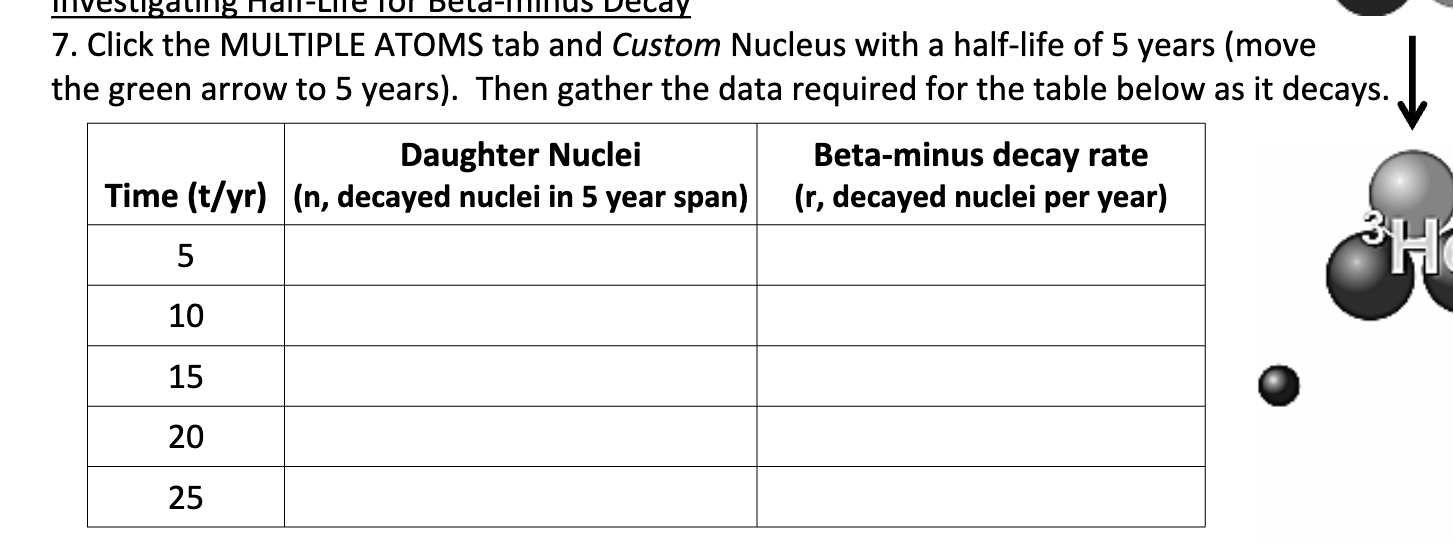
investigating Fall La- mus 7. Click the MULTIPLE ATOMS tab and Custom Nucleus with a half-life of 5 years (move the green arrow to 5 years). Then gather the data required for the table below as it decays. Daughter Nuclei Beta-minus decay rate Time (t/yr) (n, decayed nuclei in 5 year span) (r, decayed nuclei per year) 5 SH 10 15 20 25
Step by Step Solution
There are 3 Steps involved in it

Get step-by-step solutions from verified subject matter experts
 Study Help